Output Devices (Grade 10 NSC Matric Computer Application Technology): Revision Notes
📚Revision Notes
Output Devices
Output devices are essential computer components that take electronic data from your computer and transform it into something you can see, hear, or hold. Think of them as translators that convert the computer's digital language into formats that humans can understand and use.
Note
The concept of output devices as "translators" is fundamental to understanding how computers communicate with users. Without these devices, all the processing power of your computer would be useless since you wouldn't be able to see or interact with the results.
What are output devices?
Output devices receive information from a computer and convert this data into visual displays, projected images, or physical print-outs. They are the final step in the computing process, allowing you to see the results of your work and interact with digital content in meaningful ways.
Common output devices
Monitors
A monitor serves as the primary visual output device for any computer system. You might also hear it called a visual display unit (VDU). This device takes digital signals from your computer and presents them as text, images, videos, and graphics that you can see and work with.
Note
The term "VDU" is still commonly used in technical documentation and workplace settings, so it's useful to recognise both terms when discussing monitor specifications or troubleshooting display issues.
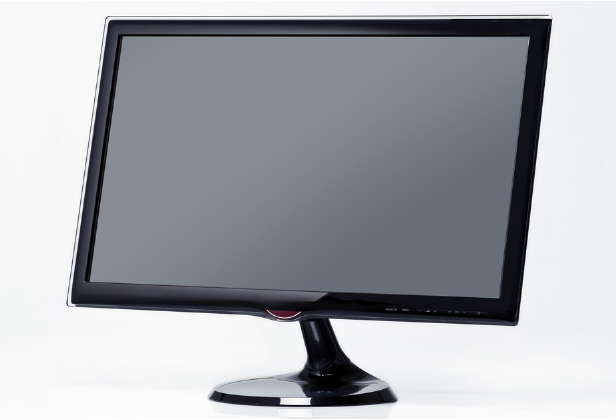
Monitor size measurement
When shopping for monitors, you'll notice they're described by their size in inches. However, this measurement isn't the width or height - it's the diagonal distance from one corner of the screen to the opposite corner.
Example
Worked Example: Monitor Size Conversion
A 22-inch monitor has a diagonal screen measurement of 22 inches.
Step 1: Apply the conversion factor 22 inches × 2.5 cm/inch = 55 cm
Step 2: Verify the result Therefore, a 22-inch monitor equals approximately 55 centimetres diagonally.
Screen resolution and image quality
One of the most important features of any monitor is its resolution, which determines how sharp and clear your display appears. Resolution is measured in pixels, where each pixel is a tiny coloured dot that makes up the complete picture on your screen. The term "pixel" is actually short for "picture element."
When you see resolution written as "1280 × 800," this means the screen can display 1280 pixels horizontally and 800 pixels vertically. The more pixels your monitor can display, the sharper and more detailed your images will appear.
Note
Monitor resolution is also measured in PPI (pixels per inch), which tells you how densely packed the pixels are on the screen. Higher PPI values result in sharper, more detailed displays - similar to how a higher thread count makes fabric feel smoother.
Refresh rate
The refresh rate determines how smoothly motion appears on your screen. It measures how quickly the monitor can update the image with new information from the computer. A higher refresh rate means smoother video playback and less eye strain during extended use.
Printers
Printers serve a different but equally important function as output devices. They convert your computer's digital files (called soft copy) into physical documents that you can hold and share (called hard copy). Whether you're printing homework assignments, photographs, or important documents, printers make it possible to have permanent, physical copies of your digital work.
Modern printing technology offers several different approaches to creating hard copies, each with their own advantages and ideal uses.
Types of printers
Inkjet printers
Inkjet printers work by heating liquid ink until it forms tiny droplets, then precisely spraying these droplets onto paper through microscopic holes. This process happens continuously as the paper moves through the printer, building up your document or image one small droplet at a time.
These printers excel at combining black, white, and colour printing all in one device. They use replaceable ink cartridges that contain the liquid ink. One characteristic of inkjet printing is that freshly printed pages may still be slightly wet to the touch and need a moment to dry completely.
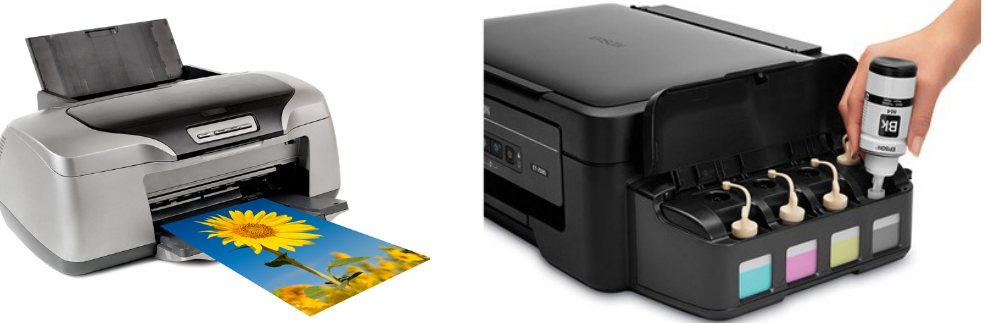
Ink tank printers
Ink tank printers use the same basic inkjet technology but with a key difference - instead of small, expensive cartridges, they use large, refillable ink tanks. Each colour (cyan, magenta, yellow, and black) has its own separate tank that can hold much more ink than traditional cartridges.
When a tank runs low, you simply refill it with bottled ink rather than replacing an entire cartridge. This makes ink tank printers particularly economical for households or offices that do a lot of printing, as they can produce over 1000 pages before needing a refill.
Laser printers
Laser printers represent a completely different printing technology that's especially popular in workplace environments. Instead of liquid ink, these printers use a fine powder called toner. The printer directs a precise laser beam onto a rotating drum, creating an invisible pattern that matches what needs to be printed.
Note
The laser printing process is quite sophisticated: the laser pattern makes certain areas of the drum magnetic, so they attract the toner powder. The drum then transfers this toner pattern onto paper, and heat is applied to permanently bond the toner to the page.
This process allows laser printers to produce many pages quickly while maintaining consistently high print quality.
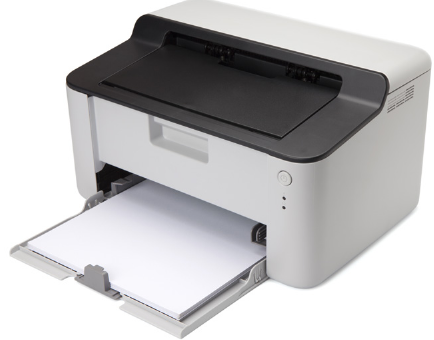
3D printers
3D printers represent the newest evolution in printing technology. Rather than putting ink on flat paper, these devices create three-dimensional physical objects from digital design files. They work by adding material layer upon layer, gradually building up the final product from bottom to top.
The process starts with a digital 3D model on your computer. The printer's software slices this model into hundreds of thin horizontal layers. Then, the printer creates each layer physically, one at a time, using materials like plastic filament that melts and hardens into the desired shapes.
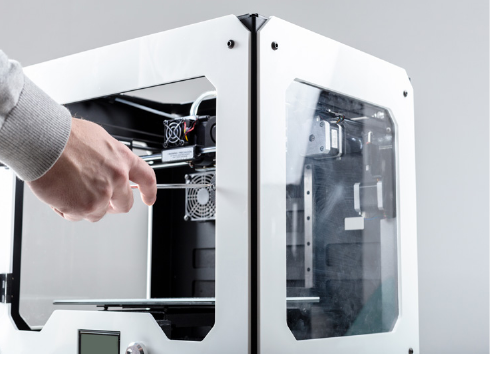
Print quality measurement
Just as monitors have resolution measured in pixels, printers have their own quality measurement called DPI (dots per inch). This works similarly to monitor pixels - the more dots of ink or toner the printer can place in each inch of paper, the sharper and more detailed your printed documents will appear.
Important
Higher DPI settings produce better quality prints but may take longer and use more ink or toner. It's important to balance quality needs with printing costs and time requirements.
Comparing printer types
Each printer type has distinct advantages and disadvantages that make them suitable for different situations:
| Type of Printer | Advantages | Disadvantages |
|---|---|---|
| Inkjet | - Portable and compact design - Affordable initial purchase price - Low cost per page for occasional printing - Takes up minimal desk space | - Expensive ink cartridge replacements - Slower printing speeds - Fresh prints may be wet and smudge - Not ideal for high-volume printing |
| Ink tank | - Portable like inkjet printers - Much cheaper refill costs than cartridges - Lower cost per page than standard inkjet - Can easily be moved between locations | - Higher upfront cost than basic inkjet - Similar slower speeds to inkjet printers - Still suitable mainly for low to medium volume printing |
| Laser | - Excellent print quality and sharpness - Very fast printing speeds - Affordable toner replacement costs - Quiet operation during printing | - Expensive initial purchase price - Large size requires dedicated space - Costly maintenance and repairs - Generally only prints in black and white (colour models are very expensive) |
| 3D | - Rapid prototyping capabilities - Low labour costs for complex shapes - Complete design customisation freedom - Can create objects impossible to make otherwise | - Limited quality compared to professional manufacturing - Very expensive equipment and materials - Mainly limited to plastic materials - Can produce toxic fumes during operation |
Summary
Key Points to Remember:
- Output devices convert computer data into formats humans can use - visual displays, sounds, or physical objects
- Monitors are measured diagonally in inches, with resolution determining image sharpness (measured in pixels and PPI)
- Inkjet printers use liquid ink droplets and are ideal for home use and colour printing
- Laser printers use toner powder and laser beams, making them perfect for fast, high-quality workplace printing
- 3D printers create physical objects layer by layer and represent the cutting edge of printing technology