Interpreting System Requirements (Grade 12 NSC Matric Computer Application Technology): Revision Notes
📚Revision Notes
Interpreting System Requirements
Understanding system requirements is crucial when choosing software for your computer. These specifications tell you whether your hardware can run a particular programme effectively, helping you avoid frustrating performance issues or software crashes.
What are system requirements?
System requirements are guidelines that software developers provide to help users understand what hardware and software their computer needs to run a programme properly. Think of them as a recipe - you need the right ingredients (hardware components) in the right amounts for the software to work well.
Note
Think of system requirements like a recipe for cooking. Just as you need specific ingredients in the right amounts to make a dish successfully, your computer needs specific hardware components with adequate capabilities to run software effectively.
It's important to understand that system requirements are guidelines rather than absolute rules. If your computer doesn't quite meet all the requirements, the software might still work, but it could run very slowly or stop working unexpectedly. This is why it's always best to try to meet at least the minimum requirements, and ideally aim for the recommended specifications.
Components of system requirements
When you look at system requirements, you'll typically see specifications for several key hardware components:
Operating system: This tells you which version of Windows, macOS, or Linux the software needs to function. For example, some modern software requires Windows 10 64-bit and won't work on older versions.
Processor (CPU): This specifies the type and speed of processor needed. Modern software often requires multi-core processors like Intel Core i3, i5, or i7, or AMD equivalents.
Memory (RAM): This indicates how much system memory the software needs to run smoothly. More demanding applications require more RAM to handle multiple tasks simultaneously.
Storage space: This shows how much free hard drive or SSD space you need to install the software and store its files.
Graphics card: For games and multimedia applications, specific graphics cards may be required to handle visual processing.
Internet connection: Many modern applications require broadband internet for updates, online features, or cloud synchronisation.
Input devices: Some software may need specific input methods like keyboards, mice, or touchscreens.
Display resolution: This specifies the minimum screen resolution needed to properly display the software interface.
Understanding minimum vs recommended requirements
System requirements are typically presented in two categories:
Note
Understanding the Two Categories
System requirements help you make informed decisions about software compatibility by providing two different performance standards to consider.
Minimum requirements represent the lowest specifications needed for the software to function at all. Meeting only these requirements usually means the software will run but may be slow, have reduced features, or provide a poor user experience.
Recommended requirements indicate the specifications needed for optimal performance. Meeting these requirements ensures smooth operation, better graphics quality, and access to all features.
Let's look at a real example:
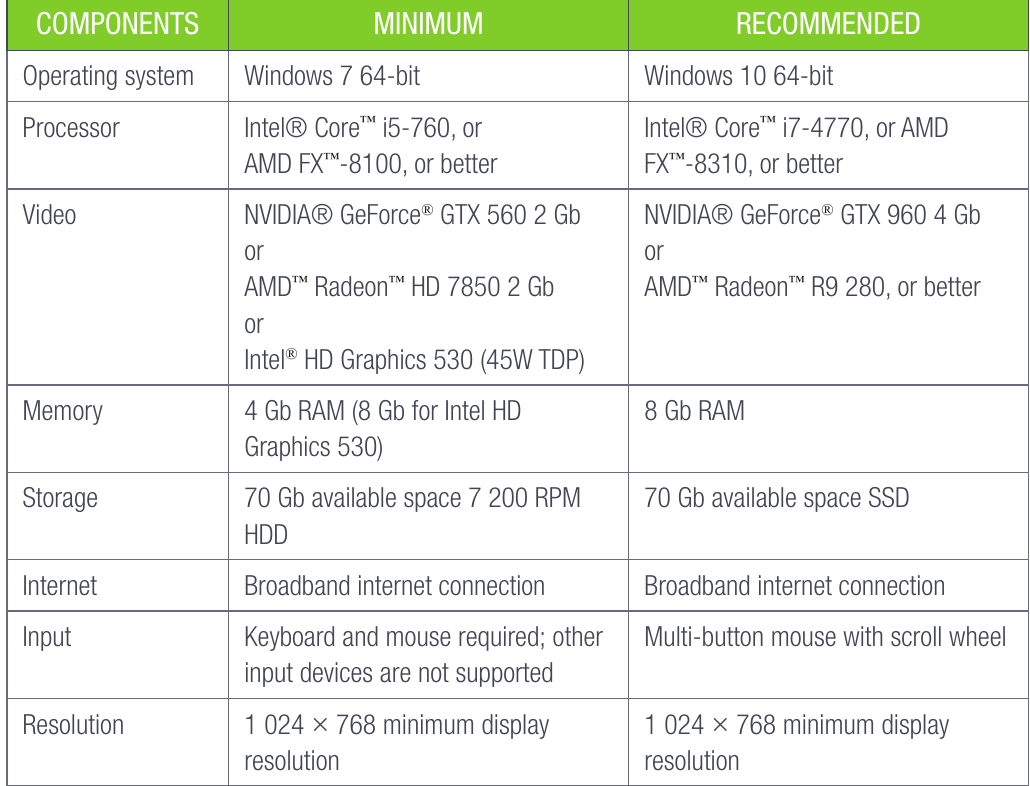
This table shows the system requirements for a popular game. Notice how the recommended specifications are significantly higher than the minimum ones. For instance, the minimum memory requirement is 4GB RAM, but 8GB is recommended for better performance.
Practical examples
Basic computer requirements
For everyday computing tasks like studying, basic office work, and internet browsing, the requirements are relatively modest:
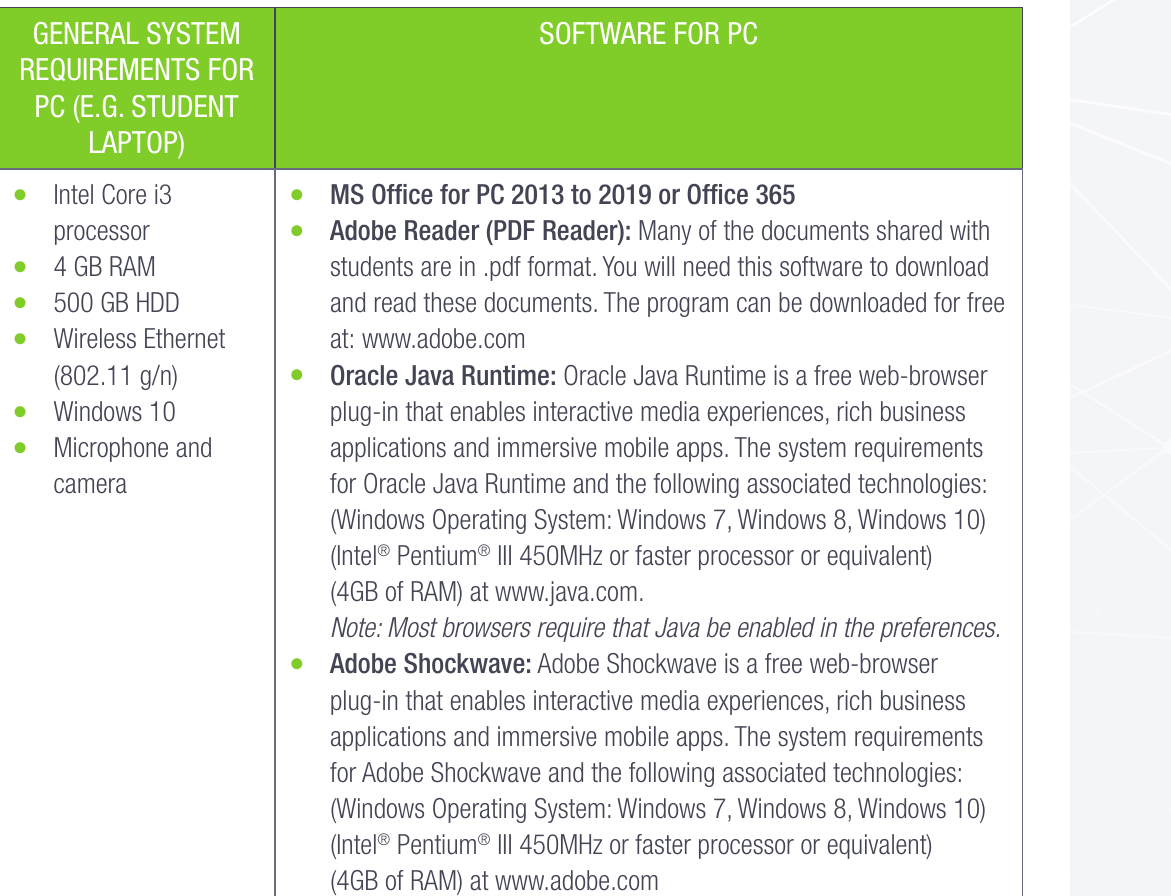
This example shows typical requirements for a student laptop, including basic hardware specifications and essential software needed for academic work.
Essential software requirements
Different types of software have varying system requirements:
Office applications like Microsoft Office typically have moderate requirements, focusing on sufficient RAM and storage space rather than powerful graphics cards.
Multimedia software such as Adobe Reader for PDFs has minimal requirements since it primarily displays documents rather than processing complex graphics.
Web-based applications like Oracle Java Runtime require specific browser compatibility and may need particular operating system versions to function properly.
Plugin-based software such as Adobe Shockwave requires not only hardware compatibility but also specific browser configurations and preferences settings.
How to interpret system requirements
When evaluating whether your computer can run specific software, follow these steps:
-
Check your current specifications: Use your computer's system information to identify your processor, RAM, storage, and operating system.
-
Compare with minimum requirements: Ensure your computer meets or exceeds every minimum requirement listed.
-
Consider recommended requirements: If possible, aim to meet the recommended specifications for better performance.
-
Plan for future needs: Consider whether you'll be using other demanding software simultaneously, which may require higher specifications.
-
Account for system overhead: Remember that your operating system and other running programmes also use system resources.
Common pitfalls to avoid
Important
Critical Compatibility Issues to Watch For
These common oversights can prevent software from working entirely, even if your hardware seems adequate.
Important
Don't ignore operating system requirements: Even if your hardware is powerful enough, the wrong operating system version can prevent software from working entirely.
Important
Consider total system load: Meeting requirements for one programme doesn't guarantee good performance if you're running multiple demanding applications simultaneously.
Important
Check for 32-bit vs 64-bit compatibility: Modern software increasingly requires 64-bit operating systems, which older computers may not support.
Important
Verify internet requirements: Some software needs constant internet connectivity to function, which might not be obvious from hardware requirements alone.
Summary
Key Points to Remember:
- System requirements are guidelines that help determine if your computer can run specific software effectively
- Minimum requirements allow basic functionality, while recommended requirements ensure optimal performance
- Key components to check include operating system, processor, memory, storage, and graphics capabilities
- Always aim to meet at least the minimum requirements, but try for recommended specifications when possible
- Consider your overall computing needs, not just single application requirements, when evaluating system compatibility