Logarithms (VCE SSCE General Mathematics): Revision Notes
📚Revision Notes
Logarithms
Introduction to logarithms
A logarithm is a mathematical tool that helps us work with very large or very small numbers by expressing them as powers of 10. Understanding logarithms is essential for analysing data that spans a wide range of values.
What are logarithms?
Consider this sequence of numbers:
These numbers can be written as powers of 10:
When we focus only on the powers, we get:
These powers are called logarithms (or logs for short). When we express numbers as powers of 10, we are working with logarithms to the base 10.
Note
Definition: A logarithm is the power to which a number must be raised in order to get another number. When we use logarithms to write numbers as powers of 10, we say we are working with logarithms to the base 10.
Notation
We write to mean "the logarithm to the base 10 of 100". Often, when the base is 10, we simply write . This tells us that , so .
Important
Key Concept: Knowing powers of 10 is essential when working with base 10 logarithms. The logarithm tells you what power you need!
Evaluating logarithms
To find the logarithm of a number, we express it as a power of 10 and identify that power.
Example
Worked Example: Evaluating log(100)
Let's find the logarithm of 100.
Step 1: Write 100 as a power of 10
Step 2: Write down the logarithm
Answer: ✓
Using a calculator to find logarithms
For numbers that aren't simple powers of 10, we use a calculator to find their logarithms.
Example
Worked Example: Finding log(45)
Find to one decimal place.
Step 1: Enter log(45) on your calculator
Using a CAS calculator, enter log(45) and press ENTER or EXE.
The calculator displays:
Step 2: Round to one decimal place
(to one decimal place)
Answer: ✓
Finding a number when the logarithm is known
If we know the logarithm of a number, we can find the original number by working backwards. This is the reverse operation.
Example
Worked Example: Finding the number when log is known
Find the number whose logarithm is 3.1876 to one decimal place.
Step 1: Identify the relationship
If , then
Step 2: Calculate using a calculator
Enter on your calculator.
Result:
Step 3: Round to one decimal place
(to one decimal place)
Answer: The number is 1540.3 ✓
Important
Important Principle: If , then
This relationship works both ways:
- From number to logarithm: Express the number as a power of 10
- From logarithm to number: Raise 10 to the power of the logarithm
Order of magnitude
Order of magnitude helps us understand the scale of different quantities by expressing them in powers of 10.
What does "order of magnitude" mean?
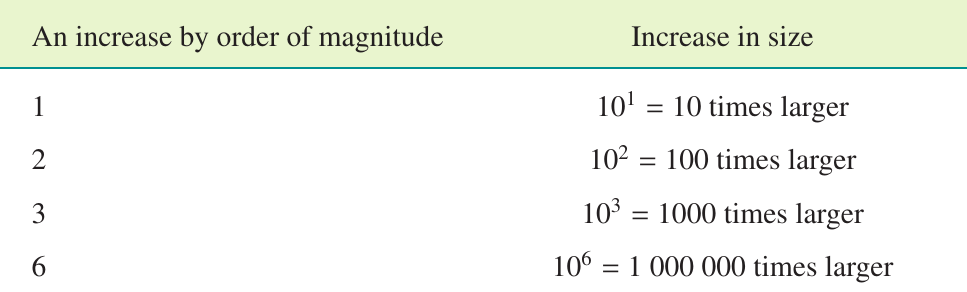
When we increase something by an order of magnitude of 1, we multiply it by 10. When we increase by an order of magnitude of 2, we multiply by 100, and so on.
Note
Understanding Orders of Magnitude:
Each increase in order of magnitude represents a tenfold increase in size:
- Order of magnitude 0: The base quantity
- Order of magnitude 1: 10 times larger
- Order of magnitude 2: 100 times larger
- Order of magnitude 3: 1000 times larger
This concept helps us compare vastly different quantities on the same scale.
General rules
Note
Increasing by order of magnitude:
An increase by n orders of magnitude is the equivalent of multiplying a quantity by .
Decreasing by order of magnitude:
A decrease by n orders of magnitude is the equivalent of dividing a quantity by .
Finding order of magnitude from standard form
The order of magnitude of a number is easiest to see when the number is written in standard form (scientific notation).
Example
Worked Example: Order of magnitude
What is the order of magnitude of 1200?
Step 1: Write 1200 in standard form
Step 2: Identify the power of 10
The power of 10 is 3, so the order of magnitude is 3.
Note: The order of magnitude of 1.2 itself is 0, since
Answer: The order of magnitude of 1200 is 3 ✓
Important
Exam Tip: When finding order of magnitude, convert to standard form first. The power of 10 gives you the order of magnitude directly.
Logarithmic transformation:
Logarithmic transformation is a powerful tool for analysing data. When data shows a curved relationship, applying a logarithmic transformation to one variable can create a linear (straight-line) relationship.
What is logarithmic transformation?
In logarithmic transformation, we replace the values on one axis (usually the horizontal axis) with their logarithms. Instead of plotting against , we plot against .
Note
When to use logarithmic transformation:
This technique is particularly useful when:
- Data spans several orders of magnitude
- The relationship between variables is exponential or power-law
- We want to linearise curved data for analysis
Linearising data makes it easier to identify patterns, calculate gradients, and make predictions.
Example
Worked Example: Transforming data using log₁₀(x)
For the table below, apply a transformation to check if this creates a straight-line relationship.
| 5 | 10 | 150 | 500 | |
|---|---|---|---|---|
| 3.1 | 4.0 | 7.5 | 9.1 |
Step 1: Calculate for all values
| 5 | 10 | 150 | 500 | |
|---|---|---|---|---|
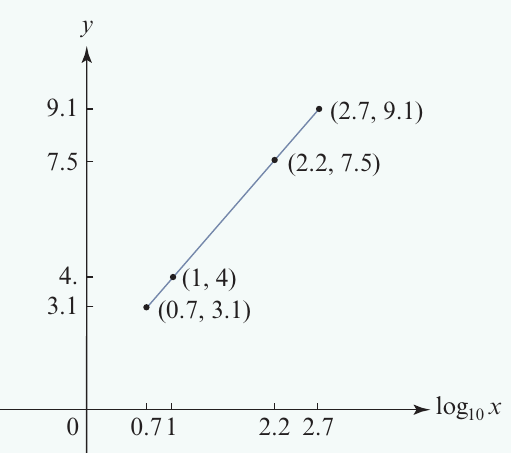
| 0.7 | 1 | 2.2 | 2.7 | |
| 3.1 | 4.0 | 7.5 | 9.1 |
Step 2: Plot against
Remember to label the horizontal axis as .
Step 3: Check for linearity
The graph shows a clear straight-line relationship. The data has been successfully linearised using the transformation.
Answer: The transformation has linearised the data. ✓
Using a CAS calculator for log transformation
A CAS calculator can efficiently perform logarithmic transformations on datasets, saving time and reducing calculation errors.
Example
Worked Example: Calculator log transformation
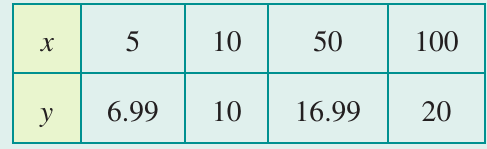
For the table below, use a CAS calculator to apply the transformation.
| 5 | 10 | 50 | 100 | |
|---|---|---|---|---|
| 6.99 | 10 | 16.99 | 20 |
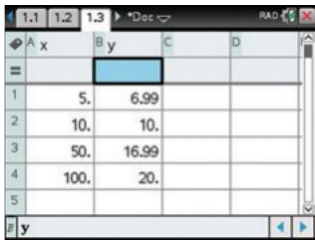
Steps for TI-Nspire CAS:
- Start a new document and select "Add Lists & Spreadsheet"
- Enter the data into columns named and
- Create a third column named "logarx"
- In the cell below "logarx", enter the formula
=log10(x)and press ENTER - Create a scatterplot of against using "Add Data & Statistics"
Steps for CASIO ClassPad:
- In the Statistics application, enter data into columns named and
- Create a third column named "log x"
- In the calculation cell at the bottom of the third column, type
log10(x) - Create a scatterplot by setting XList to "main\logx" and YList to "main\y"
The resulting scatterplot will show whether the transformation has linearised the data.
Real-world applications of logarithms
Logarithms are particularly useful when working with data that spans many orders of magnitude, such as the sizes of different animals or astronomical distances.
Example
Worked Example: Mammal body weight and heart rate
Let's explore the relationship between mammal body weight and heart rate.
The data:
| Mammal | Body weight (g) | Heartbeat/minute |
|---|---|---|
| Shrew | 2.5 | 1400 |
| Chick | 50 | 400 |
| Rabbit | 1000 | 205 |
| Monkey | 5000 | 190 |
| Tree kangaroo | 8000 | 192 |
| Giraffe | 900,000 | 65 |
| Elephant | 5,000,000 | 30 |
| Blue whale | 170,000,000 | 16 |
Challenge: The body weights range from 2.5 grams (shrew) to 170,000,000 grams (blue whale). This enormous range makes it difficult to plot on a normal scale.
Solution: Use logarithmic transformation.
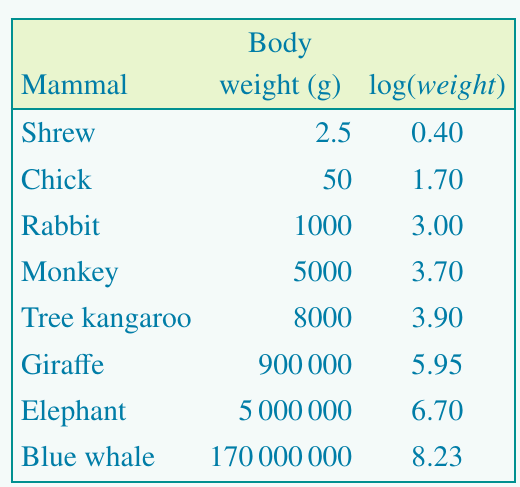
Step 1: Calculate for each mammal
| Mammal | Body weight (g) | Heartbeat/minute | |
|---|---|---|---|
| Shrew | 2.5 | 0.40 | 1400 |
| Chick | 50 | 1.70 | 400 |
| Rabbit | 1000 | 3.00 | 205 |
| Monkey | 5000 | 3.70 | 190 |
| Tree kangaroo | 8000 | 3.90 | 192 |
| Giraffe | 900,000 | 5.95 | 65 |
| Elephant | 5,000,000 | 6.70 | 30 |
| Blue whale | 170,000,000 | 8.23 | 16 |
Step 2: Plot heart rate against
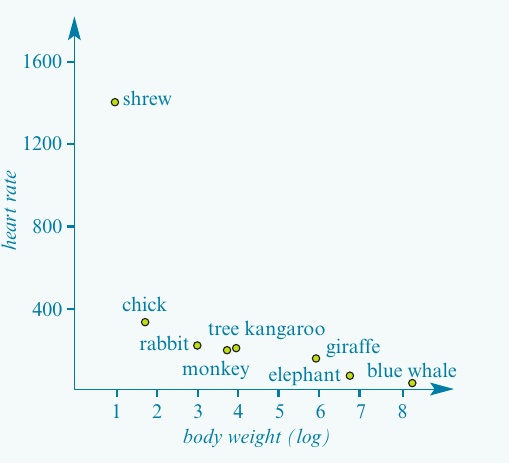
Observation: The logarithmic transformation allows us to visualise the relationship clearly. Smaller animals (low log weight values) have faster heart rates, while larger animals (high log weight values) have slower heart rates.
Using logarithms to compare quantities
Logarithms make it easy to calculate how many times larger one quantity is compared to another, especially when dealing with very large numbers.
Example
Worked Example: Comparing animal weights
Using the logarithmic values from the table above, how many times heavier is a giraffe than a rabbit?
Step 1: Subtract the logarithms
Step 2: Interpret the difference
The difference of 2.95 means the giraffe is times heavier than the rabbit.
Step 3: Calculate
Step 4: Round to nearest hundred
Answer: A giraffe is approximately 900 times heavier than a rabbit. ✓
Important
Exam Tip: Comparing quantities using logarithms
To compare quantities using logarithms:
- Subtract the smaller logarithm from the larger
- Calculate to find the ratio
This method works because:
- If , then
Summary
Key Points to Remember:
-
A logarithm is the power to which 10 must be raised to get a number. For example, because .
-
An increase by n orders of magnitude means multiplying by . For instance, an increase by 3 orders of magnitude means multiplying by 1000.
-
The logarithmic transformation can linearise data that shows exponential or power-law relationships, making it easier to analyse.
-
When comparing quantities using logarithms, subtract the smaller log from the larger, then calculate to find how many times larger one quantity is than the other.
-
Logarithms are essential for working with data spanning many orders of magnitude, such as astronomical distances, microscopic sizes, or biological data like animal body weights.
-
The reverse operation principle: If , then — this works both ways and is fundamental to working with logarithms.