Aspects of Software Development (AQA A-Level Computer Science): Revision Notes
📚Revision Notes
Aspects of Software Development
Introduction to software development
Creating and maintaining computer programs involves a systematic process known as software development. This process consists of multiple stages that developers work through to solve computer-based problems effectively. The stages typically include analysis, design, implementation, testing, and evaluation.
It's important to understand that a system is more than just the programs that will run on it. A complete system encompasses the file structures, hardware, operating system, and the people who will interact with it.
The extent to which you work through each stage depends on the nature of your project. When creating a brand new application from the ground up, you would work through every stage thoroughly. However, if you're simply updating an existing application, you might only need to work through two or three stages.
Important
For A-Level, you'll need to be familiar with all the processes at each stage, and for your A-Level project, you'll work through each stage comprehensively – this project is worth 20% of your A-Level grade.
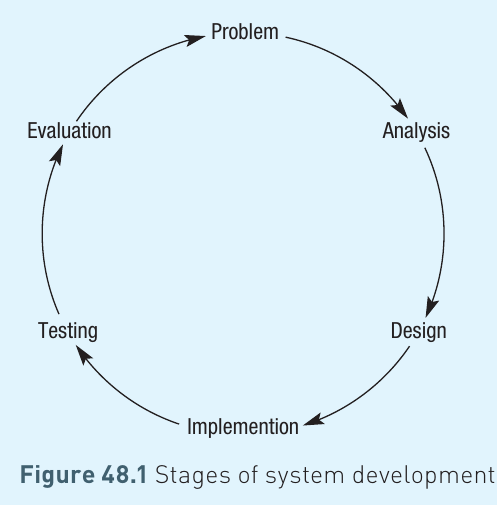
The diagram above shows how the stages of system development form a continuous cycle. After evaluation, improvements and refinements may lead you back to any earlier stage, starting the whole process again.
Analysis
The analysis stage is where you identify and fully investigate the nature of the problem. This is the foundation stage of system development, and rushing through it can lead to problems later on.
Important
Never Rush the Analysis Stage
The analysis stage is the foundation of system development. Rushing through it will create problems later in the project that could have been avoided with thorough initial investigation. Always take the time to properly understand the problem before moving forward.
Defining the problem
When you've identified that there's a problem with an existing system, or spotted an opportunity for developing something new, it's crucial to maintain an open mind. Focus on thoroughly understanding what the problem involves rather than jumping straight to potential solutions. This means:
- Identifying the scope of the problem
- Being realistic about how much of the problem a new system can actually solve
- Recognising any constraining factors that may limit what's possible
If you're creating a solution for someone else, it's vital that you agree on the specification and scope of work before starting. Generally speaking, the more you involve the end users at this stage, the less likely you are to create something they don't want.
Prompts for a new system
There are numerous reasons why organisations decide to create new computer systems. These reasons often stem from the ever-increasing demands placed on existing systems and the rapid advances in computer technology:
- Existing systems cannot cope with increased data volumes: For example, the way banks maintain their data has changed dramatically over the past 20 years. Banks have invested millions of pounds updating their systems to handle the massive increase in transactions and data.
- New technology makes existing systems outdated: Technology advances rapidly. For instance, booking a holiday used to require significant time and effort, but now it can be completed in real time within minutes, with you seeing exactly which flights are available.
- Current systems are inflexible or inefficient: For example, the increasing number of people flying each year has placed pressure on airport immigration authorities. Computer-readable passports now allow immigration staff much greater control and instant access to traveller details.
- New technology creates new opportunities: The explosion of Internet usage has opened up countless opportunities such as e-commerce and e-banking. Developments in computer control and GPS have created entirely new fields. Cars are becoming increasingly automated, with current technology even enabling self-parking features.
- Commercial reasons: Companies often create new systems to generate demand from customers. There isn't always a genuine need for a new system, but businesses introduce them because customers will purchase them.
- New platforms and operating systems: Businesses create new systems to take full advantage of new platforms and operating systems. Thousands of new apps have been created specifically for iOS and Android devices.
- Increased processing power: As processing power increases, new software is developed to take advantage of it. Applications that are processor-intensive may become feasible with faster processors.
- Increased network power: Many modern applications are developed to leverage ever-increasing connectivity. For instance, many leading applications written in recent years have been based on social media platforms.
Methods of gathering information
When tackling a problem based on an existing system, it's often worthwhile to investigate how the current system works, though sometimes a completely fresh approach might lead to a better solution. You can gather data about an existing system through several methods:
Note
Interviews
Speaking with people involved with the current system provides valuable insights. This includes the systems administrator, the people actually using the system, and their customers or clients. Whilst this can be time-consuming, talking to actual users gives you first-hand knowledge that's invaluable. You can follow up on any comments they make. However, each person may give you a very personal view of the system, which may not represent the complete picture.
Questionnaires and surveys: Unless carefully structured, the data collected from interviews can be difficult to analyse. Asking someone to complete a carefully designed questionnaire or survey allows you to carry out more accurate analysis of the responses. These tools restrict the data you gather to specific, closed answers, and questionnaires allow you to gather substantial data relatively quickly.
Observation: Although time-consuming, observing current practices helps identify problem areas. This method is objective rather than subjective, and you may spot issues that everyone else has overlooked.
Examination of current system: Looking at the files, paperwork, and processes used will help identify the data requirements of the new system. This examination also assists with creating the human-computer interface (HCI) and helps you understand the overall scope of the problem.
Feasibility study
A feasibility study is a preliminary report presented to the person who requested the new system. It identifies possible solutions and suggests the best way forward. The report should indicate how practical a solution is regarding time and other resources, including the availability of suitable software and hardware and the abilities of the end user to cope with the proposed solution.
Possible solutions identified in a feasibility study might include:
- Doing nothing
- Having bespoke software written specifically for you
- Writing the software yourself
- Buying an existing package 'off the shelf' and tailoring it to your needs
Design
Before actual creation of the solution can begin, the availability of appropriate hardware and software must be assessed. The choice of hardware will be influenced by the users' needs and the way data will be manipulated and stored. Design work begins on the file structures and algorithms that will be used.
Breaking down the problem
Most substantial projects are far too large to be considered as one complete problem. The best approach is to break them down into smaller modules. Each module should be self-contained, and programmers will test it independently. This approach allows multiple people to work on the solution simultaneously.
Often, the view a user has of the system will need to be defined so that all modules have the same 'feel' to them.
The process of examining a big problem and breaking it down into smaller problems, then breaking each smaller problem down further until each problem is manageable, is known as top-down design. The benefits of this approach are similar to modular design (discussed next), though there's a potential problem: you might get too engrossed in small details, such as fine-tuning the human-computer interface. It makes more sense to solve the overall problem first before getting too involved in screen layouts.
Modular design is a method that breaks a whole system down into smaller units or modules. This approach allows different programmers to work on different modules simultaneously, with each module being tested independently.
Note
Benefits of Modular Design
- Multiple programmers can work on different modules at the same time
- Each module can be tested independently before integration
- Problems can be isolated to specific modules
- Modules can be reused in other projects
- Makes maintenance and updates easier
Data flow diagram (DFD)
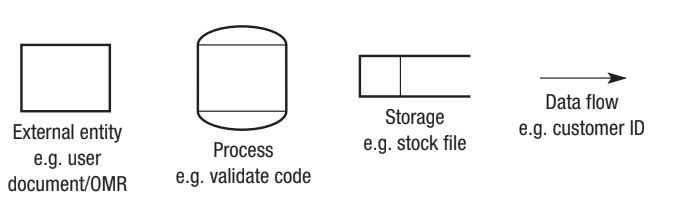
There are various ways to represent a problem and its possible solution. A data flow diagram focuses purely on how data moves around a system. It uses only four symbols:
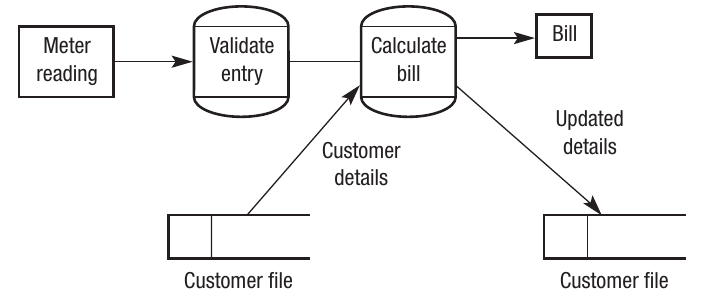
The diagram below demonstrates how a DFD might be used, showing what happens after an electricity meter at a house has been read:
Describing algorithms
At the design stage, you should include a description of the algorithms that will be used. These won't be fully formed lines of code yet, as it's only the design stage. For example, if search or sort algorithms are needed, they should be identified at this stage.
It may be appropriate to develop the algorithms into pseudo-code that reflects the programming language being used. For instance, if using a functional programming language, the main functions should be identified at the design stage. If a relational database is being used, the main SQL statements should be identified.
Data dictionary
Where relevant, a data dictionary should be produced to specify what data will be used and how it will be stored. Careful planning at this stage will reduce problems encountered later in the project, particularly for database projects.
Important
The Importance of Data Dictionaries
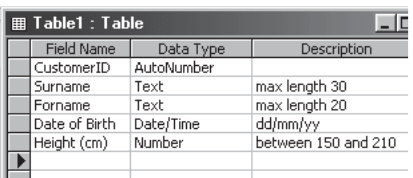
A data dictionary serves as a database about the database – it holds background details but not the data itself. Details of the data to be stored, including the data type, length, title, and any validation checks, are recorded in a data dictionary. Proper planning at this stage will significantly reduce problems later in the project.
The figure below shows part of a table definition in Microsoft Access, which forms part of the data dictionary defining the whole solution:
Variables table and data structures
It's important to decide what variables a program will need and their purpose. Some programming languages only allow programmers to use variables that have been declared beforehand. Declaring variables at the start of the program gives the programmer much tighter control over their program.
The programmer needs to decide on certain characteristics of each variable:
- Type (integer, string, boolean, etc.)
- Length
- Name
- Whether the variable is local or global
Example
Example: Declaring Variables in Visual Basic
Here's how three global variables might be set up in Visual Basic:
Public Age As Integer
Public Name As String
Public WearsGlasses As Boolean
These declarations specify that Age is an integer, Name is a string, and WearsGlasses is a boolean variable, all with global scope.
Using blocks or modules to make a project more manageable was introduced in earlier chapters. Allocating names to these procedures and defining local variables used within them is also best carried out at this stage.
Volumetrics
The volume of data that a system will be asked to handle, both now and in the future, will influence how programmers decide to store and handle the data. They need to consider:
- The throughput of data – how many transactions the system will need to cope with in a given time span
- How much data the system will need to store at any one time
This affects the storage media used and is a consideration when back-up strategies are being decided. The programmer also needs to consider how many users will be allowed to access the files and programs at one time.
Note
Scale Matters
It's important to recognise that the databases most students encounter at school or college are generally quite small. Even a pupil database in a school with 1200 pupils is very small compared to high street banks that have literally millions of customers, each with hundreds of fields of data stored about them. The computers used by the DVLA store details of well over 20 million cars, which means the planning needed for this project is vastly different to planning how the secretary of a swimming club will store their data.
The human-computer interface (HCI)
The human-computer interface refers to any form of communication between a computer and its user. For most of us, this seems limited to the computer screen with its familiar graphical user interface (GUI), but it can also include the layout of buttons on a mobile phone, house alarm system displays, tablet presentations, or the flight controls of a new aircraft.
Several aspects need to be considered when designing an effective HCI:
Ease of use: There's no point creating sophisticated software if the functions are hidden behind numerous screens and button presses. A good HCI should feel almost intuitive.
Target audience: What suits a child might not necessarily suit an adult, so it's important that the programmer is aware of who the end user will be.
Technology: There's little point creating a screen layout that works comfortably on a 21 inch flat screen if the target audience mostly uses tablets and smart phones.
Ergonomics: The interface should be 'comfortable' to use. This is particularly important if the user is likely to be sitting with the interface for extended periods, for example, an airline pilot or a tele-sales operative.
Implementation
This is the stage when the application is actually written, creating the fully working system using the appropriate tools identified in the feasibility study. The process of implementing a system is based on the design, and the programmer(s) need to be fully aware of the requirements set out in the design.
Note
Modular Implementation
It's important to note that many systems are modular, meaning different modules don't all have to be written at the same time. For example, some parts of the system may still be at the design stage whilst other parts are being implemented. In some cases, one module depends on another. In other cases, the design of one part of the system may change as a result of implementing another part.
Systems development must be a responsive process, with the developer ready to respond to issues as they arise throughout the development process.
Prototypes
Creating a solution to a problem can be very costly in terms of both finance and time. There's little point presenting the end user with a completed project if they're going to ask you to alter various details. In such cases, it would be sensible to produce a prototype.
The functionality of a prototype may vary depending on the nature of the project. For instance, the human-computer interface may be very well developed in the prototype and quite closely reflect the finished system. However, the functionality behind it may be incomplete.
At this stage, the end user is asked to comment on the product so far, and they'll check to ensure all major functions work as expected.
Testing
It's crucial that the system is tested to ensure it performs as expected. Various test strategies can be used, and it's important to understand that any testing plan must include tests carried out as the code is written, not just at the end.
Test data
Test data are data that generate a known result. Test data need to be devised that test every aspect of the solution, from the expected responses to the extremes that humans can subject a computer program to.
As individual units or modules are completed, they're tested to ensure they carry out the functions they contain. As the project proceeds, modules can be fitted together, and at this stage, integration testing takes place to ensure the modules work together. Much of these processes make use of test data.
Test data are data that will generate a known response. Typically, three types of test data are used:
Important
The Three Types of Test Data
-
Normal test data: Data that the system is expected to handle as they fall within an acceptable range. For example, an age field could be tested with values between 0 and 110.
-
Boundary test data: Data on the extremes of the acceptable range. This means testing the minimum and maximum values and those just inside and just outside the range. For example, with age, you might use 0, 1, 109, and 110.
-
Erroneous test data: Data that are clearly incorrect and therefore you would expect the program to catch the error. For example, test data for age could be 1000 or an item of text instead of a value.
Example
Example: Testing an Age Field
Let's say you're testing an age field that should accept values between 0 and 110:
Normal test data:
- 25 (typical adult age)
- 7 (child)
- 65 (senior)
Boundary test data:
- -1 (just below minimum)
- 0 (minimum value)
- 1 (just above minimum)
- 109 (just below maximum)
- 110 (maximum value)
- 111 (just above maximum)
Erroneous test data:
- "twenty" (text instead of number)
- 1000 (clearly impossible age)
- -50 (negative value)
Development testing
Development testing takes place during the development of the program and includes several approaches:
Black box testing involves entering test data into a routine or procedure and checking the resulting output against the expected outcome. Essentially, it tests that an input produces the correct output without examining how it does it.
White box testing involves testing every aspect of a routine or procedure. Whilst black box testing is concerned with testing data handling, white box testing considers all the other processes involved – for example, how the program reacts if it fails to find a suitable printer. White box testing checks all pathways through the code, looking inside it and potentially adding extra commands to check what's happening.
Unit testing ensures each unit carries out the function it has been designed for. It incorporates both black box and white box testing.
Once all units have been tested, they're put together to form bigger sections. Integration testing is the process of ensuring that the different modules that have been tested as individual units will work together.
System testing
System testing involves testing the system as a complete unit rather than as individual modules, ensuring it satisfies the specification agreed with the user.
Alpha testing is carried out on the finished system. This involves creating test data in-house. This test data will try to cover all possible eventualities, so they allow the system to be tested under normal conditions. The benefits of this process are that any problems found can be rectified before true live data are used by the end user. Another benefit of using a known set of test data is that, if necessary, the system can be stopped and restarted.
Beta testing: Some program developers release an early or beta version of their new program to potential users. At this stage, the software is bound to have 'bugs' in it, and the users are expected to send details of the problems they've encountered back to the programmers for them to resolve.
Note
Benefits of Beta Testing
The benefits of this system are that passing your software to people who haven't been involved with the development means the testers will all use the system in slightly different ways and will highlight faults that might not have been found by normal means.
Acceptance testing: Although developers test the system they've developed as thoroughly as possible, it's the end users who need to be satisfied that the solution does what they wanted it to. They enter their own live data and ensure the system matches the specification agreed with the program writers.
Some problems may only come to light some time after the system has been implemented by the user. These might include issues involving the volume of data the system is asked to cope with. Problems such as these will be resolved as part of the system's maintenance.
Evaluation
The final stage of system development is evaluation. The solution that has been created is designed to match the specification agreed with the user. An evaluation compares the actual outcome with this specification. It should also contain suggestions for future improvements.
These improvements and refinements may start the whole cycle all over again. Evaluation may take place over an extended period of time. In fact, many systems are constantly being evaluated.
Several criteria may be used to evaluate a system:
Functionality: Does it do what it's supposed to?
Ease of use: This isn't the same as 'easy to use', but it means that the level of complexity is appropriate to the user.
Ease of implementation: How easy was it to transfer from the old system to the new system?
Reliability: A measure of how much the system is 'up' or 'down'.
Performance: Does the system meet its performance criteria, which might relate to the speed of operation or the amount of data it can handle?
Cost effectiveness: Refers to how much it costs to implement the solution and whether the cost is justified.
Ease of maintenance and adaptability: How easy is it to fix faults or add new modules?
Longevity: How future-proof is the system?
Summary
Key Points to Remember:
-
Software development is a systematic process consisting of five main stages: analysis, design, implementation, testing, and evaluation, which form a continuous cycle.
-
The analysis stage is crucial for identifying the problem, gathering information through interviews, questionnaires, observation, and system examination, and conducting a feasibility study.
-
During the design stage, use top-down or modular approaches to break down problems, create data flow diagrams to visualise data movement, and plan data dictionaries and variables tables carefully.
-
Testing must use three types of test data: normal (within acceptable range), boundary (at the extremes of the range), and erroneous (clearly incorrect). Use both black box testing (testing inputs and outputs) and white box testing (checking all code pathways).
-
The evaluation stage compares the completed system against the original specification using criteria such as functionality, ease of use, reliability, performance, cost effectiveness, and maintainability.