Problem Solving and Algorithm Creation (AQA GCSE Computer Science): Revision Notes
📚Revision Notes
Problem solving and algorithm creation
When tackling computing problems, programmers need to break down complex tasks into step-by-step solutions called algorithms. These algorithms can be represented in three main ways that help us plan, understand, and communicate our solutions effectively.
An algorithm is essentially a set of clear instructions that solve a specific problem. Think of it like a recipe - it tells you exactly what ingredients you need and what steps to follow to get the result you want. In computing, we can represent these "recipes" using flowcharts, pseudo-code, or actual programme code.
Note
The choice of representation method often depends on your audience and purpose. Flowcharts are great for visual learners and explaining concepts to non-programmers, pseudo-code works well for planning and collaboration, while programme code is what actually gets executed by computers.
Flowcharts
What are flowcharts?
A flowchart is a visual way to represent an algorithm using special shapes and arrows. It's like creating a map that shows the journey your programme takes from start to finish. Each shape has a specific meaning, and arrows show the direction of flow between different steps.
Flowcharts are particularly useful because they help you see the "big picture" of your algorithm before you start writing actual code. They're also great for spotting problems in your logic and explaining your solution to others.
Understanding flowchart symbols
Different shapes in flowcharts have specific meanings. Here are the essential symbols you need to know:
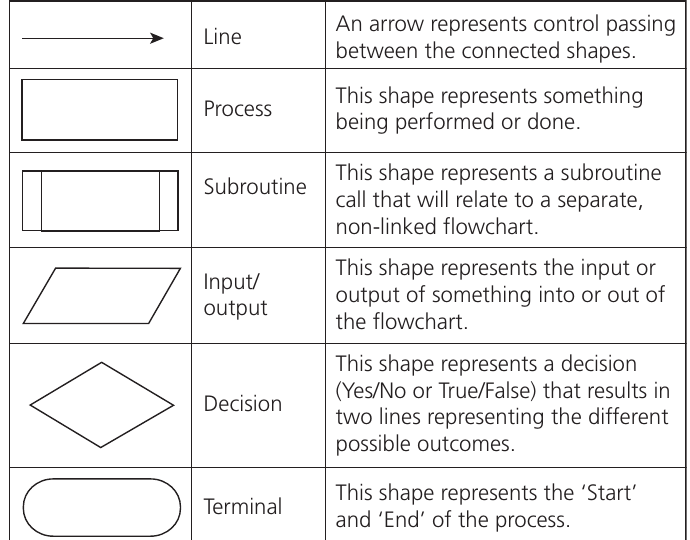
Let's break down what each symbol does:
- Terminal (oval shape): This marks the beginning and end of your algorithm. Every flowchart must start with "Start" and finish with "End"
- Process (rectangle): Shows an action or calculation being performed, like adding two numbers together or storing a value
- Input/Output (parallelogram): Represents getting information from the user or displaying results back to them
- Decision (diamond): Creates a branching point where the programme asks a yes/no or true/false question
- Subroutine (rectangle with double lines): Calls another separate flowchart or procedure to perform a specific task
- Line/Arrow: Shows the direction of flow and connects all the shapes together
Rules for creating flowcharts
Important
When creating flowcharts, there are some important rules to follow:
- Always begin and end with terminal shapes
- Use parallelograms for any input or output operations
- Decision boxes must have exactly two possible outcomes (True/False or Yes/No)
- All other processes use rectangles
- When breaking your algorithm into smaller parts (subroutines), use the special subroutine rectangle
- Arrows should clearly show the flow direction between steps
Real-world example: inventory management
Let's look at a practical example that demonstrates how flowcharts work in real business situations:
Example
Worked Example: T-shirt Inventory Management Flowchart
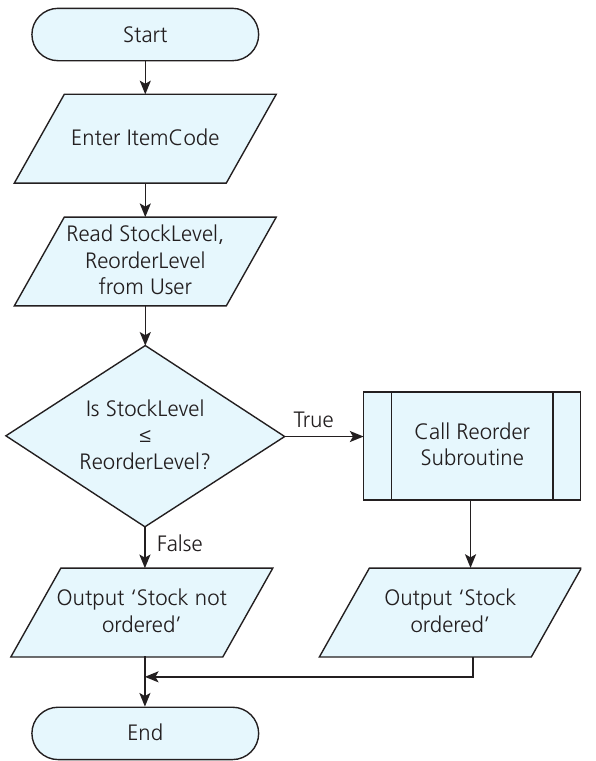
This flowchart shows an automated inventory management system for a T-shirt company. Here's how it works:
- The process starts by getting an item code from the user
- It reads the current stock level and reorder level from the system
- The key decision compares whether the stock level is less than or equal to the reorder level
- If stock is low (True), it calls a reorder subroutine and outputs "Stock ordered"
- If stock is sufficient (False), it outputs "Stock not ordered"
- Both paths lead to the end of the process
This type of system helps businesses automatically track inventory and place orders when stock runs low, preventing the company from running out of popular items.
Pseudo-code
What is pseudo-code?
Pseudo-code is a text-based method for describing algorithms using English-like statements. It sits between flowcharts and actual programming code - it's more detailed than a flowchart but less strict than real programming languages.
The beauty of pseudo-code is that anyone can read and understand it, even without programming knowledge. It allows you to focus on the logic of your algorithm without worrying about the specific syntax rules of particular programming languages.
Features of pseudo-code
Pseudo-code has several characteristics that make it useful:
- Uses everyday English words and phrases
- Follows a logical structure with clear steps
- Includes programming concepts like IF statements and loops
- Doesn't require perfect syntax - variations are acceptable
- Can be easily converted into any programming language
Note
For example, instead of using the strict programming keyword OUTPUT, you might see PRINT, DISPLAY, or SHOW in pseudo-code - all are perfectly acceptable as long as the meaning is clear.
Example pseudo-code
Here's the same T-shirt inventory system written in pseudo-code:
Example
Worked Example: T-shirt Inventory System in Pseudo-code
ItemCode ← USERINPUT
StockLevel ← USERINPUT
ReorderLevel ← USERINPUT

IF StockLevel ≤ ReorderLevel THEN
    ReOrder()
    OUTPUT 'Stock ordered'
ELSE
    OUTPUT 'Stock not ordered'
ENDIF
Notice how this reads almost like normal English instructions. The arrow (←) symbol shows that we're storing user input into variables, and the IF-THEN-ELSE structure makes the decision logic very clear.
Programme code
What is programme code?
Programme code refers to instructions written in specific high-level programming languages that computers can understand and execute. Unlike pseudo-code, programme code must follow exact syntax rules and can actually run on a computer to solve real problems.
For GCSE Computer Science, you need to be familiar with Python, VB.Net, or C# programming languages. Each language has its own way of writing instructions, but they all follow similar logical patterns.
Why precision matters in programme code
Important
When writing programme code, every detail matters. Unlike pseudo-code where small variations are acceptable, programming languages require exact spelling, punctuation, and structure. Even a missing bracket or incorrect capitalisation can prevent your programme from working properly.
However, the logical thinking you develop when creating flowcharts and pseudo-code directly translates to writing programme code. The same problem-solving steps apply - you're just expressing them in a more precise format.
Examples in different programming languages
Here's how the T-shirt inventory system looks in three different programming languages:
Example
Worked Example: Inventory System in Multiple Programming Languages
Python:
ItemCode = input("enter item code")
StockLevel = int(input("enter stock level"))
ReorderLevel = int(input("enter reorder level"))
if StockLevel <= ReorderLevel:
    ReOrder()
    print("stock ordered")
else:
    print("stock not ordered")
VB.Net:
Dim ItemCode As String
Dim StockLevel As Integer
Dim ReorderLevel As Integer
ItemCode = Console.ReadLine()
StockLevel = Console.ReadLine()
ReorderLevel = Console.ReadLine()
If StockLevel <= ReorderLevel Then
    ReOrder()
    Console.WriteLine("stock ordered")
Else
    Console.WriteLine("stock not ordered")
End If
C#:
string ItemCode;
int StockLevel;
int ReorderLevel;
ItemCode = Console.ReadLine();
StockLevel = Convert.ToInt32(Console.ReadLine());
ReorderLevel = Convert.ToInt32(Console.ReadLine());
if (StockLevel <= ReorderLevel)
{
    ReOrder();
    Console.WriteLine("stock ordered");
}
else
{
    Console.WriteLine("stock not ordered");
}
Notice how each language has its own way of declaring variables, getting user input, and structuring conditional statements, but the underlying logic remains the same across all three versions.
Summary
Key Points to Remember:
- Flowcharts use specific symbols: Terminal (oval), Process (rectangle), Decision (diamond), Input/Output (parallelogram), and Subroutine (rectangle with double lines)
- Pseudo-code is flexible: It uses English-like statements and doesn't require perfect syntax, making it ideal for planning algorithms
- Program code must be precise: Every symbol, bracket, and spelling must be correct for the code to work properly
- All three methods solve the same problems: Whether you use flowcharts, pseudo-code, or programme code, you're breaking down complex problems into manageable steps
- Start simple, then get specific: Begin with flowcharts to visualise your solution, use pseudo-code to plan the logic, then implement in programme code for the final working solution