Use of SQL to Insert, Update and Delete Data (AQA GCSE Computer Science): Revision Notes
📚Revision Notes
Use of SQL to insert, update and delete data
SQL isn't just for retrieving data - it's also the key tool for managing and modifying information in databases. This revision note covers the three essential commands you need to know for manipulating data: INSERT, UPDATE, and DELETE.
What is SQL data manipulation?
Data manipulation in SQL refers to the ability to add new records, modify existing ones, and remove unwanted data from database tables. These operations are fundamental to keeping databases current and useful. Think of it like editing a document - sometimes you need to add new content, change what's already there, or delete sections that are no longer needed.
Note
Understanding Data Manipulation
Just like you might edit a word document by adding paragraphs, changing sentences, or deleting sections, SQL allows you to perform similar operations on database tables. These three commands - INSERT, UPDATE, and DELETE - are the foundation of database maintenance and are essential skills for any database administrator or developer.
INSERT command - adding new records
The INSERT command allows you to add brand new rows of data to an existing table. When you want to store fresh information, this is your go-to command.
How INSERT works
The basic structure follows this pattern: you specify which table you're adding to, list the fields you want to fill, and then provide the actual values to insert. The field names and values must match up perfectly - the first value goes into the first field, the second value into the second field, and so on.
Here's the general syntax:
INSERT INTO table_name (field1, field2, field3)
VALUES (value1, value2, value3)
Worked example: Adding a new room
Let's say we have a Room table that tracks different rooms in a school, including their codes, locations, and whether they have IT facilities. To add a new room called "Room 27" located in the "Science corridor" with IT facilities, we would write:
Example
Worked Example: Adding a New Room Record
Step 1: Identify the table and fields
- Table: Room
- Fields: RoomCode, Location, IT_facilities
Step 2: Write the INSERT statement
INSERT INTO Room (RoomCode, Location, IT_facilities)
VALUES ("Room 27", "Science corridor", True)
Step 3: Understand the result This creates a new row in the Room table with:
- RoomCode = "Room 27"
- Location = "Science corridor"
- IT_facilities = True
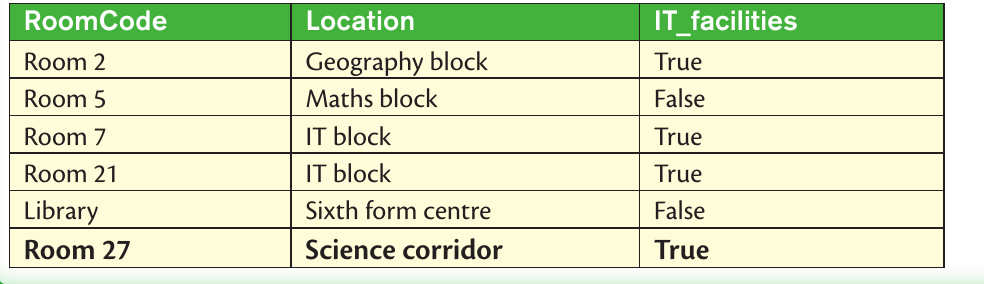
After running this INSERT command, the Room table would contain all the original data plus the new record we just added.
UPDATE command - modifying existing records
Sometimes you need to change information that's already stored in your database. Maybe a room has been moved, or equipment has been installed. The UPDATE command lets you modify existing records without having to delete and recreate them.
How UPDATE works
The UPDATE command has three key parts: you specify which table to update, use SET to define what changes to make, and include a WHERE clause to specify exactly which records should be modified. Without the WHERE clause, you'd accidentally change every single record in the table!
The general syntax looks like this:
UPDATE table_name
SET field_name = new_value
WHERE condition
Worked example: Changing room locations
Imagine all the rooms that were previously in the "IT block" are now located in the "Computer Science block". Here's how you'd update them all at once:
Example
Worked Example: Updating Multiple Room Locations
Scenario: All rooms in "IT block" need to be relocated to "Computer Science block"
Step 1: Identify what needs updating
- Table: Room
- Field to change: Location
- Condition: Where Location = "IT block"
Step 2: Write the UPDATE statement
UPDATE Room
SET Location = "Computer Science block"
WHERE Location = "IT block"
Step 3: Understand the effect This finds every room where Location currently says "IT block" and changes it to "Computer Science block"
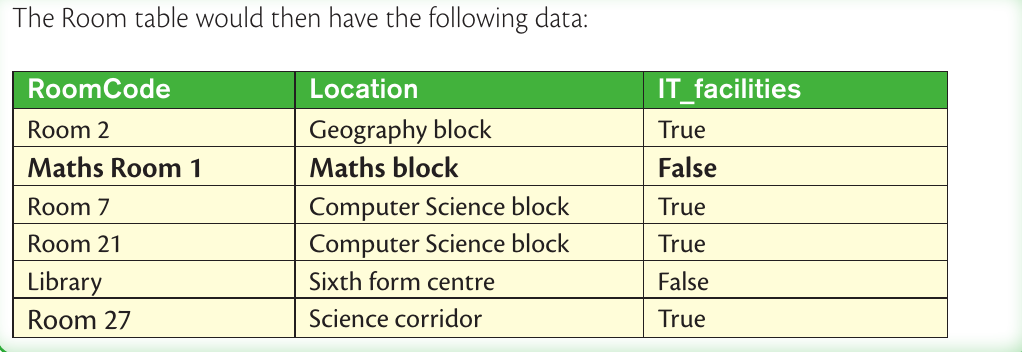
This command finds every room where the Location field currently says "IT block" and changes it to "Computer Science block".
Another example: Renaming a specific room
You can also update individual records. To change "Room 5" to be called "Maths Room 1", you'd use:
Example
Worked Example: Updating a Single Room Code
UPDATE Room
SET RoomCode = "Maths Room 1"
WHERE RoomCode = "Room 5"
This targets just the one room with RoomCode "Room 5" and gives it a new name.
DELETE command - removing records
When information is no longer needed or becomes outdated, the DELETE command helps you remove unwanted records from your database. This keeps your data clean and relevant.
How DELETE works
The DELETE command is potentially the most dangerous SQL command because it permanently removes data. Like UPDATE, it should almost always include a WHERE clause to specify exactly which records to delete. The structure is simpler than INSERT or UPDATE:
DELETE FROM table_name
WHERE condition
Worked example: Removing rooms without IT facilities
Suppose you want to remove all rooms that don't have IT facilities from your database:
Example
Worked Example: Deleting Records Based on Criteria
Scenario: Remove all rooms that don't have IT facilities
Step 1: Identify the deletion criteria
- Table: Room
- Condition: IT_facilities = False
Step 2: Write the DELETE statement
DELETE FROM Room
WHERE IT_facilities = False
Step 3: Understand the result This searches for all records where IT_facilities is False and removes those entire rows from the table.
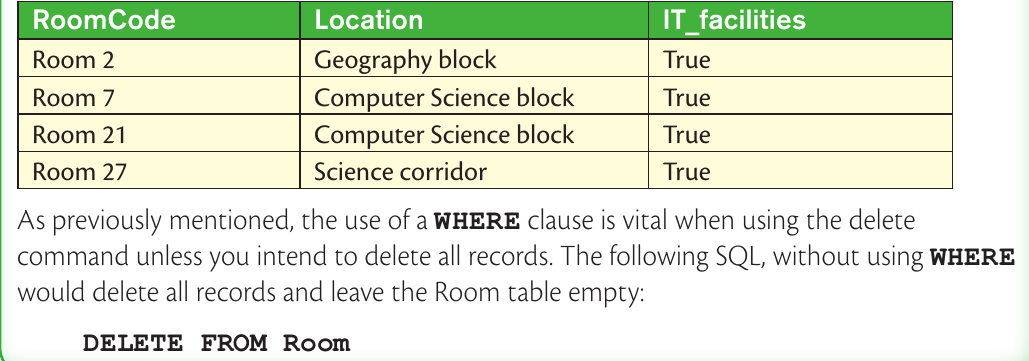
This command searches for all records where IT_facilities is False and removes those entire rows from the table.
The danger of DELETE without WHERE
Important
Critical Warning: DELETE Without WHERE
If you write DELETE FROM Room without a WHERE clause, it will delete every single record in the Room table! The table structure remains, but all the data disappears. Always double-check your DELETE commands before running them.
This is one of the most common and devastating mistakes in database management - always include a WHERE clause with DELETE commands unless you genuinely want to empty the entire table.
Important safety considerations
The WHERE clause is your safety net when using UPDATE and DELETE commands. It acts like a philtre, ensuring you only modify the specific records you intend to change. Understanding proper safety practices is crucial for responsible database management.
Important
Essential Safety Tips for Data Manipulation
- Always test your WHERE conditions first by using them in a SELECT statement to see which records will be affected
- Double-check which records will be affected before running UPDATE or DELETE commands
- Consider making backups of important data before making large changes
- Use specific conditions rather than broad ones when possible to minimise risk
- Think of the WHERE clause like the address on an envelope - it ensures your changes reach exactly the right destination and nowhere else
Think of database safety like driving a car - you need to check your mirrors, signal your intentions, and proceed carefully to avoid accidents. The same applies to data manipulation commands.
Summary
Key Points to Remember:
- INSERT INTO adds completely new records to a table using the VALUES keyword
- UPDATE with SET modifies existing data, but always needs a WHERE clause to specify which records to change
- DELETE FROM removes entire records permanently, and also requires WHERE to avoid deleting everything
- WHERE clauses are essential for UPDATE and DELETE to prevent accidental changes to all your data
- The order matters - field names and values must match up exactly in INSERT statements
- Safety first - always test your conditions and consider the consequences before running data manipulation commands