Flowcharts (Edexcel GCSE Computer Science): Revision Notes
📚Revision Notes
Flowcharts
What are flowcharts?
Flowcharts are visual diagrams that show the steps in an algorithm. They're like a roadmap for your programme, showing exactly what happens and in what order. Once you've designed your algorithm using a flowchart, you can then translate it into actual programme code that a computer can run.
Note
Think of flowcharts as the planning stage before you build something - just like an architect draws blueprints before constructing a building! This planning phase helps you identify potential problems before you start coding.
Flowchart symbols
Every flowchart uses standard symbols that have specific meanings. Learning these symbols is essential because they're used worldwide by programmers and computer scientists. Here are the six main symbols you need to know:
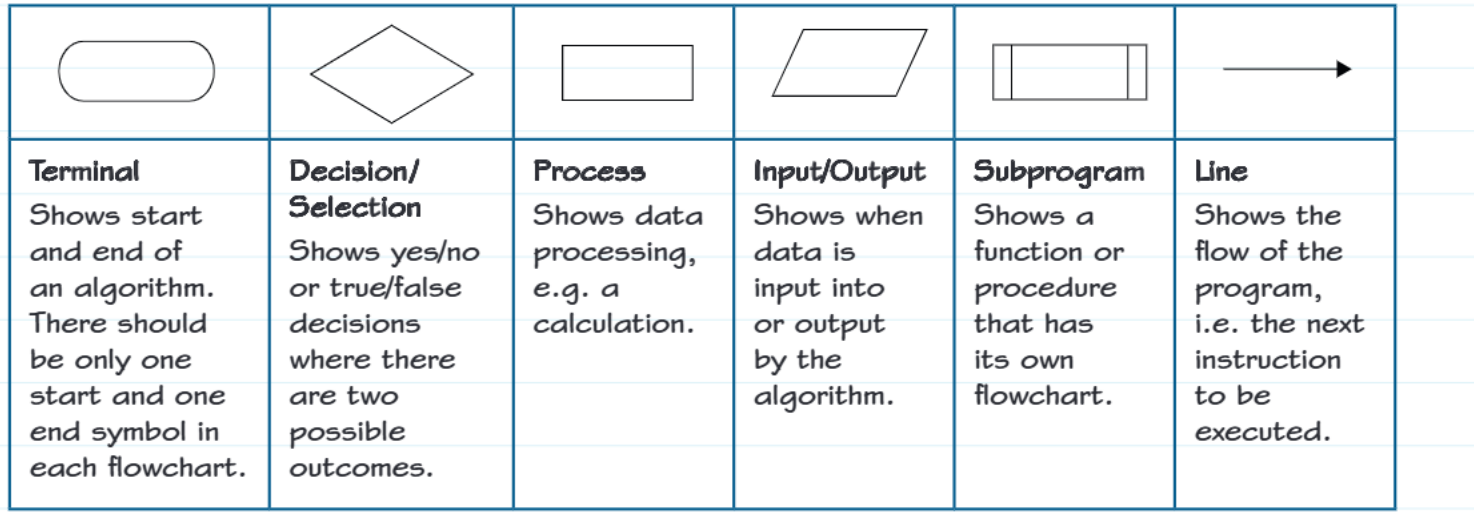
Terminal symbol (oval shape)
This rounded rectangle marks the beginning and end of your algorithm. Every flowchart must have exactly one "start" symbol and one "stop" symbol - no more, no less! Think of it like the starting gun and finish line in a race.
Decision/selection symbol (diamond shape)
This diamond shape represents a point where your programme needs to make a choice. It asks a yes/no question or checks if something is true/false. The programme will follow different paths depending on the answer. For example, "Is the password correct?" - if yes, log in; if no, show error message.
Process symbol (rectangle)
This simple rectangle shows where your programme does some work or processing. This could be performing calculations, processing data, or any other operation that changes or manipulates information. For example, "calculate total = price + tax" would go in a process box.
Input/output symbol (parallelogram)
This slanted rectangle (parallelogram) shows when data flows into or out of your programme. Input means getting information from the user (like asking for their name), while output means displaying results to the user (like showing the final answer).
Subprogram symbol (rectangle with side bars)
This rectangle with bars on the sides represents a function or procedure that has its own separate flowchart. It's like saying "go and do this complex task" without cluttering up your main flowchart with all the details.
Line symbol (arrow)
These arrows are crucial - they show the flow and direction of your programme. They connect all the other symbols and tell you which step comes next. Without arrows, your flowchart would just be a collection of disconnected shapes!
Understanding sequence
Sequence is one of the four fundamental programming constructs (along with selection, repetition, and iteration). It's the most basic concept - it simply means that instructions are carried out one after another, in the exact order you specify.
In flowcharts, sequence is shown by connecting symbols with arrows. The arrows create a path that the programme follows from start to finish, ensuring each step happens at the right time.
Important
Without proper sequencing, your programme might try to display results before calculating them, or ask for input after the programme has finished! Always ensure your flowchart follows a logical sequence.
Worked example walkthrough
Let's examine how to create a flowchart for a programme that adds two numbers together:
Example
Worked Example: Adding Two Numbers
Problem: Create a programme that asks the user for two numbers, adds them together, and displays the result.
The flowchart solution shows these steps:
- Start (terminal symbol) - Every algorithm begins here
- Initialise variables (process symbol) - Set up num1, num2, and total variables
- Get first number (input symbol) - Ask user to enter the first number
- Get second number (input symbol) - Ask user to enter the second number
- Calculate total (process symbol) - Add num1 and num2 together
- Display result (output symbol) - Show the total to the user
- Stop (terminal symbol) - The algorithm ends here
The arrows connect each step in sequence, creating a clear path from start to finish.
Key points to remember:
- Terminal symbols mark the start and end points clearly
- The first process symbol can handle multiple initialisation tasks
- Input symbols use words like "get" to show data coming into the programme
- Process symbols show calculations and data manipulation
- Output symbols use words like "display" to show results going to the user
- A flowchart without a stop symbol would create an infinite loop that never ends
Practice opportunity
Note
Try This Yourself
Try creating your own flowchart for this problem: Design an algorithm that greets a user by name.
For example, if someone enters "Sarah", your programme should output "Hello, Sarah".
Think about what symbols you'll need and in what order. Remember to include start and stop terminals, and consider whether you need input, process, and output symbols.
Summary
Summary
Key Points to Remember:
-
Every flowchart needs exactly one start symbol and one stop symbol - like bookends for your algorithm
-
Use the correct symbol for each type of operation - diamonds for decisions, rectangles for processing, parallelograms for input/output
-
Arrows show the sequence and flow - they're not just decorative, they control the order of operations
-
Sequence ensures steps happen in the right order - this is fundamental to making programmes work correctly
-
Flowcharts are universal - programmers worldwide use these same symbols, so learning them properly will help you communicate your ideas clearly