Selection (Edexcel GCSE Computer Science): Revision Notes
📚Revision Notes
Algorithms: selection
What is selection in algorithms?
Selection is one of the fundamental building blocks of programming, alongside sequence, repetition, and iteration. When we write algorithms, we often need our programmes to make decisions and choose between different paths based on certain conditions. This is where selection comes in.
Selection allows your programme to choose between two or more different options. Think of it like a fork in the road - your programme looks at some information (like a number or user input) and decides which way to go based on what it finds.
Note
Programme flow is controlled by sequence, selection, repetition and iteration. Selection is used to choose between two or more options based on conditions that your programme evaluates.
Understanding flowcharts for selection
Flowcharts are a brilliant way to visualise how selection works in your algorithms. They help you plan out the decision-making process before you start writing actual code.
Note
Flowcharts provide a visual representation that makes it much easier to understand the logic flow before you translate your algorithm into programming code. This planning step can save you time and prevent errors later.
The diamond symbol
In flowcharts, selection is always represented by a diamond shape. This diamond is your decision point - it's where your programme stops to think and make a choice.
Important
Rules for selection symbols in flowcharts:
- There must be only one entry point into the diamond (one arrow going in)
- There must be exactly two exit paths (two arrows coming out)
- Each exit path must be clearly labelled with "yes" or "no"
- The question inside the diamond should be written so it can only have a yes/no answer
When do you need to use selection?
You'll know you need selection in your algorithm when you see certain keywords in the problem description. Look out for words like:
- "if"
- "otherwise"
- "choose"
- "decide"
- "depending on"
For example: "If the number is greater than 70, then print 'distinction', otherwise if the number is greater than 50, then print 'pass', otherwise print 'no award'."
Selection in Python programming
When you're ready to turn your flowchart into actual code, Python uses the if...elif...else structure to handle selection.
if (number > 70):
    print ("Distinction")
elif (number > 50):
    print ("Pass")
else:
    print ("No award")
Notice how this works:
- if checks the first condition
- elif (short for "else if") checks additional conditions
- else catches everything that doesn't match the previous conditions
The elif statement creates additional selection paths in your flowchart, appearing as extra diamond symbols connected to the "no" arrow of the previous decision.
Worked example: number categorisation
Let's look at a practical example that shows how selection works in a flowchart.
Example
Worked Example: Number Categorisation Flowchart
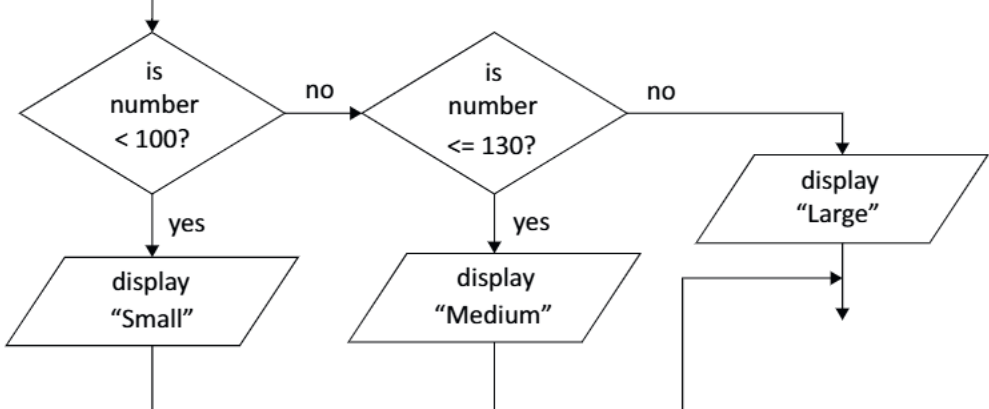
This flowchart categorises numbers into three groups: Small, Medium, and Large. Here's how it works:
Step 1 - First decision: Is the number less than 100?
- If yes: Display "Small" and finish
- If no: Move to the next decision
Step 2 - Second decision: Is the number less than or equal to 130?
- If yes: Display "Medium" and finish
- If no: Display "Large" and finish
Testing with different values:
- Input 45: ? Yes → Display "Small"
- Input 123: ? No → ? Yes → Display "Medium"
- Input 150: ? No → ? No → Display "Large"
- Input 130: ? No → ? Yes → Display "Medium"
Exam tips for selection
Note
Exam Success Tips:
- Always check your flowchart has exactly one entry and two exits for each diamond
- Make sure your questions can only be answered with yes or no
- When writing Python code, remember that elif and else only work after an if statement
- Test your algorithm with different values, including boundary cases (like exactly 100 or 130 in our example)
- In exams, carefully trace through each path to make sure you get the right output
Summary
Key Points to Remember:
-
Selection lets your programme make choices based on conditions - it's like a fork in the road for your algorithm
-
Diamond symbols in flowcharts represent decision points, with exactly one entry and two labelled exits (yes/no)
-
Look for keywords like "if" and "otherwise" in problem descriptions to identify where you need selection
-
Python uses if...elif...else to implement selection, where elif creates additional decision paths
-
Always test your selection logic with different input values, especially boundary cases, to make sure it works correctly