Arrays (Edexcel GCSE Computer Science): Revision Notes
📚Revision Notes
Arrays
What are arrays?
An array is an organised method for storing data in computer programming. Think of it like a filing cabinet with numbered drawers - each drawer can hold one piece of information, and you can find what you need by knowing the drawer number.
Arrays are similar to variables, but while a variable can only store one piece of data at a time, an array can store multiple pieces of data under the same name. This makes them incredibly useful for organising related information.
Note
Arrays are fundamental data structures that form the backbone of many programming solutions. Understanding arrays will help you write more efficient and organised code.
Key benefits of using arrays:
- Efficiency: Instead of creating separate variables for each piece of data (like name1, name2, name3), you can store everything in one array
- Organization: All related data stays together under one identifier
- Easy access: You can quickly find any piece of data using its position number
Understanding array indexes
Every piece of data in an array (called an element) has a specific position called an index. Here's the crucial point that often confuses beginners: array indexing starts at 0, not 1.
Important
Critical Concept: Zero-Based Indexing
Array indexing starts at 0, not 1! This is one of the most common sources of confusion for beginners. The first element is always at index 0, the second at index 1, and so on.

Example
Array Index Example: Colour Array
In this example, the array contains five colour names:
- The first element "red" is at index 0
- The second element "green" is at index 1
- The fifth element "brown" is at index 4
The length of this array is 5 (it contains 5 elements), but the highest index is 4.
Working with one-dimensional arrays
A one-dimensional (1D) array is like a single row of data. When you create an array in code, you use square brackets [ ] and separate elements with commas.
Example
Creating 1D Arrays in Python
names = ["Alice", "David", "Orla", "Raja"]
scores = [10, 13, 17, 20]
These arrays store related data under single identifiers, making them easy to manage and access.
Accessing array elements
To get a specific element from an array, you use the array name followed by the index in square brackets:
print(names[0])  # This will output: Alice
print(scores[2])  # This will output: 17
Traversing arrays
Traversing means going through every element in an array one by one. Here's how you can do this with code:
Example
Array Traversal Example
for index in range(len(array)):
    print(array[index])
How this works:
- len(array) finds the length of the array
- range() creates a sequence of numbers from 0 to the array length
- The loop goes through each index and prints the corresponding element
Note
Interesting Fact
Inside computers, text strings are actually stored as arrays of individual characters! When you work with a string like "Hello", the computer treats it as an array: ['H', 'e', 'l', 'l', 'o'].
Two-dimensional arrays
A two-dimensional (2D) array is like a table or grid with rows and columns. Each element needs two indexes to describe its position: one for the row and one for the column.
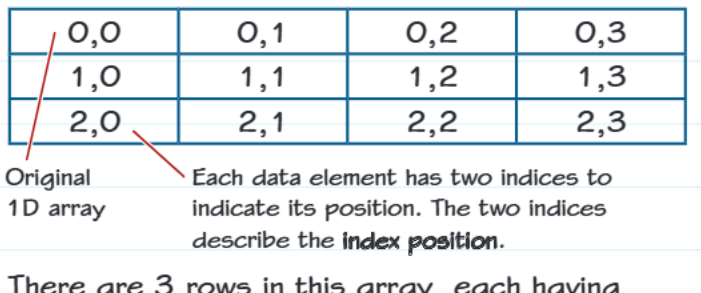
This diagram shows a 2D array with:
- 3 rows (numbered 0, 1, 2)
- 4 columns (numbered 0, 1, 2, 3)
- Each position shows its coordinates as (row, column)
Creating and accessing 2D arrays
Example
Working with 2D Arrays
Here's how you create a 2D array in code:
scores = [[1, 2, 3, 4],
          [111, 222, 333, 444]]
To access a specific element, you use two sets of square brackets:
scores[1][3] = 15 # This changes the element in row 1, column 3
Note
Memory Tip
Always think "row first, then column" when working with 2D arrays. This is like reading coordinates on a map - you find the street (row) first, then the house number (column).
Real-world example: pulse rate data
Let's look at how arrays work in practice. A student recorded pulse rate data over four days, taking three measurements each day:
| Day | 9am | 12:30pm | 8pm |
|---|---|---|---|
| Day 1 | 65 | 73 | 70 |
| Day 2 | 69 | 75 | 68 |
| Day 3 | 70 | 80 | 65 |
| Day 4 | 78 | 79 | 69 |
Example
Pulse Rate Data as a 2D Array
This data is perfectly suited for a 2D array because it has:
- Rows representing days
- Columns representing different times
- All data is the same type (pulse rates as numbers)
Accessing specific readings:
- Day 3 at 8pm: pulse[2][2] = 65 (remember, indexing starts at 0!)
- Day 1 at 12:30pm: pulse[0][1] = 73
Common mistakes to avoid
Important
Watch Out for These Common Array Mistakes
- Forgetting that indexing starts at 0 - The first element is always at index 0, not 1
- Getting row and column mixed up - Always remember "row first, column second"
- Index out of range errors - Make sure your index doesn't exceed the array length
- Mixing up 1D and 2D syntax - Use single brackets [i] for 1D arrays and double brackets [i][j] for 2D arrays
These mistakes can cause your programmes to crash or produce incorrect results!
Exam tips
Note
Exam Success Strategies
- Read questions carefully - Check whether you're working with 1D or 2D arrays
- Always count from 0 when working out index positions
- Show your working - Write down the row and column numbers when accessing 2D array elements
- Practice with real examples - Arrays are easier to understand when you see them used with actual data
Summary
Summary
Key Points to Remember:
- Arrays are organised collections of data elements stored under one name
- Indexing always starts at 0, not 1
- 1D arrays use single square brackets [index] to access elements
- 2D arrays use double square brackets [row][column] to access elements
- Arrays improve programme efficiency by keeping related data together
- Always think "row first, then column" for 2D arrays