Binary search (Edexcel GCSE Computer Science): Revision Notes
📚Revision Notes
Binary search
What is binary search?
Binary search is a super efficient way to find a specific item in a list - but there's one important catch: the list must already be sorted (either in ascending or descending order). Think of it like looking up a word in a dictionary - you don't start from page 1, you jump to roughly where you think the word might be!
Important
Critical Requirement: Binary search only works on sorted data. If your list isn't sorted, you must sort it first or use a different search method.
The key idea behind binary search is that it uses a divide-and-conquer strategy. This means it keeps splitting the list in half, dramatically reducing the number of items to check each time. This makes it much faster than checking every single item one by one.
How binary search works
Here's the step-by-step process that binary search follows:
- Select the median (middle item) of the current list
- Compare the median with the item you're searching for
- If the search item is smaller than the median, throw away the median and everything to its right
- If the search item is larger than the median, throw away the median and everything to its left
- Calculate the new median from the remaining items
- Repeat this process until you either find the item or run out of items to check
Note
The beauty of this process is that each step eliminates roughly half of the remaining possibilities, making the search incredibly efficient!
Finding the median
Understanding how to find the median is crucial for binary search:
- For odd number of items (like 13 items): The median is simply the middle item (the 7th item)
- For even number of items (like 10 items): The median would be between the 5th and 6th items. Since there's no actual middle position, we round down to position 5
Note
Quick formula: median position = (using integer division, so we ignore any remainder)
Worked example walkthrough
Let's see binary search in action with a practical example:
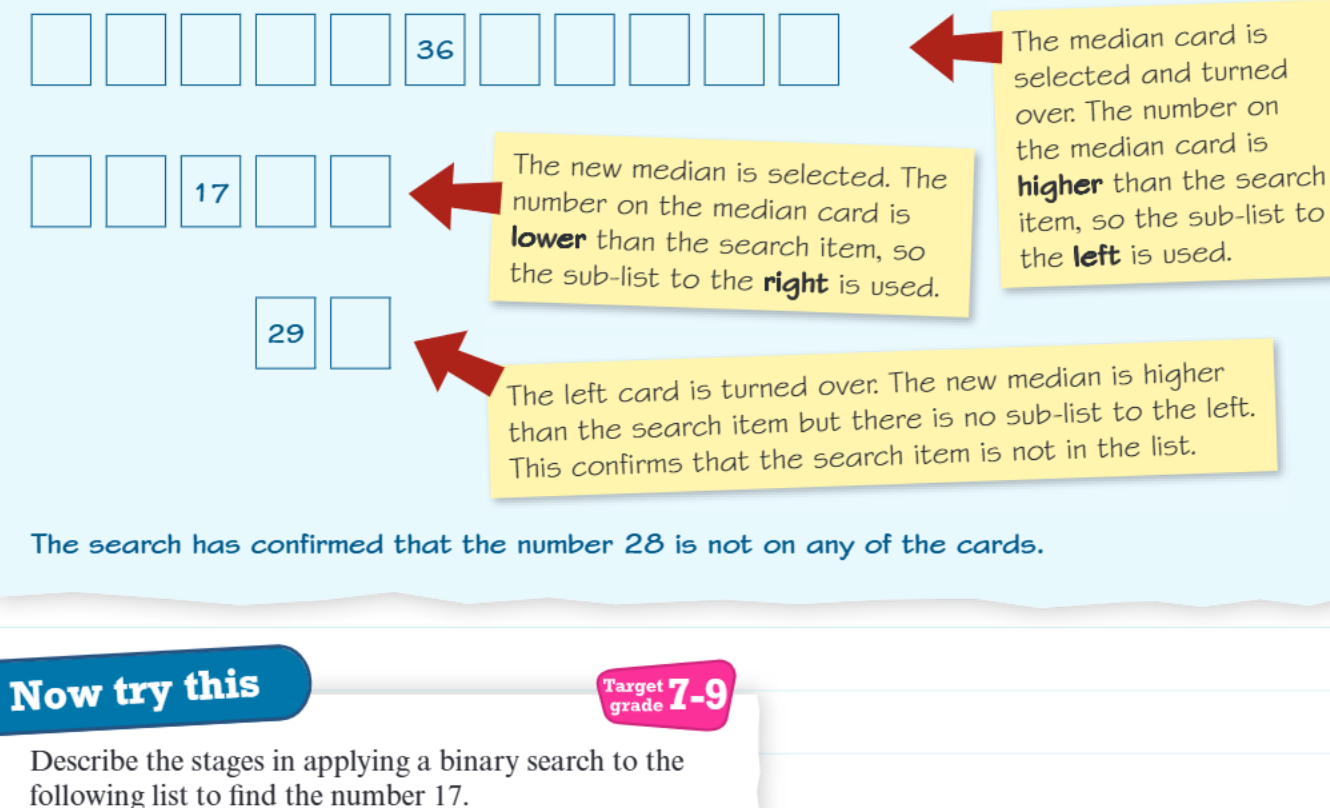
Example
Worked Example: Finding the Number 28
The scenario: We have 11 cards arranged in ascending order, and we want to find if the number 28 is among them.
Stage 1: We select the median card (the 6th card out of 11). It contains the number 36. Since 28 is smaller than 36, we know 28 must be in the left half, so we discard the median card and everything to its right.
Stage 2: Now we're working with just the left 5 cards. The new median is the 3rd card, which contains 17. Since 28 is larger than 17, we know 28 must be in the right half of our remaining cards, so we discard the median and everything to its left.
Stage 3: We're now left with just 2 cards. We check the left card and find 29. Since 29 is higher than our target of 28, and there are no more cards to the left, we can conclude that 28 is not in our list.
Why binary search is so efficient
Instead of potentially checking all 11 cards one by one (which could take up to 11 checks), binary search found our answer in just 3 steps! This efficiency becomes even more impressive with larger lists - for a list of 1000 items, binary search would need at most 10 checks, compared to potentially 1000 checks with a linear search.
Note
This dramatic efficiency improvement is due to the logarithmic time complexity of binary search, which grows much more slowly than linear search as the data size increases.
Exam tips and common mistakes
Remember these key points for your exam:
- Always check that the list is sorted before applying binary search
- When calculating the median position, use integer division (ignore remainders)
- If the search item equals the median, you've found it!
- Keep track of which part of the list you're discarding at each step
- The search ends when you either find the item or have no more items left to check
Important
Common pitfalls to avoid:
- Don't forget to recalculate the median position after each split
- Make sure you understand whether to go left or right based on the comparison
- Remember that binary search only works on sorted data
Practice makes perfect
Try working through binary search problems step by step, clearly showing:
- The current list you're searching
- Which item is the median
- How the median compares to your search item
- Which part of the list you're keeping for the next step
Summary
Key Points to Remember:
- Binary search only works on sorted lists - this is essential!
- It uses a divide-and-conquer approach, splitting the list in half each time
- Always start by finding the median (middle item) of your current search area
- Compare the median with your target - go left if target is smaller, right if larger
- Binary search is incredibly efficient - much faster than checking every item one by one
- Practice the step-by-step process until it becomes second nature for your exam!