Determining correct output (Edexcel GCSE Computer Science): Revision Notes
📚Revision Notes
Determining correct output
When working with algorithms, it's crucial to understand exactly what they do and predict their output. This skill helps you debug code, verify that algorithms work correctly, and solve programming problems step by step.
What is determining correct output?
Determining correct output means figuring out what an algorithm or programme will produce when it runs. This involves carefully following each instruction in order and tracking how variables change throughout the process.
Note
It's like being a detective - you need to trace through every step to solve the mystery of what the programme does. This analogy helps remember that you're investigating the algorithm's behaviour systematically.
Dry runs
A dry run is your main tool for understanding how an algorithm works. Think of it as doing a "practice run" of the algorithm without actually running it on a computer.
What is a dry run? A dry run involves working through an algorithm step by step using just your brain, a pen, and paper. You manually execute each instruction one at a time, keeping track of what happens to all the variables and data. It's called "dry" because you're not actually running the programme - you're doing it by hand.
Important
Why are dry runs essential?
- They help you understand what an algorithm does before running it
- You can spot errors and bugs in the logic
- They're essential for exam questions about algorithm execution
- They improve your programming and problem-solving skills
Trace tables
While doing a dry run, it's helpful to organise your work using a trace table. This is like creating a diary of everything that happens during the algorithm's execution.
What is a trace table? A trace table is a structured way to record the values of variables, inputs, and outputs as they change during programme execution. Each column represents a different variable or piece of data, and each row represents a step in the algorithm's execution.
Important
How to create a trace table:
- Set up columns for each variable in your algorithm
- Add columns for any inputs and outputs
- Work through the algorithm step by step
- Record how each variable changes in each row
- Note when inputs are received and outputs are produced
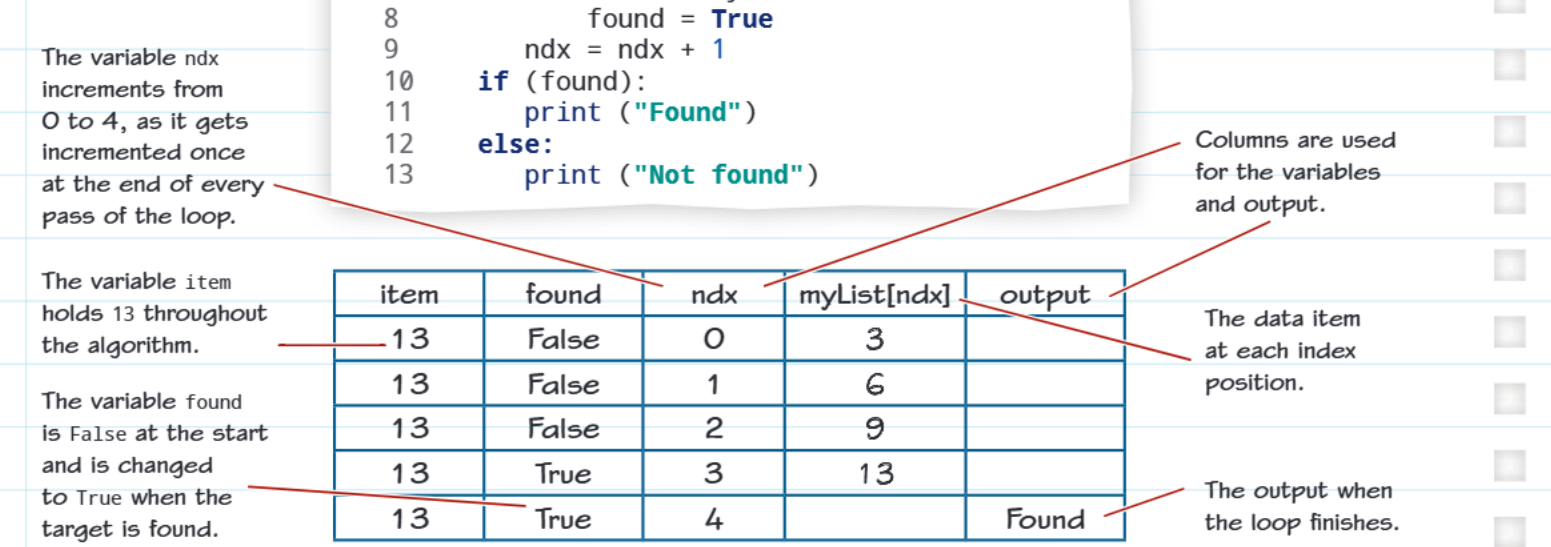
Worked example: Linear search algorithm
Let's examine how a linear search algorithm works using a dry run and trace table. This algorithm searches through a list to find a specific target value.
Example
Worked Example: Linear Search Algorithm
The algorithm:
myList = [3,6,9,13,17,21]
found = False
length = len(myList)
ndx = 0
item = int(input("Target?"))
while ((ndx < length) and (not found)):
    if (item == myList[ndx]):
        found = True
    ndx = ndx + 1
if (found):
    print ("Found")
else:
    print ("Not found")
Understanding the variables:
- myList: Contains the data we're searching through [3,6,9,13,17,21]
- found: A boolean that tracks whether we've found our target (starts as False)
- length: Stores how many items are in the list (6 in this case)
- ndx: The index position we're currently checking (starts at 0)
- item: The target value we're looking for (13 in this example)
Following the execution: The algorithm checks each position in the list one by one. The ndx variable acts like a pointer, moving from position 0 to position 4. At each step, it compares the target value (13) with whatever is stored at the current position.
When ndx reaches position 3, it finds that myList[3] contains 13, which matches our target. At this point, found changes from False to True. Even though ndx gets incremented to 4, the loop condition (ndx < length) and (not found) becomes false because found is now True.
The trace table shows exactly how each variable changes at every step, making it easy to follow the algorithm's logic and verify that it works correctly.
Practice opportunities

Trace tables are commonly tested in GCSE exams. You might be given an algorithm and asked to complete a trace table showing how variables change during execution. Practice with different types of algorithms like loops, conditional statements, and simple calculations to build your confidence.
Note
Exam Tips for Trace Tables:
- Always read through the entire algorithm before starting your trace table
- Set up all your columns first, including variables, inputs, and outputs
- Work through one line of code at a time
- Don't skip steps - even if a variable doesn't change, you might need to show that
- Double-check your work by reading through the trace table to ensure it makes sense
Remember!
Summary
Key Points to Remember:
- Dry runs help you understand algorithms by working through them step by step without using a computer
- Trace tables organise your work by tracking how variables change throughout the algorithm's execution
- Follow the algorithm exactly - don't skip steps or make assumptions about what should happen
- Practice with different algorithms to build confidence in reading and understanding code
- Use trace tables in exams to show your working and avoid making careless mistakes when determining programme output