Errors that can occur in programs (Edexcel GCSE Computer Science): Revision Notes
📚Revision Notes
Errors that can occur in programmes
What are programming errors?
A programming error is essentially a mistake or bug in your code that stops your programme from working properly. These errors can either prevent your programme from running at all, or cause it to give you the wrong results when it does run.
Understanding different types of errors is crucial for debugging - the process of finding and fixing problems in your code. There are three main categories of errors that you'll encounter when programming.
Syntax errors
Syntax errors happen when you break the rules of the programming language you're using. Think of syntax like grammar rules in English - if you don't follow them, your message doesn't make sense.
These errors are actually the easiest type to spot and fix because:
- The computer will tell you exactly where the problem is
- Your programming environment will usually highlight the error with a red line or warning message
- The programme won't run at all until you fix them
Note
Common examples of syntax errors include:
- Misspelling command words (like writing pritn instead of print)
- Forgetting punctuation marks like brackets, quotes, or colons
- Using a variable name before you've created it
- Missing indentation in languages like Python
Here's an example of a syntax error:
import randem
ModuleNotFoundError: No module named 'randem'
The word random has been misspelt as randem, so Python can't find the module you're trying to import.
Runtime errors
Runtime errors are trickier because they only show up when your programme is actually running. Your code follows all the syntax rules correctly, so it starts running fine, but then something goes wrong during execution.
These errors usually happen when you ask the computer to do something impossible, such as:
- Dividing a number by zero
- Trying to access a file that doesn't exist
- Attempting to use a list item that doesn't exist (accessing index 5 in a list that only has 3 items)
Note
Key characteristics of runtime errors:
- Your programme starts running normally
- The error only appears when the problematic line of code is reached
- The programme typically crashes when the error occurs
- You get an error message explaining what went wrong
Here's an example of a runtime error:
print (tree (index))
IndexError: list index out of range
This error happens when you try to access an item in a list using an index number that's too high.
Logic errors
Logic errors are the most challenging type to find and fix. Your programme follows all the syntax rules correctly and runs without crashing, but it produces the wrong results or behaves unexpectedly.
Important
Why logic errors are so difficult:
- The programme appears to work normally (no error messages)
- You only notice something's wrong when you check the results carefully
- The computer can't help you find them - it's doing exactly what you told it to do
- They require you to think through your code step by step
Finding logic errors - what to check:
When hunting for logic errors, examine these areas carefully:
- Variable initialization: Make sure all your variables start with the correct values
- Mathematical operators: Check you're using the right symbols (+, -, *, /, etc.)
- Assignment statements: Ensure you're putting values in the right variables
Example
Worked Example: Fixing logic errors
Let's look at a programme that calculates the average mark and maximum mark for student assignments. The programme has logic errors on lines 5, 13, and 15 that need fixing.
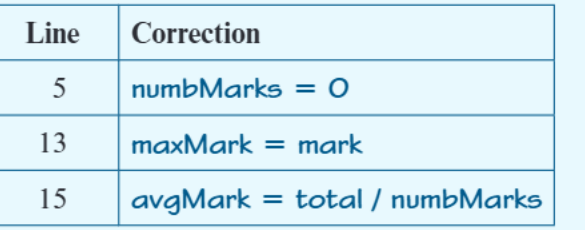
Here are the corrections needed:
Line 5: numbMarks = 0
- The variable counting marks should start at 0, not 1
Line 13: maxMark = mark
- When finding the maximum, we need to store the actual mark value, not compare it
Line 15: avgMark = total / numbMarks
- To calculate an average, we divide the total by the number of marks
These corrections show common logic error patterns: incorrect initialisation, wrong variable assignment, and incorrect formula implementation.
Debugging strategies
Note
For syntax errors:
- Read error messages carefully - they tell you exactly what's wrong
- Check spelling and punctuation around the highlighted line
- Make sure you're following the language rules correctly
Note
For runtime errors:
- Look at the error message to understand what operation failed
- Check if you're trying to access data that might not exist
- Add validation to check inputs before using them
Important
For logic errors:
- Test your programme with simple, known inputs
- Use print statements to see what values your variables contain
- Work through your code line by line with pen and paper
- Compare your results with hand-calculated answers
Summary
Key Points to Remember:
- Syntax errors are the easiest to find because the computer points them out immediately
- Runtime errors only appear when your programme is running and usually cause crashes
- Logic errors are the hardest to detect because your programme runs but gives wrong results
- Always test your programmes thoroughly with different inputs to catch logic errors
- Understanding error messages is a crucial programming skill that gets easier with practice