Linear search (Edexcel GCSE Computer Science): Revision Notes
📚Revision Notes
Linear search
What is linear search?
Linear search is one of the most basic searching algorithms you'll learn in computer science. Think of it like looking through a list of names one by one until you find the person you're looking for - that's exactly how linear search works!
A linear search is a sequential algorithm, which means it checks items in order from the beginning of a list. The algorithm starts at the first item and moves through each item one by one until it either finds what it's looking for or reaches the end of the list.
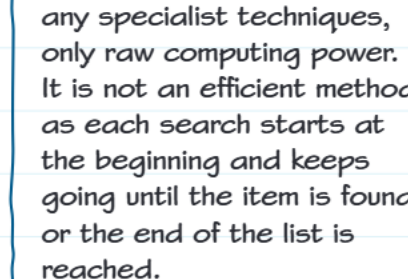
Linear search is also known as a brute force algorithm. This means it doesn't use any clever tricks or shortcuts - it just relies on raw computing power to check every single item if necessary. While this makes it simple to understand and implement, it's not the most efficient method for searching large amounts of data.
Note
Think of this like searching through a physical phone book page by page when you don't know the alphabetical order - you'd have to check each entry until you find what you're looking for!
How linear search works
The linear search process follows a straightforward pattern that makes it easy to understand and implement. Let's break down the process step by step:
- Start at the beginning - The algorithm begins at the first item in the list (index 0)
- Compare - Check if the current item matches what you're searching for
- Found it? - If yes, stop and report success
- Not found? - If no, move to the next item
- Repeat - Continue steps 2-4 until you find the item or reach the end
Note
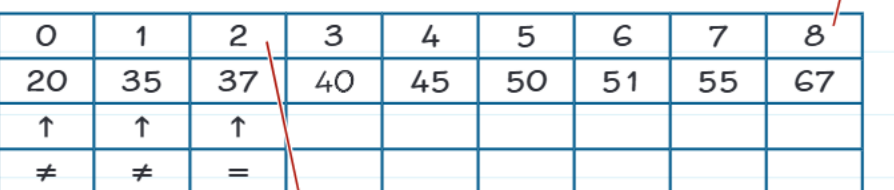
In this example, we're searching for the number 37 in a list. The search starts at index 0 (value 20), then checks index 1 (value 35), and finally finds 37 at index 2. The arrows show how we compare each value, using ≠ for "not equal" until we reach the = for "equal" when we find our target.
Programme code implementation
Here's how linear search looks in actual code:

Understanding the implementation requires examining each component of the algorithm. Let's break down the key parts of this code:
names = ["Francis", "Helen", "Anish", "Mary"]
target = "Anish"
found = False
index = 0
length = len(names)
while (not found) and (index < length):
    if (target == names[index]):
        found = True
    index = index + 1
Note
Key components:
- found: A Boolean flag that starts as False and becomes True when we find our target
- index: Keeps track of our current position in the list
- while loop condition: Continues searching while we haven't found the item AND we haven't reached the end
- Comparison: Checks if the current item matches our target
- Index increment: Moves to the next position after each check
Step-by-step algorithm
The formal algorithm for linear search provides a systematic approach that can be applied to any programming language. Here's the complete process:
Example
Formal Linear Search Algorithm:
- Check list length - If the list is empty (length is zero), stop searching
- Start position - Begin at the first item in the list
- Compare items - Compare the current list item with what you're searching for
- Match found - If they're the same, stop the search (success!)
- No match - If they're different, move to the next item
- Repeat - Keep going through steps 3-5 until you reach the end of the list
Important
Important exam tip: When describing linear search in an exam, remember to mention that it checks items sequentially from the beginning and that it's a brute force method.
When does the search stop?
Understanding when a linear search terminates is crucial for implementing it correctly. A linear search will complete (stop looping) under two specific conditions:
Important
Search Termination Conditions:
- Item found - The target item is discovered in the list
- End reached - The search has checked every item without finding the target
These conditions prevent the search from running forever and ensure it always gives a definite result.
Real-world example
Example
Real-World Analogy:
Imagine you're looking for your friend's phone number in an old phone book that isn't organised alphabetically. You'd have to start from the first entry and check each name until you found your friend or reached the end - that's linear search in action!
Advantages and disadvantages
Linear search has both strengths and weaknesses that make it suitable for certain situations but not others.
Advantages:
- Simple to understand and implement
- Works on any type of list (sorted or unsorted)
- Guaranteed to find the item if it exists
Disadvantages:
- Can be very slow for large lists
- Always starts from the beginning
- Uses a lot of computing resources for big searches
Summary
Key Points to Remember:
- Linear search checks items one by one in order from the beginning of a list
- It's a brute force algorithm that relies on raw computing power rather than clever techniques
- The search stops when either the item is found or the end of the list is reached
- It uses a Boolean flag to track whether the target has been found
- While simple to implement, it's not efficient for searching large amounts of data