Logical operators (Edexcel GCSE Computer Science): Revision Notes
📚Revision Notes
Logical operators
What are logical operators?
Logical operators are fundamental building blocks used in computer systems to make decisions based on different conditions. Think of them like switches that can be either ON (true/1) or OFF (false/0). Every computer-aided device uses these operators to process information and make logical decisions.
These operators work with Boolean values, which are simply true or false statements represented as 1s and 0s. You'll represent logic using statements and truth tables that show every possible combination of inputs and their results.
Note
Boolean logic forms the foundation of all digital systems. Understanding these basic operators is essential because they're combined in countless ways to create the complex decision-making processes in modern computers, from simple calculators to artificial intelligence systems.
The AND operator
The AND operator is like a strict gatekeeper - it only lets things through when all conditions are met. In technical terms, a logical expression using AND evaluates to true only when both inputs are true.
For the expression , here's how it works:
- If A is false OR B is false (or both are false), then P is false
- Only when A is true AND B is true does P become true
Example
Real-World Example: Safe Security System
Think of it like needing both a key AND the correct password to open a safe:
- Key present: True, Password correct: False → Safe remains locked (False)
- Key present: False, Password correct: True → Safe remains locked (False)
- Key present: True, Password correct: True → Safe opens (True)
You need both conditions to be true for the system to work.
The OR operator
The OR operator is much more flexible - it's like saying "this OR that will work". A logical expression using OR evaluates to true when at least one of the inputs is true.
For the expression :
- If A is true, P is true (even if B is false)
- If B is true, P is true (even if A is false)
- If both A and B are true, P is still true
- Only when both A and B are false does P become false
Example
Real-World Example: Light Switch System
Think of it like having multiple ways to turn on a light - either switch will work:
- Switch A: On, Switch B: Off → Light turns on (True)
- Switch A: Off, Switch B: On → Light turns on (True)
- Switch A: On, Switch B: On → Light turns on (True)
- Switch A: Off, Switch B: Off → Light stays off (False)
Any single true input is enough to make the output true.
The NOT operator
The NOT operator is the simplest one - it just flips the input around. A logical expression using NOT inverts whatever input it receives.
For the expression :
- If A is true (1), then P becomes false (0)
- If A is false (0), then P becomes true (1)
It's like an "opposite day" operator - whatever goes in comes out as the opposite.
Note
The NOT operator is also called an "inverter" in digital circuits. It's the only logical operator that works with just one input, making it unique among the basic operators.
Understanding truth tables
Truth tables are systematic ways of showing all possible combinations of inputs and their resulting outputs. They help you visualise exactly how logical operators work in every situation.
Important
Truth tables are essential tools for understanding and verifying logical operations. They show every possible scenario - this completeness makes them invaluable for designing and testing logical systems. Always work through truth tables methodically, checking each row carefully.

This shows a basic truth table structure with inputs A and B, and output P. Each row represents a different combination of input values.
Combining operators in real systems
Real computer systems often combine multiple operators to create more complex logic. Understanding how operators work together is crucial for designing effective systems.
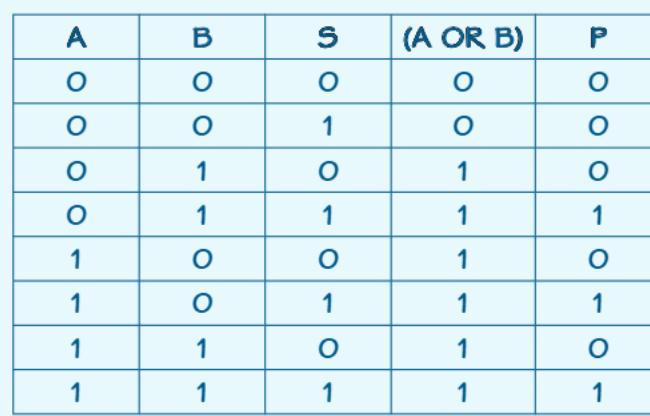
This truth table demonstrates a more complex system where we first calculate , then combine that result with input S using an AND operation. This creates the final output .
Important
Order of Operations Matters
When combining logical operators, always work through brackets first, just like in mathematics. The expression means:
- First calculate:
- Then combine that result with:
Getting the order wrong will give you completely different results!
Worked example: Fire alarm system
Example
Worked Example: Fire Alarm Logic System
Scenario: A fire alarm has a master switch (S) and two sensors (A and B). The alarm sounds if any sensor is activated, but only when the master switch is on.
Step 1: Identify the logic requirements
- Any sensor activation should trigger the alarm:
- But only when the master switch is on:
Step 2: Write the logic statement
Step 3: Understand what this means
- First, check if sensor A OR sensor B is activated
- Then, AND that result with the master switch S
- The alarm (P) only sounds when sensors detect something AND the master switch is on
Step 4: Test with scenarios
- Sensor A triggers, master switch OFF: → No alarm
- Sensor A triggers, master switch ON: → Alarm sounds
Note
Exam Tip: When solving these problems, work through the logic step by step. Calculate any brackets first (like ), then apply the remaining operations. This systematic approach prevents errors and helps you explain your reasoning clearly.
Common exam questions and tips
When preparing for exams on logical operators, you'll encounter several common question types that test your understanding in different ways.
Truth table construction: You'll often be asked to complete truth tables. Remember to:
- List all possible input combinations systematically (usually in binary counting order: 00, 01, 10, 11)
- Work through each row step by step
- Double-check your logic for each operator
- Show your working - marks are often awarded for method as well as final answers
Real-world applications: Practice translating everyday scenarios into logical statements. Common examples include:
- Security systems (multiple sensors AND master control)
- Safety warnings (various conditions OR emergency override)
- Access control (correct password AND valid user)
Important
Key Notation Variations
Remember that you might see different representations in exams:
- 1 and 0 (most common in computing)
- TRUE and FALSE (common in logic problems)
- T and F (shortened form)
All represent the same concepts - practice working with all notation styles so you're prepared for any exam format.
Summary
Key Points to Remember:
- AND operator: Only true when ALL inputs are true - think "strict gatekeeper"
- OR operator: True when AT LEAST ONE input is true - think "flexible options"
- NOT operator: Simply flips the input - true becomes false, false becomes true
- Truth tables: Show every possible combination of inputs and outputs systematically
- Real systems: Often combine multiple operators to create complex decision-making logic
- Exam success: Always work through brackets first and show your step-by-step reasoning