Records (Edexcel GCSE Computer Science): Revision Notes
📚Revision Notes
Records
What are records?
Records are data structures that group together related pieces of information. Think of a record like a digital filing card that can store different types of data about one thing. Each piece of information stored in a record can be a different data type - for example, numbers, text, or decimal values.
The individual pieces of information within a record are called fields. Each field has a specific purpose and can hold a different type of data.
Note
Records are fundamental building blocks in programming and database design. They allow you to organise related information in a logical, structured way that mirrors how we think about real-world objects and their properties.
Creating a single record
When you create a record, you're essentially making a container that holds multiple related pieces of information. Let's look at a practical example:

Example
Student Record Example:
In this student record, we have three fields with different data types:
- Student number (integer data type): 3428
- Last name (string data type): "Jones"
- Dining card balance (real/decimal data type): 12.56
This demonstrates how a single record can store multiple types of information about one entity.
Accessing data in records
To get specific information from a record, we use indexing. This means we can point to exactly which field we want by using its position number (starting from 0).
In the example above, if we want to access the dining card balance (which is in position 2), we would write: student[2], which would give us the value 12.56.
Important
Key Concept: A single record is considered to have one dimension - it's like a single row of data. You only need one index number to access any field within the record.
Arrays of records
While a single record is useful, the real power comes when you create collections of multiple records. This is called an array of records or a nested structure.
When you have multiple records stored together, you need two-dimensional indexing to access the data. This means you need:
- The first index to choose which record you want
- The second index to choose which field within that record
Example
Two-Dimensional Indexing:
If you have a collection called school with three student records:
school[1]would access the entire second recordschool[2][1]would access the second field of the third record
Remember: the first number selects the record, the second number selects the field within that record.
Important
Key Concept: A collection of records has two dimensions - think of it like a grid where you need both row and column coordinates to find specific data.
Tables and records
Records are often displayed as tables, which makes them much easier to understand and work with. In a table format:
- Each row represents one complete record
- Each column represents one field across all records
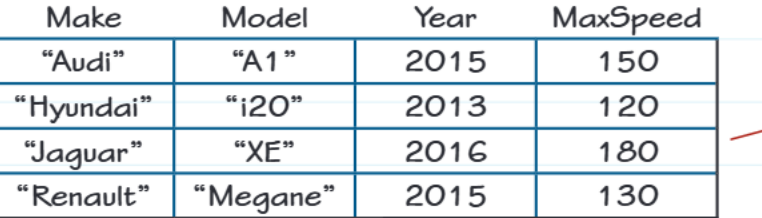
Looking at this car records table:
- Each row contains all the information about one car (one record)
- Each column shows the same type of information for all cars (one field)
- The column headers (Make, Model, Year, MaxSpeed) help identify what each field represents
Important
Important Note: When you see column names in a table, remember these are just labels to help you understand the data - they don't actually exist in the computer's memory as part of the data structure.
Real-world applications
Records are everywhere in computing! Here are some common examples where records store related information:
- Student databases: storing names, ID numbers, grades, and contact information
- Online shopping: product descriptions, prices, stock levels, and codes
- Banking systems: account numbers, balances, transaction histories
- Medical records: patient details, symptoms, treatments, and dates
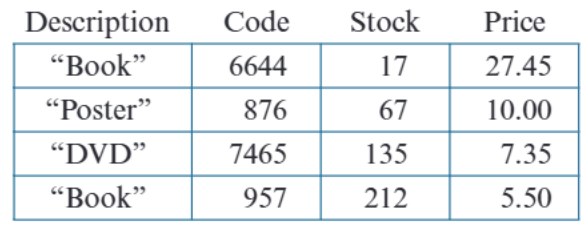
Note
This inventory table shows how records might be used in a shop's stock system, with each item having multiple fields of information. Notice how each row (record) contains all the related information about one product, while each column (field) shows the same type of data across all products.
Exam tips
Summary
Key Points for Exams:
When drawing data structures:
- For single records: draw a simple rectangle and label it as one record
- For collections: remember to show the two-dimensional nature
- Always label fields clearly
- Don't include column headers when drawing the actual data structure
For accessing data:
- Single record: use one index number
record[position] - Collection of records: use two index numbers
collection[record][field] - Remember that indexing usually starts from 0, not 1
Remember!
Summary
Essential Concepts to Remember:
- Records group related data - like a digital filing card with multiple pieces of information
- Fields are the individual data items within a record, and each can be a different data type
- Single records have one dimension - you only need one index to access fields
- Collections of records have two dimensions - you need two indices to access specific data
- Tables are visual representations of record collections, with rows as records and columns as fields
- Indexing starts from 0 - the first item is at position [0], not [1]