Designing, Creating & Refining Algorithms (OCR GCSE Computer Science): Revision Notes
📚Revision Notes
Algorithms
Designing, Creating, and Refining Algorithms
When working with algorithms in Computer Science, it's important to understand how to break down problems into small, manageable steps. Algorithms describe a sequence of steps to solve a problem and can be represented using pseudocode (written code-like steps), flowcharts (visual diagrams), or actual programming languages.
Identifying Inputs, Processes, and Outputs
- Inputs: These are the data items provided to the programme (e.g., user inputs like a name or a number).
- Processes: The operations or calculations that the programme performs on the inputs (e.g., adding two numbers, sorting a list).
- Outputs: The final result produced after processing (e.g., printing the sum of two numbers, showing a message).
Algorithm Structures
Sequence
- A sequence means following instructions in the exact order they appear.
- For example, when you follow a recipe, you add ingredients one after the other. Similarly, in programming, the computer follows each instruction in order.
Example in Pseudocode (Adding Two Numbers)
num1 = 5
num2 = 10
sum = num1 + num2
output(sum)
- Input the first number
- Input the second number
- Add the two numbers
- Output the result
In this example, the programme will take two numbers (
num1andnum2), add them together, and then display the result.
Selection
- Selection refers to the decision-making part of an algorithm, where the programme chooses a path based on a condition.
- A real-world example is deciding what to wear based on the weather. If it's raining, wear a raincoat. Otherwise, wear regular clothes.
Example of Selection Using IF-ELSE
if the score >= 50 then
   output("You passed!")
else
   output("You failed!")
endif
- Check if the score is 50 or more
- If true, print "You passed"
- If false, print "You failed" In this example, if the student scores 50 or above, the programme will output "You passed!" Otherwise, it will output "You failed!"
Iteration
- Iteration is when the same instructions are repeated multiple times (loops). This is useful when you need to perform the same task over and over again, like counting or going through items in a list.
- For example, when counting from 1 to 10, you repeat the action of adding 1 until you reach 10.
Example of a FOR Loop (Counting)
for i = 1 to 10:
   output(i)
- Start at 1, repeat until i reaches 10
- Output the current value of i
In this example, the loop will print the numbers from 1 to 10, repeating theoutput(i)step for each value of i.
Creating Algorithms Using Flowcharts
A flowchart is a diagram that shows the steps in a process. Each step is represented by a shape, and arrows show the flow of the process.
Common Flowchart Signals
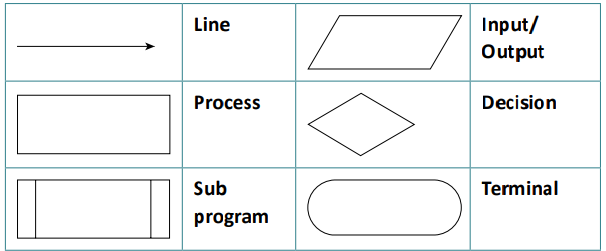
- Line: Shows the flow of steps from one action to the next.
- Input/Output: Represents an action where data is entered or output (e.g., asking for user input or displaying a result).
- Process: Represents an action or calculation performed by the programme (e.g., adding two numbers).
- Decision: A point where the programme must make a choice based on a condition (e.g., an IF statement).
- Sub Programme: Refers to a separate process or function that is called by the main programme.
- Terminal: Represents the start or end of the flowchart.
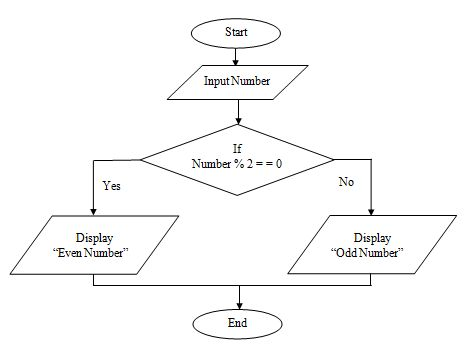
Example of a Flowchart
A simple flowchart for deciding if a number is even or odd might look like this:
Trace Tables
A trace table is a technique that follows an algorithm step-by-step to check its behaviour or find errors. You write down the variables in each step to see how they change.
Example Trace Table for a Sum Algorithm
Let's track how a sum is calculated for the pseudocode:
sum = 0
for i = 1 to 5:
   sum = sum + i
Explanation: The loop repeats for values of i from 1 to 5
| Iteration | i | sum (after calculation) |
|---|---|---|
| 1 | 1 | 1 |
| 2 | 2 | 3 |
| 3 | 3 | 6 |
| 4 | 4 | 10 |
| 5 | 5 | 15 |
In this table:
- Iteration tracks how many times the loop runs.
iis the current number in the loop.sumshows the running total after each step.
Common Errors in Algorithms
Syntax Errors
These occur when the code breaks the rules of the programming language, such as a missing parenthesis or spelling mistake in a command.
- Example:
print("Hello World)is missing a closing quote.
Logic Errors
These happen when the code runs, but it doesn't produce the expected result because the algorithm is incorrect.
- Example: A programme meant to check if a student passed might incorrectly mark a score of 50 as a fail if the condition is
if score > 50instead ofif score >= 50.
Runtime Errors
These errors occur while the programme is running, like trying to divide a number by zero.
- Example:
total = 100 / 0will crash the programme because division by zero isn't allowed.
Key Concepts
Nesting
Nesting means putting one structure inside another. For example, you can place an if statement inside a loop.
Example
Loop through numbers and check if they are even or odd.
for i = 1 to 5:
   if i % 2 == 0 then
      output(i + " is even")
   else
      output(i + " is odd")
   endif
Here, the if statement (which checks for even or odd numbers) is nested inside the loop that counts from 1 to 5.
Casting
Casting means converting one data type into another. For example, converting a string (text) into an integer (whole number) so you can perform maths on it.
Example
In this example, the user inputs their age as a string. We cast it to an integer so that we can add 5 to it. Finally, we cast it back to a string to display the result.
age = input("Enter your age: ")
age = int(age)
output("In 5 years, you will be " + str(age + 5))
- Input is always a string
- Convert the string to an integer
- Perform maths, then convert back to string to output
Example Algorithms in Pseudocode
Input and Output
name = input("Enter your name: ")
output("Your name is " + name)
Here, the user is asked for their name, and the programme outputs it using a message.
Iteration with While Loop
count = 0
while count < 5:
   output(count)
   count = count + 1
This loop will print numbers from 0 to 4. The condition count < 5 means the loop continues until the count reaches 5.
Selection with IF-ELSE
if age >= 18 then
   output("You are an adult")
else
   output("You are a minor")
endif
This example uses selection to check whether a person is an adult or minor based on their age.
Note
Key Points to Remember
- Algorithms use sequence, selection, and iteration to solve problems step by step.
- Pseudocode and flowcharts help plan and visualise algorithms before writing actual code.
- Trace tables are useful for tracking variable changes and identifying errors in your algorithm.
- Nesting allows placing loops and conditional statements inside one another for more complex logic.
- Common errors include syntax (code rules), logic (wrong output), and runtime errors (like dividing by zero).