Python Programming : Intermediate (Leaving Cert Computer Science): Revision Notes
📚Revision Notes
Python Programming : Intermediate
Strings
We will begin by revisiting strings and examining them more closely.
A string is an object, it has methods that can be invoked and fields we can access.
Note
Object-orientated programming (methods, fields, objects) are outside the scope of the Leaving Certificate syllabus. The key thing to know is that a method is a function that we can access from an object and a field is a value we can access from an object.
Assuming str is our string, common string methods include :
- str.lower() : Converts all characters in the string to lowercase.
- str.upper() : Converts all characters in the string to uppercase.
- str.capitalise() : Capitalises the first character of the string
- str.title() : Capitalises the first character of each word in the string
Note
We invoke methods by typing . on our after the object.
sentence = "this is my string"
print(sentence.upper()) # THIS IS MY STRING
print(sentence.title()) # This Is My String
- str.strip() : Removes leading and trailing whitespace.
- str.lstrip() : Removes leading whitespace.
- str.rstrip() : Removes trailing whitespace.
sentence = "    this is my string    "
print(sentence.strip())  #  "this is my string"
print(sentence.title())  #  "this is my string    "
Strings are indexed, meaning each character has a position (index) starting from 0. You can access individual characters or slices of a string using square brackets [] .
Consider the string "Hello John", the index of each character is as follows :
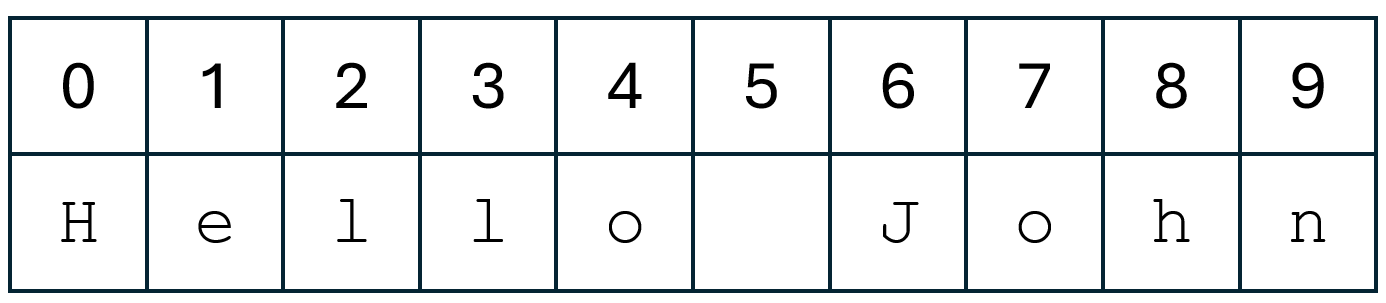
greeting = "Hello John"

first_letter = greeting[0] # "H"
sixth_letter = greeting[5] # " " (whitespace character)
last_letter = greeting[len(greeting) - 1] # "n"
Indexing also allows us to slice strings, which let's us take substrings.
- [start : end] slices a string from the start index up until but not including the end index.
- [start : ] slices a string from the start index up until the end of the string.
- [ : end] slices a string from the start of the string up until but not including the end index of the string.
greeting = "Hello John"

first_word = greeting[0 : 5]  # "Hello"
substring = greeting[2 : 7]   # "llo J"
second_word = greeting[6 : ] # "John"
- str.find(sub) : Returns the lowest index in the string where substring sub is found, or 1 if not found.
- str.rfind(sub) : Returns the highest index in the string where substring sub is found, or 1 if not found.
- str.replace(old, new): Returns a new string where all occurrences of substring old are replaced by new.
text = "Hello, World!"

print(text.find('World'))      # 7
print(text.rfind('o'))         # 8
print(text.replace('World', 'Python'))  # 'Hello, Python!'
- str.startswith(prefix) : Returns True if the string starts with the specified prefix.
- str.endswith(suffix) : Returns True if the string ends with the specified suffix.
- str.isalpha() : Returns True if all characters in the string are alphabetic.
- str.isdigit() : Returns True if all characters in the string are digits.
- str.isalnum() : Returns True if all characters in the string are alphanumeric.
text = "Python3"
print(text.startswith('Py'))   # True
print(text.endswith('3'))      # True
print(text.isalpha())          # False
print(text.isdigit())          # False
print(text.isalnum())          # True
Escape Characters
Escape characters are used to include special characters in a string. They are prefixed with a backslash - [].
- \n : Newline
- \t : Tab
- \ : Backslash
- ' : Single quote
- " : Double quote
print("Hello\nWorld")     # Newline
print("Hello\tWorld")     # Tab
print("Backslash: \\")    # Backslash
print("Single quote: \'") # Single quote
print("Double quote: \"") # Double quote
Boolean Expressions
Boolean expressions in Python are expressions that evaluate to either True or False.
- and : Returns True if both operands are true
- or : Returns True if at least one operand is true
- not : Returns True if the operand is false
x = True
y = False

print(x and y)  # False
print(x or y)   # True
print(not x)    # False
print(not y)    # True
Conditionals
Conditionals allow you to execute different code blocks based on certain conditions. In Python, conditional statements are used to make decisions in the code by evaluating Boolean expressions.
The if statement is used to test a condition. If the condition evaluates to True, the code block under the if statement is executed. If the condition is False, the code block is skipped.
age = 18

if age >= 18:
    print("You are an adult.")
Note
If we change age to 10 for example, the print statement will not execute.
Note
Note that the print statement is indented. The compiler uses indentation to see if code belongs to a certain block. In this case, the print statement belongs to the if branch. Most editors automatically indent the code once you type :. Otherwise you can indent by pressing the tab button.
The else statement follows an if statement and is executed if the if condition is False. It provides an alternative set of instructions when the if condition is not met.
age = 16

if age >= 18:
    print("You are an adult.")
else:
    print("You are a minor.")
The elif (short for "else if") statement allows you to check multiple conditions.
It must follow an if statement or another elif statement. When an elif condition is True, its associated code block is executed, and the remaining elif and else blocks are skipped.
age = 20

if age < 13:
    print("You are a child.")
elif age < 18:
    print("You are a teenager.")
else:
    print("You are an adult.")
Lists
Lists are one of the most versatile and commonly used data structures in Python. They are used to store multiple items in a single variable.
Lists are mutable, meaning their elements can be changed after the list has been created.
Lists are defined by enclosing items in square brackets ([]), separated by commas.
numbers = [1, 2, 3, 4, 5]
fruits = ["apple", "banana", "cherry"]
mixed_list = [1, "apple", 3.14, True]
Like strings, lists are also indexed.
fruits = ["apple", "banana", "cherry"]

print(fruits[0])  # apple
print(fruits[1])  # banana
print(fruits[2])  # cherry
You can access a range of elements in a list using slicing. The syntax is list[start : end : step].
numbers = [0, 1, 2, 3, 4, 5, 6, 7, 8, 9]

print(numbers[2:5])   # Output: [2, 3, 4]
print(numbers[:4])    # Output: [0, 1, 2, 3]
print(numbers[5:])    # Output: [5, 6, 7, 8, 9]
print(numbers[::2])   # Output: [0, 2, 4, 6, 8]
print(numbers[::-1])  # Output: [9, 8, 7, 6, 5, 4, 3, 2, 1, 0]
Lists are also objects, and support their own methods.
- append() : Adds an element to the end of the list.
- insert() : Inserts an element at a specified position.
- extend() : Adds all elements of a list to the end of the current list
fruits = ["apple", "banana", "cherry"]
fruits.append("orange")
print(fruits)  # ['apple', 'banana', 'cherry', 'orange']

fruits.insert(1, "blueberry")
print(fruits)  # ['apple', 'blueberry', 'banana', 'cherry', 'orange']

more_fruits = ["mango", "pineapple"]
fruits.extend(more_fruits)
print(fruits)  # ['apple', 'blueberry', 'banana', 'cherry', 'orange', 'mango', 'pineapple']
- remove() : Removes the first occurrence of a specified value.
- pop() : Removes and returns the element at a specified position. If no index is specified, pop() removes and returns the last item.
- clear() : Removes all elements from the list.
fruits = ["apple", "banana", "cherry", "banana"]
fruits.remove("banana")
print(fruits)  # ['apple', 'cherry', 'banana']

fruits.pop(1)
print(fruits)  # ['apple', 'banana']

fruits.pop()
print(fruits)  # ['apple']

fruits.clear()
print(fruits)  # []
Iteration
Iteration is a fundamental concept in programming that refers to the process of repeatedly executing a block of code. In Python, we perform iteration using loops.
The two primary types of looping are while loops and for loops.
A while loop repeatedly executes a block of code as long as a given condition is True.
count = 0
while count < 5:
    print(count)
    count = count + 1

"""
0
1
2
3
4
"""
Note
Code Analysis
- The variable count is initialised to 0.
- The while loop checks the condition count < 5 before each iteration. If the condition is True, the loop's body will execute. If the condition is False, the loop will terminate.
- count is 0, which is less than 5, so the condition count < 5 is True.
- The current value of count (0) is printed.
- The value of count is incremented by 1 using the statement count = count + 1. Now, count is 1
- count is 1, which is less than 5, so the condition count < 5 is True. The same process repeats as in step 2.
- The loop will repeat until the condition evaluates to False.
The count = count + 1 portion of the code is a crucial component of the loop. This is called incrementation.
If we didn't increment, count will never get changed, and the loop will go on forever. This is a problem which may cause the programme to crash.
Incrementation is so widely used that Python supports shorthand notations for different types of variables reassignments.
count = 0

count += 1  # equivalent to a = a + 1
count -= 2  # equivalent to a = a - 2
count *= 2  # equivalent to a = a * 2
count /= 2  # equivalent to a = a / 2
By declaring a counter before entering a loop, we can iterate over lists and string.
Here is an example that replaces all negative integers in a list to 0.
index = 0
list = [2, 4, 5, -1, -3, 5, 1, 0, -4]

while (index < len(list)) :
    if list[index] < 0 :
        list[index] = 0
    index += 1

print(list)  # [2, 4, 5, 0, 0, 5, 1, 0, 0]
Here is an example that counts the number of vowels in a string.
index = 0
counter = 0
vowels = ['a', 'i', 'e', 'o', 'u']
sentence = "here is my string"

while (index < len(sentence)) :
    if sentence[index] in vowels :
        counter += 1
    index += 1

print(counter) # 4
Note
Note the in keyword. This has many interpretations depending on the context. For this code snippet, the condition checks if the current character in iteration is in the list vowels.
A for loop in Python is used to iterate over anything that is iterable which is any object that can be looped over such as lists or strings.
The general syntax of a for loop in Python is :
for variable in sequence :
	# do something
fruits = ["apple", "banana", "cherry", "banana"]

for fruit in fruits:
	print(fruit)
Note
Note how easier it is to iterate over as sequence using a for loop that a while loop.
The range function generates a sequence of numbers. It is useful for iterating a specific number of times.
# Iterating from 0 to 4
for i in range(5):
    print(i)

# Iterating from 1 to 5
for i in range(1, 6):
    print(i)

# Iterating with a step
for i in range(0, 10, 2):
    print(i)
Note
Note that providing a third parameter to the range function specifies the step of the sequence. The default step is 1.