Basic Software Concepts (Grade 10 NSC Matric Computer Application Technology): Revision Notes
📚Revision Notes
Basic Software Concepts
Introduction to software
Software is a collection of instructions that tells a computer exactly what to do and how to do it. Think of software as the brain of your computer - without it, your computer would just be an expensive paperweight!
All software can be divided into two main categories that work together to make your computer functional and useful:
Note
Understanding the two main categories of software is fundamental to computer literacy. These categories work together but serve completely different purposes in your computing experience.
- Application software - These are the programmes you use directly to complete specific tasks, such as playing games, writing documents, browsing the internet, or creating presentations
- System software - This includes the operating system and other programmes that work behind the scenes to control and manage how your computer operates
Understanding these two categories is essential because they serve completely different purposes, yet both are crucial for your computer to work properly.
Application software
Application software is the type of software that you interact with most often. It's designed to help you accomplish specific tasks and goals. Whether you're writing an essay for school, chatting with friends online, watching videos, or shopping for the latest gaming console, there's likely an application designed to help you do exactly what you need.
Modern application software has evolved significantly over the years. In the past, most programmes were designed to work only with specific operating systems - for example, some software worked only with Windows, while other programmes only functioned on iOS or Unix systems. However, recent developments have changed this landscape dramatically. Many applications now run through web browsers, making them accessible across different platforms and devices.
Types of application software
There are many different categories of application software, each designed for specific purposes. Here are the most common types you'll encounter:
| Application Software | Examples |
|---|---|
| Office suites | Microsoft Office, Libre Office, Google G-Suite |
| Internet browser | Chrome, Firefox, Internet Explorer, Edge |
| Movie player | VLC, Windows Media Player |
| Presentations | PowerPoint |
| Word processor | Microsoft Word |
| Portable Document Format (PDF) | Adobe Acrobat Reader, Foxit Reader |
| Operating system | Microsoft Windows, Linux, Android, iOS |
| Antivirus | Norton, AVG, McAfee, Symantec, Windows Defender |
| Spreadsheets | Microsoft Excel |
| Accounting | Pastel, QuickBooks |
| Gaming | Minesweeper, Solitaire, Counter Strike |
| Designing and graphics | Adobe Photoshop, AutoCAD |
Windows accessories
Microsoft Windows includes several built-in programmes called accessories. These are additional tools that aren't absolutely necessary for your computer to function, but they provide useful extra functionality. You can access these programmes through the Start menu by searching for their names.
Important
Accessory Definition: Any device or programme that is not necessarily required, but can be added to perform additional functions. Windows accessories are pre-installed programmes that extend your computer's capabilities beyond basic operations.
Common Windows accessories include the Calculator, Paint, and the Snipping Tool. Let's explore these three essential accessories:
Windows calculator
The Windows Calculator is a versatile tool that can perform various mathematical operations. Here's how to access and use it:
Example
Using Windows Calculator:
Step 1: Click the Start button
Step 2: Type "calc" in the search box\
Step 3: Click "Calculator" from the search results
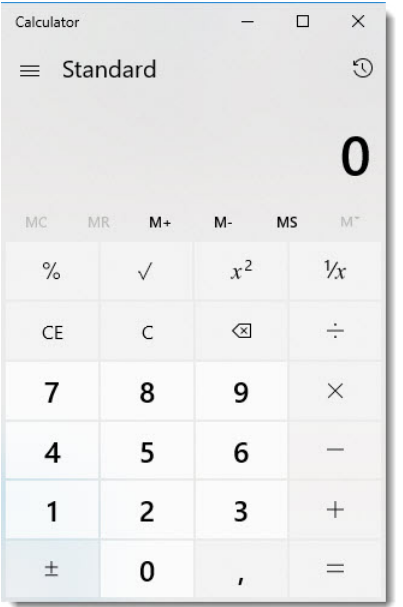
Once opened, you can perform calculations in several ways:
- Use your keyboard to type numbers and operations
- Click the calculator buttons with your mouse
- Press Enter to get your answer
The calculator offers different modes beyond the standard view, including scientific and programming modes for more advanced calculations.
Snipping tool
The Snipping Tool is an incredibly useful programme for capturing screenshots of your computer screen. You can save these images, attach them to emails, or paste them into other applications like Microsoft Word or Paint.
To access the Snipping Tool:
- Click the Start menu
- Type "snip" in the search
- Click "Snipping Tool" from the results
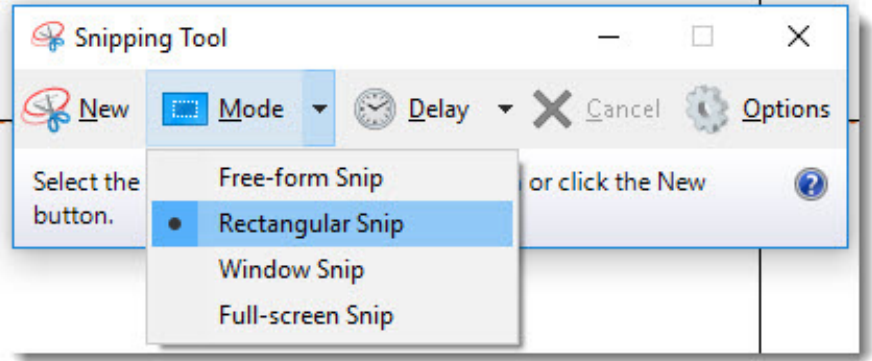
The Snipping Tool offers four different capture modes:
- Free-form snip: Draw any shape around the area you want to capture
- Rectangular snip: Select a rectangular area
- Window snip: Capture an entire window
- Full-screen snip: Capture the entire screen
After capturing your snip, you can save it by going to File > Save As and giving it a filename.
Paint
Microsoft Paint is a graphics programme that provides virtual pens and brushes for creating artwork or editing images. It's perfect for simple drawing tasks or basic image editing.
To open Paint:
- Click the Start button
- Type "paint" in the search
- Click "Paint" from the search results
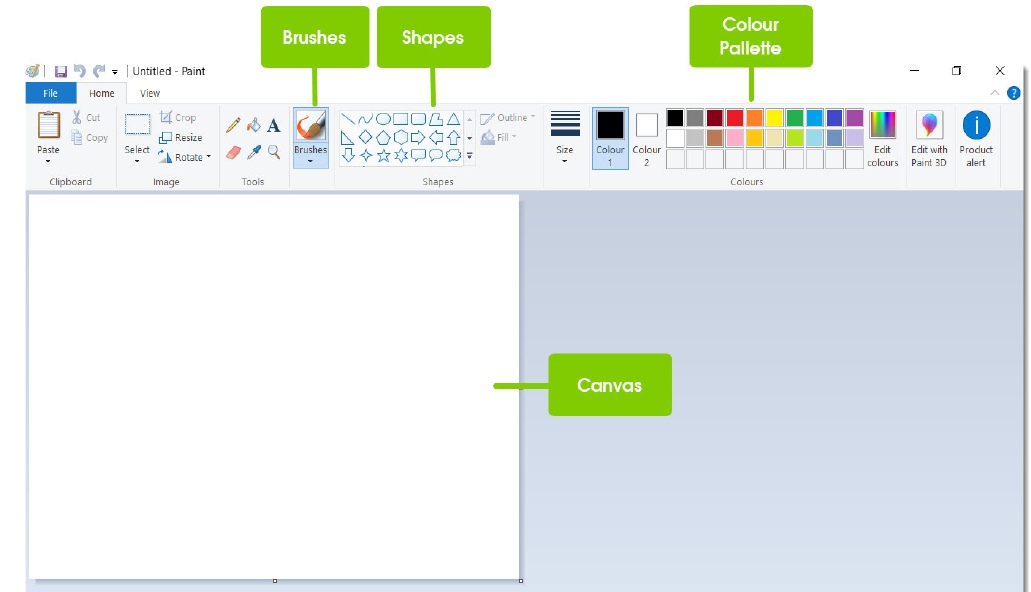
Paint's interface includes several key areas:
- Brushes: Different drawing tools for various line styles and effects
- Shapes: Pre-made geometric shapes you can add to your canvas
- Colour Palette: A wide selection of colours for your artwork
- Canvas: The white workspace where you create your art
You can create original artwork by clicking and dragging with the mouse, or by using the various brushes and tools available.
System software
System software is the behind-the-scenes technology that manages your computer's operations. Like a traffic officer at a busy intersection, system software manages the flow of data and information throughout your computer system.
System software performs several critical functions:
- Translating instructions from application software into a language that the computer hardware can understand
- Sending these instructions to the correct hardware components
- Receiving information from hardware devices (like when you press a key on your keyboard) and passing it to the appropriate software
- Enabling different applications to communicate with each other
- Ensuring all hardware and software components are functioning properly
Important
The operating system is the most crucial type of system software because it manages all other programmes running on your computer. Without an operating system, your computer cannot function at all.
Types of system software
System software can be categorised into four main types:
| System Software | Examples |
|---|---|
| Operating systems | Microsoft Windows, Linux, Android, iOS |
| Device drivers | Drivers for the mouse, keyboard, sound card, display card, network card, printer, etc. |
| Firmware | Firmware is the operational software embedded within a flash drive, ROM, or EPROM memory chip for the operating system to identify it |
| Utilities: This kind of software is designed to maintain the computer | Antivirus and security software, Disc partition services, Disc defragmentation, File compression, Data back-up for security reasons, Hardware diagnostic services, Data recovery, Firewall, Screensaver |
Operating systems manage all the basic operations of your computer and provide the platform for other software to run.
Device drivers are specialised programmes that allow your operating system to communicate with specific hardware components like your mouse, keyboard, or printer.
Firmware is software that's permanently stored in your computer's memory chips. It provides the basic instructions your computer needs when it first starts up.
Utilities are maintenance programmes designed to keep your computer running smoothly. These include antivirus software to protect against malware, disc cleanup tools to free up storage space, and backup programmes to protect your important files.
Summary
Key Points to Remember:
- Software is divided into two main categories: application software (programmes you use directly) and system software (programmes that manage your computer)
- Application software helps you complete specific tasks like writing documents, browsing the internet, or playing games
- Windows accessories like Calculator, Paint, and Snipping Tool are useful built-in programmes that provide additional functionality
- System software works behind the scenes to manage your computer's hardware and enable different programmes to work together
- The operating system is the most important type of system software as it controls all other programmes on your computer