Processing Devices (Grade 10 NSC Matric Computer Application Technology): Revision Notes
📚Revision Notes
Processing Devices
Introduction
When your computer receives information from input devices like your mouse or keyboard, this raw data needs to be transformed before it can be sent to output devices such as your printer or monitor. Processing devices are the components responsible for converting this data into useful, meaningful information that you can understand and use.
Note
The transformation process is essential - without processing devices, your computer would just be collecting raw data with no way to make it useful for you.
The main processing devices we need to understand include:
- Motherboard
- Central Processing Unit (CPU)
- Random Access Memory (RAM)
- Read-only memory (ROM)
Motherboard
The motherboard serves as the foundation of your computer system. Think of it as the skeleton of the human body - it connects all the different parts of a computer together, ensuring they can communicate and work as one unified system. You might also imagine it as a mother holding all her children (the various components) together in one place.
Note
Helpful Analogy
Just like how your body's skeleton provides structure and connection points for muscles, organs, and other body parts, the motherboard provides the framework that allows all computer components to work together harmoniously.
The motherboard is essentially a large printed circuit board that provides connections for all the different components in your computer, including the CPU and RAM. Without the motherboard, these individual parts would have no way to work together.
Beyond connecting internal components, the motherboard also includes connectors that allow you to attach a power supply to your computer. Additionally, it features multiple ports on the back panel where you can easily plug in external devices such as keyboards, speakers, and monitors.
Important
Mobile Device Connection
Mobile devices like phones and tablets also contain motherboards, though they're often called logic boards in these smaller devices.
Central Processing Unit (CPU)
The CPU is often called the "brain" of your computer because it controls everything the computer does. Just as your brain processes thoughts and controls your body's actions, the CPU receives and carries out all computer instructions.
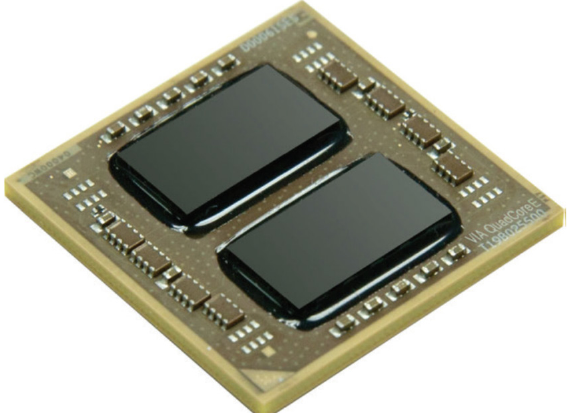
The CPU accomplishes its tasks by utilising millions or even billions of tiny electronic switches called transistors. Each transistor can be turned on or off individually, and this switching action is what enables the CPU to process information.
CPU cores and performance
Modern CPUs often contain multiple cores, which are independent processing units that can handle tasks simultaneously. When a CPU has multiple cores, it's called a multi-core processor. By including several cores in one CPU, manufacturers can dramatically increase the processing power available to your computer, allowing it to handle multiple tasks more efficiently.
Important
Common Misconception
Many people mistakenly refer to their entire computer as "the CPU". However, the CPU is actually just one component - a single chip found inside the computer.
Measuring CPU speed
The speed of a CPU is measured in gigahertz (GHz), which indicates how many instructions the processor can perform in one second. To put this in perspective:
This represents an incredibly fast rate of operation.
Note
CPU History
The development of CPUs has a fascinating history. The first processor was created by Intel during the 1970s - the 4004 processor. Initially, processors were identified by numbers (like the Intel 80486 or 80386), with higher numbers indicating faster and more capable processors. However, after Intel developed the Pentium processor, manufacturers began using names like Pentium, Celeron, and Duron to identify their products.
Memory
While you've already learned about hard drives for storage, computers also use two other crucial types of memory: Random Access Memory (RAM) and Read-only Memory (ROM). These memory types work together with the CPU to ensure your computer operates smoothly.
Random Access Memory (RAM)
RAM serves as your computer's temporary workspace. It stores the programmes and data that your CPU needs to access in real-time while you're actively using your computer. Think of RAM as your desk while you're studying - it holds all the materials you're currently working with so you can access them quickly.
Important
Volatile Memory Characteristic
The key characteristic of RAM is that it's volatile memory. This means that all data stored in RAM is erased the moment you switch off your computer. RAM requires a constant supply of electrical power to maintain the information stored within it. This is why unsaved work disappears if your computer loses power unexpectedly.
Despite being temporary storage, RAM is essential because it operates much faster than traditional hard drives, allowing your CPU to access frequently needed information almost instantaneously.
Read-only Memory (ROM)
ROM plays a different but equally important role in your computer system. It's used primarily when your computer starts up and contains essential information needed for the boot process - the sequence that gets your computer running when you first turn it on.
Important
Non-volatile Memory Advantage
Unlike RAM, ROM is non-volatile memory, which means it will retain any data stored on it even when the computer is switched off or if the power supply is disconnected. This permanent storage capability makes ROM perfect for storing critical startup instructions that your computer needs every time it boots up.
The information stored in ROM doesn't change during normal computer operation, which is why it's called "read-only" - the CPU can read the information but typically cannot modify it.
Summary
Key Points to Remember:
- Processing devices transform raw data into useful information that computers can work with effectively
- The motherboard connects all computer components together, serving as the foundation that allows different parts to communicate
- The CPU is the computer's brain, containing millions of transistors and potentially multiple cores for enhanced performance
- RAM provides fast, temporary storage for active programmes but loses all data when power is removed (volatile memory)
- ROM stores permanent startup information that remains intact even when the computer is turned off (non-volatile memory)