Storage Media and Devices (Grade 10 NSC Matric Computer Application Technology): Revision Notes
📚Revision Notes
Storage Media and Devices
Introduction to storage devices
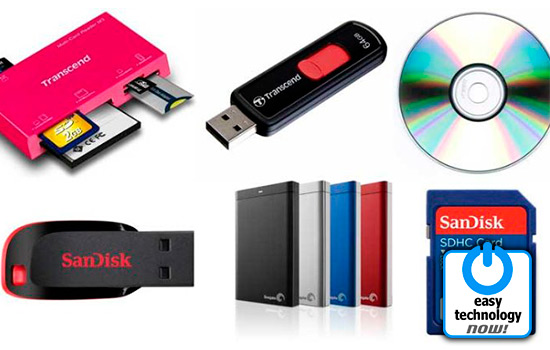
All storage devices serve the same fundamental purpose - to store digital data. Whether you're saving your favourite music, important school projects, or family photos, different storage devices offer various advantages depending on your needs. In this section, we'll explore three important categories of storage devices that you'll commonly encounter.
Note
Understanding the right storage device for your needs can save you money and ensure your data is properly protected. Each type has been designed with specific use cases in mind.
Types of storage devices
Understanding different storage devices helps you choose the right option for different situations. Each type has unique characteristics that make it suitable for specific uses.
Optical discs (CDs, DVDs and Blu-Ray)
Optical discs represent one of the most familiar forms of portable storage. These circular discs use laser technology to read and write data, which is why they're called "optical" discs.
Compact Discs (CDs) are the smallest capacity option, holding up to 0.9 GB of data. While this might seem tiny by today's standards, it's perfect for storing music albums or small collections of documents.
Digital Versatile Discs (DVDs) offer significantly more space with up to 9.7 GB capacity. This extra space makes them ideal for storing movies, larger software programmes, or backing up important files from your computer.
Blu-Ray discs provide the largest storage capacity at up to 50 GB. This massive space allows them to store high-definition movies with crystal-clear picture quality and surround sound.
Example
Storage Capacity Comparison
To understand the scale of difference:
- CD (0.9 GB): Can store about 80 minutes of music or 900 digital photos
- DVD (9.7 GB): Can store about 10 times more data - roughly 2 hours of video or 9,700 digital photos
- Blu-Ray (50 GB): Can store about 50 times more data than a CD - multiple high-definition movies or 50,000 digital photos
These optical discs are particularly useful because music, films, and television series are commonly distributed on them. You can also use them to create backups of your computer files, though you'll need the appropriate disc writer for your computer to copy data onto them.
Memory cards
Memory cards are small, lightweight storage devices that have become essential components in our digital world. You'll find them in smartphones, digital cameras, gaming consoles, and media players.
These compact devices are designed for portability and convenience. Despite their small size, modern memory cards can store enormous amounts of data - from a few gigabytes to several terabytes. This makes them perfect for storing thousands of photos, hours of video footage, or extensive music collections.
Note
One of the biggest advantages of memory cards is their durability. Unlike optical discs, they have no moving parts, making them resistant to scratches and physical damage.
Important
Consider the trade-offs: While memory cards are durable and portable, their small size can make them easy to lose, and their cost per gigabyte is typically higher than other storage options.
Memory cards are particularly valuable for transferring files between different devices, though this can be expensive if you need large amounts of storage space.
Memory card readers
Memory card readers serve as the bridge between your memory cards and your computer. These devices allow you to access the data stored on memory cards by connecting them to your computer's USB port or other connection methods.
Many modern devices come with built-in card readers. You'll often find them integrated into printers, smartphones, tablets, and personal computers. This built-in functionality eliminates the need for separate card reader devices in many situations.
External memory card readers are particularly useful when your device doesn't have a built-in reader or when you need to read different types of memory cards. They're small, portable, and relatively inexpensive, making them handy accessories for anyone who regularly works with memory cards.
Technology trends
Important
Changing Technology Landscape
The world of storage technology is constantly evolving. An important trend to be aware of is that CD and DVD drives in laptops are becoming increasingly rare. Many laptop manufacturers have stopped including optical drives in their newer models to make laptops lighter, thinner, and more affordable.
This change reflects how people now consume media differently - streaming services for music and videos, cloud storage for files, and digital downloads for software have largely replaced the need for physical discs. However, optical discs still remain useful for certain applications, particularly for creating permanent backups or when internet access is limited.
Summary
Key Points to Remember:
-
Storage devices all serve the same basic purpose - storing digital data, but each type offers different advantages for specific situations
-
Optical disc capacities increase significantly: CDs hold up to 0.9 GB, DVDs up to 9.7 GB, and Blu-Ray discs up to 50 GB
-
Memory cards are ideal for portable devices like phones and cameras because they're small, durable, and can store large amounts of data
-
Memory card readers are essential tools that allow you to transfer data between memory cards and computers, and are often built into modern devices
-
Technology is changing rapidly - optical drives are becoming less common in laptops as digital distribution and cloud storage become more popular