Input Devices (Grade 10 NSC Matric Computer Application Technology): Revision Notes
📚Revision Notes
Input Devices
What are input devices?
Input devices are physical hardware components that enable you to provide information to a computer system and communicate with it. Think of them as the tools that let you "talk" to your computer by giving it instructions and data.
When you use an input device, you're essentially telling the computer what you want it to do. Every keystroke, mouse click, or touch is an instruction that the computer processes as data.
Note
The relationship between you and your computer is entirely dependent on input devices. Without them, there would be no way to tell the computer what tasks to perform or what information to process.
Common input devices
There are several types of input devices that we use regularly. Let's explore the most important ones you'll encounter in your daily computer use.
Keyboard
A keyboard serves as your primary tool for entering text, numbers, and symbols into a computer system. Each time you press a key, you're sending a specific piece of data to the computer for processing.

Types of keyboards
Different keyboards are designed for specific purposes and user needs. Here are the main types you should know about:
Note
Understanding Keyboard Varieties
Each type of keyboard is optimised for different use cases and user preferences. Consider your specific needs when choosing a keyboard - whether you prioritise portability, comfort, gaming performance, or traditional functionality.
Standard keyboard (external): This is the traditional full-sized keyboard that connects to desktop computers. It includes all the standard keys, function keys, and a numeric keypad on the right side. These keyboards are separate from the computer and connect via USB cable.
Laptop keyboard (built-in): These keyboards are integrated directly into laptop computers. They're more compact than standard keyboards and often have keys that serve multiple functions when combined with special modifier keys like "Fn".
Ergonomic keyboard: These specially designed keyboards have a curved or split layout that helps reduce strain on your wrists and hands during extended typing sessions. They're particularly helpful for people who type for long periods.
Gaming keyboard: Built specifically for gaming enthusiasts, these keyboards often feature mechanical switches for better responsiveness, customisable backlighting (often with coloured LEDs), and programmable keys for gaming shortcuts.
Foldable keyboard: These portable keyboards can be folded for easy transport. They're useful for people who travel frequently and need to type on tablets or smartphones.
Laser keyboard: A modern innovation that projects a virtual keyboard onto any flat surface using laser technology. Users can then type on the projected image, which detects finger movements.
Pointing devices
Pointing devices allow you to control the movement of the cursor (the small arrow or pointer) that appears on your computer screen. The most common pointing device for desktop computers is the mouse, while laptops typically use touchpads.
Mouse
The mouse ranks as the second most important input device for computer systems. It enables you to move the cursor around the screen, click on items, and interact with the computer's graphical interface.

Using a mouse, you can perform various actions like selecting text, opening programmes, dragging files, and navigating through menus and windows.
Types of mice
Wireless mouse: These mice connect to your computer using wireless technology such as Wi-Fi or Bluetooth. They don't require cables, giving you more freedom of movement. However, they need batteries or regular charging to function.
Cable mouse: Traditional mice that connect to computers through a USB cable. They're reliable because they don't need batteries and maintain a constant connection to the computer. The cable provides both power and data transmission.
Important
Connection Trade-offs
When choosing between wireless and cable mice, consider the trade-off: wireless mice offer greater freedom of movement but require power management (batteries or charging), while cable mice provide reliable, constant connectivity without power concerns but limit your range of movement.
Historical perspective
Understanding the history of input devices helps us appreciate how far technology has advanced.
Note
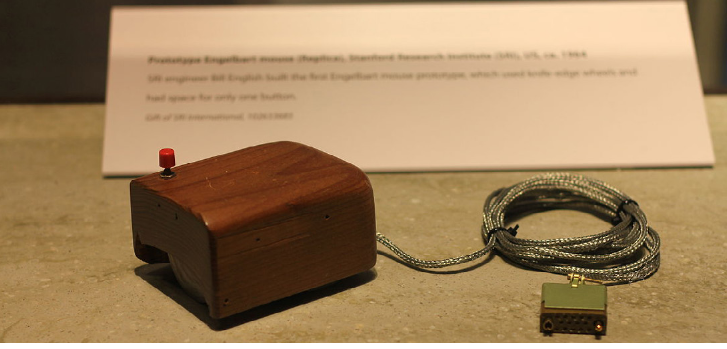
The Birth of the Computer Mouse
Douglas Engelbart invented the first computer mouse in 1963. This early version had two wheels positioned at a 90-degree angle to each other to track movement. The ball mouse that many people remember wasn't developed until 1972, and optical mice appeared around 1980.
This innovation revolutionised how people interact with computers, making them much more user-friendly and accessible to everyday users.
Remember!
Summary
Key Points to Remember:
-
Input devices are essential tools that allow you to communicate with and control computer systems through data entry and interaction.
-
Keyboards come in various types - standard external keyboards for desktops, built-in laptop keyboards, ergonomic designs for comfort, gaming keyboards for performance, and portable options like foldable and laser keyboards.
-
The mouse is the second most important input device and enables cursor control and graphical interface interaction through pointing and clicking.
-
Connection methods vary - devices can connect through USB cables (reliable, no batteries needed) or wirelessly via Wi-Fi/Bluetooth (more freedom, but requires power management).
-
Different devices serve different needs - choose input devices based on your specific requirements, whether for gaming, professional work, portability, or ergonomic comfort.