Email as a Form of E-Communication (Grade 10 NSC Matric Computer Application Technology): Revision Notes
📚Revision Notes
Email as a Form of E-Communication
What is email?
Email is an electronic way of communicating that allows people to send messages through computers, smartphones, tablets, and other digital devices. Unlike traditional post, email requires an internet connection to work. You also need special software called an email application (or email client) that lets you send, receive, forwards, and reply to messages.
Note
With email, you can do much more than just send text messages. You can attach files like documents, photos, and even videos to your emails, though there are usually limits on how big these files can be.
How email compares to traditional mail
Email has revolutionised the way we communicate, offering significant advantages over traditional postal mail. Understanding these differences helps explain why email has become such an essential communication tool.
The main differences between traditional mail and email include:
Addressing systems: Traditional mail uses physical addresses with street names, cities, and postal codes. Email uses electronic addresses that follow a specific format with usernames and domain names.
Delivery methods: Traditional mail relies on postal workers and physical transport to deliver letters in envelopes. Email travels electronically across the internet through email servers and providers like Gmail or Outlook.
Speed and timing: Perhaps the biggest advantage of email is speed. Traditional mail can take several days or even weeks to arrive, depending on the distance. Email is delivered almost instantly, usually within minutes or even seconds.
Understanding email addresses
To send or receive emails, you need a unique email address. Think of it as your electronic postal address - it tells the email system exactly where to deliver messages meant for you.
Every email address follows the same standard format and has specific parts called a taxonomy. Let's break down the components using the example computer@mweb.co.za:
Example
Email Address Breakdown: computer@mweb.co.za
Username (computer): This is the first part before the @ symbol. It can include letters, numbers, and some special characters like underscores or dots. However, special characters cannot be the first or last characters of the username. This part identifies you specifically within your email provider's system.
@ symbol: This always appears in the middle and means "at". It separates the username from the domain information.
Domain name (mweb): This identifies the company or organisation that provides the email service.
Company identifier (co): This often shows what type of organisation runs the service.
Country code (za): This shows the location or country where the service is based. In this case, "za" stands for South Africa.
Important
It's crucial to type email addresses correctly. Even a small mistake can mean your message goes to the wrong person or doesn't get delivered at all.
Choosing between ISP and webmail services
When setting up email, you need to decide between using your Internet Service Provider (ISP) or a webmail service. Both options have their advantages and disadvantages, and your choice often depends on your needs and budget.
Note
ISP email advantages: The main benefit is technical support. When something goes wrong with your email, you can contact your ISP for help since email is part of their paid service.
ISP email disadvantages: There are several drawbacks to consider:
- Your emails are stored on your ISP's servers, so if their servers have problems, you can't access your mail
- You need to configure passwords and settings correctly, which can be complicated
- ISPs usually charge for their email service
- If you change ISPs, you'll need to get a new email address
- There are often limits on how much email storage you get
Note
Webmail advantages:
- Most webmail services are completely free
- You can access your email from any computer with a web browser and internet connection
- You can keep the same email address even if you change internet providers
Webmail disadvantages: The main drawback is advertising. Since these services are free, they make money by showing you advertisements. Some services like Gmail even scan your email content to show you relevant ads.
Popular webmail providers include Google's Gmail and Microsoft's Outlook.com. These services are widely used because they're reliable and can be accessed from anywhere in the world, including on smartphones and tablets.
How email transmission works
Understanding how email travels from sender to recipient helps explain why email is so fast and reliable. The process involves several steps and different computer servers working together.
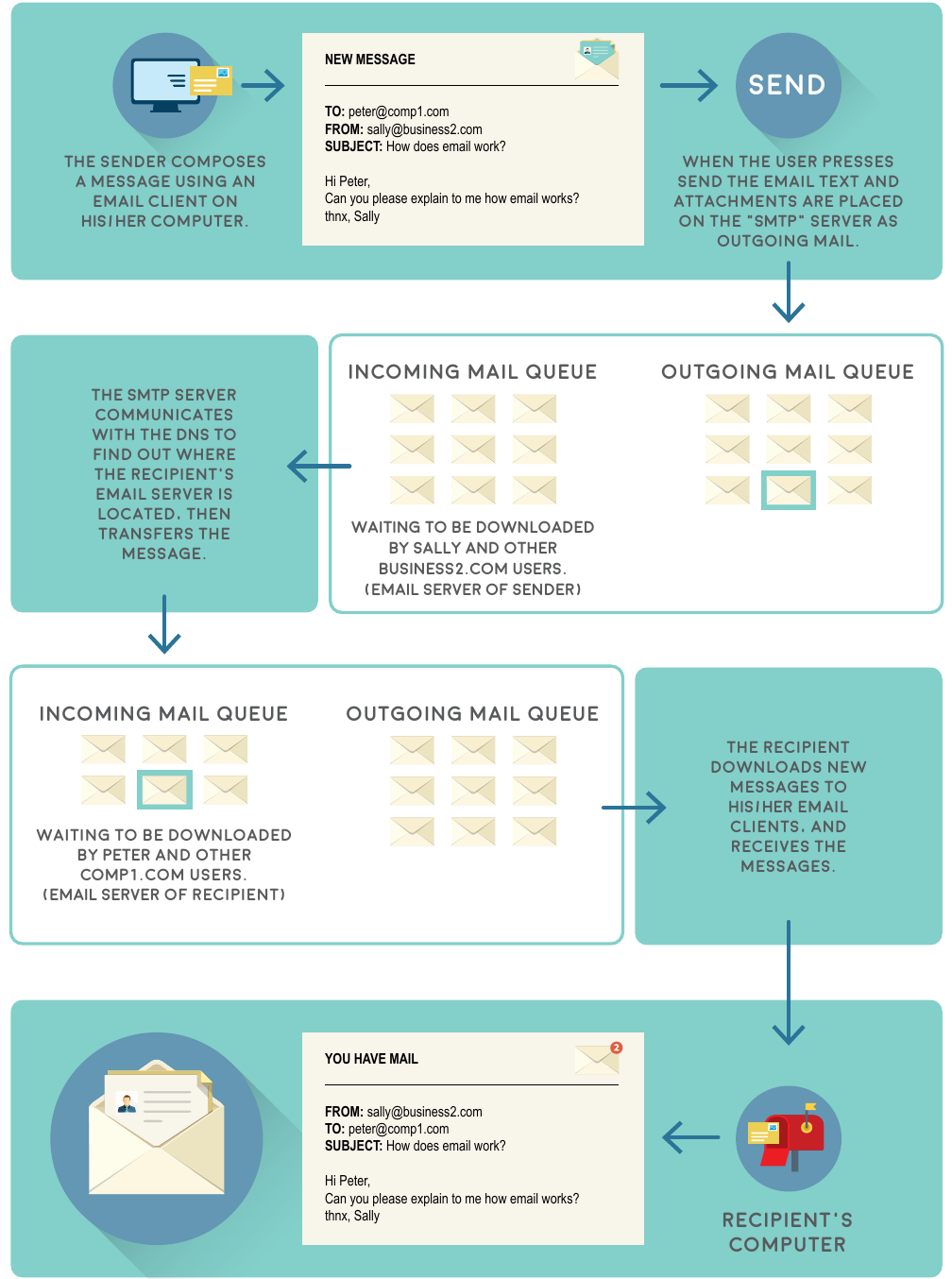
Example
Step-by-Step Email Transmission Process
Step 1 - Composing: You write your message using an email client on your computer, phone, or through a web browser. This includes adding the recipient's address, subject line, and your message content.
Step 2 - Sending: When you click "Send", your email and any attachments are placed on an SMTP (Simple Mail Transfer Protocol) server as outgoing mail. This server handles sending emails from your account.
Step 3 - Server communication: The SMTP server communicates with DNS (Domain Name System) servers to find out where the recipient's email server is located. It's like looking up an address in a phone book.
Step 4 - Transfer: Once the recipient's email server is found, your message is transferred there and placed in their incoming mail queue, waiting to be downloaded.
Step 5 - Delivery: The recipient downloads new messages to their email client when they check their email, and your message appears in their inbox.
This entire process usually takes just a few seconds or minutes, which is why email is so much faster than traditional mail. The system works 24 hours a day, so emails can be sent and received at any time.
Remember!
Summary
Key Points to Remember:
- Email requires internet: Unlike traditional mail, you need an internet connection and email software to send and receive messages
- Email addresses have a specific format: Always include the username, @ symbol, and domain name (like username@domain.com)
- Choose your email service wisely: ISP email offers support but costs money, while webmail is free but shows advertisements
- Email is nearly instant: Messages travel electronically through servers and usually arrive within minutes
- Double-check addresses: One small typo in an email address means your message won't reach the right person