Maps, Directions, Seating Plans, and Floor Plans (Grade 10 NSC Matric Mathematical Literacy): Revision Notes
📚Revision Notes
Maps, Directions, Seating Plans, and Floor Plans
Understanding how to read and use various types of plans is an essential skill in daily life. Whether you need to navigate a shopping centre, find your seat in a cinema, or describe your location to someone, being able to interpret maps and plans accurately will help you communicate spatial information effectively.
What are plans and maps?
Note
Plans are detailed drawings that show the layout of buildings, rooms, or areas from a bird's-eye view. They help us understand the arrangement and relationship between different spaces and objects.
Maps are representations of larger areas that show the location of places, roads, and landmarks. Both plans and maps use scales to represent real distances in a smaller, manageable format.
Types of plans you'll encounter
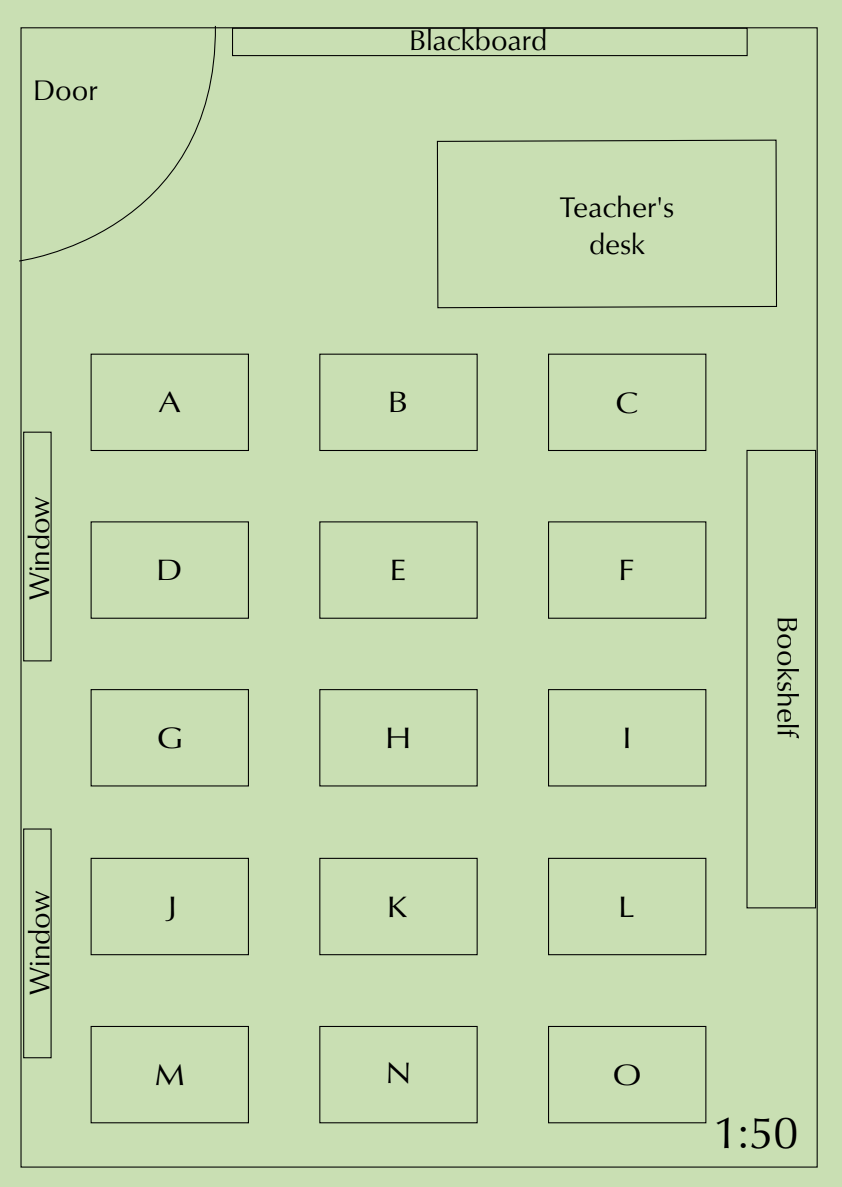
Classroom seating plans
These show the arrangement of desks, furniture, and facilities within a classroom. They help with navigation and understanding spatial relationships between students and classroom features.
School ground plans
These display the layout of school buildings, sports fields, and facilities across the entire school property. They often include multiple buildings and outdoor areas.
Cinema seating plans
These show seat availability and help customers choose optimal viewing positions. They typically use colour coding to indicate available, booked, or special seating areas.
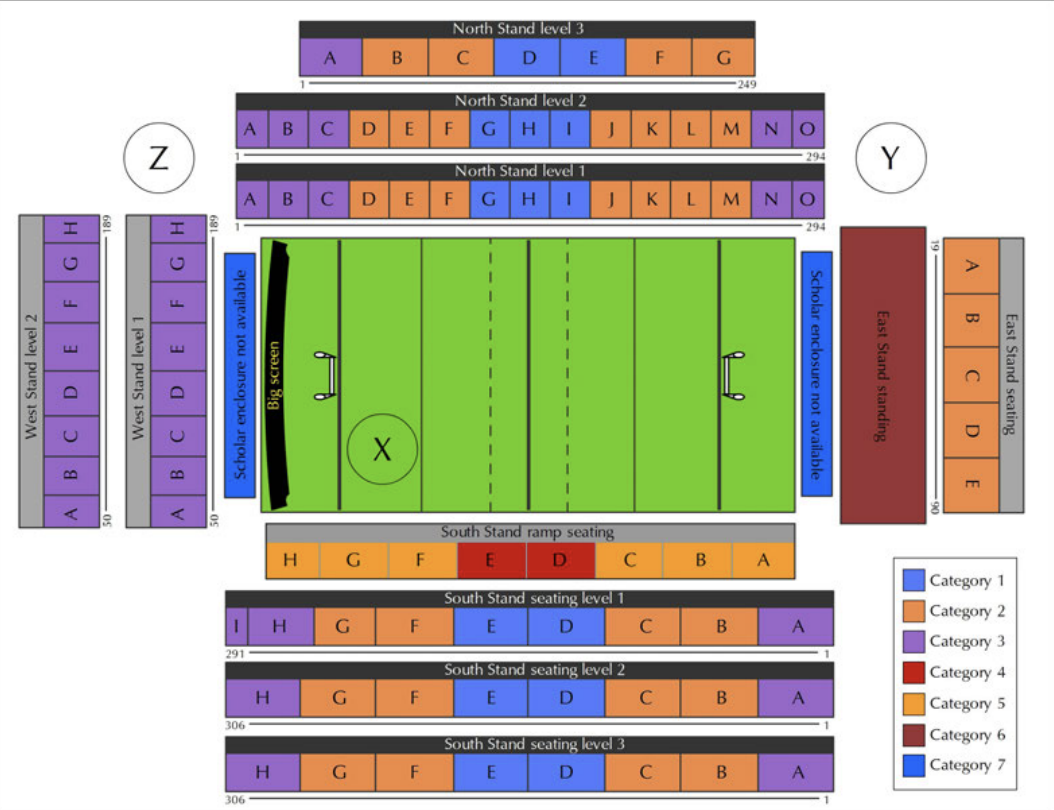
Stadium seating plans
These display different seating sections with various pricing categories and help visitors navigate to their designated areas.
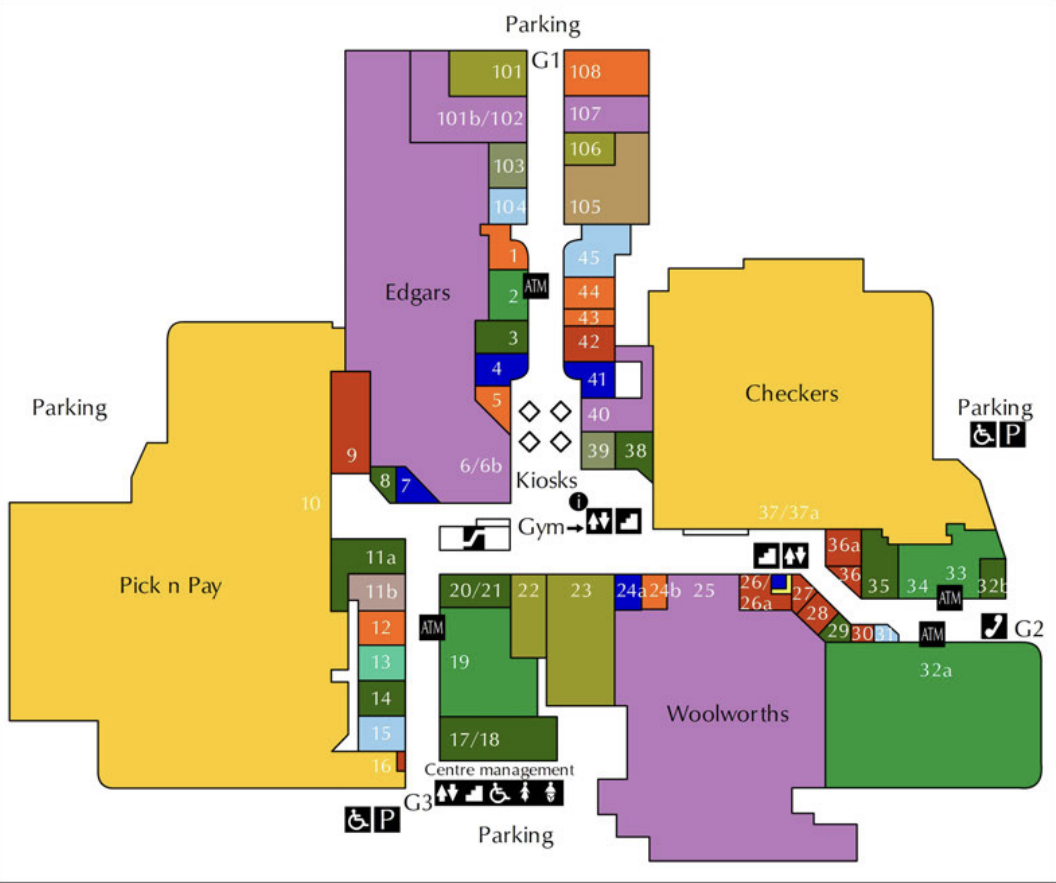
Shopping centre floor plans
These show store locations, facilities, and navigation routes through multi-level retail spaces.
Understanding scales
Important
Scale is the relationship between distances on a plan and real distances in the actual space. This is the most important concept you need to master when working with plans and maps.
Number scales
A number scale like means that unit on the plan represents of the same units in reality.
For example: If a classroom measures cm wide on a plan with scale , the real width is:
- Real measurement = Plan measurement × Scale factor
- Real width =
Bar scales
A bar scale provides a visual ruler showing actual distances. It typically shows segments representing different measurements (like m, m, m).
Note
To use a bar scale, measure the distance on the plan with a ruler, then compare it to the bar scale to find the real distance. This method is particularly useful when you don't have a specific number scale ratio.
Reading and giving directions
When navigating using plans, use clear directional language:
- Spatial relationships: left, right, in front of, behind, next to, opposite
- Movement instructions: walk straight, turn left/right, go past, stop at
- Reference points: use landmarks like doors, windows, or specific facilities
Note
Direction Tips:
- Always give directions from the person's perspective, not your own
- Use specific landmarks as reference points
- Be clear about turns and distances
- Test your directions by walking through them mentally
Example direction sequence:
"Walk through the door and turn right before desk B. Walk straight down the aisle passing desks E and H on the left. At desk K (behind desk H) turn around to face the blackboard and sit down."
Common map symbols
Maps and plans use universal symbols to represent facilities and features. These symbols help you quickly identify:
- Lifts/Elevators: for moving between floors
- Escalators: moving stairs
- Regular stairs: fixed steps
- Toilets: restroom facilities
- Restaurants: food services
- Disabled access: wheelchair accessibility
Worked examples
Example
Worked Example 1: Classroom scale calculations
Using the classroom plan with scale :
Step 1: Measure the classroom width on the plan = cm
Step 2: Apply the scale formula =
Step 3: Convert to metres =
Step 4: For the length measurement =
Example
Worked Example 2: Cinema seating analysis
When analyzing cinema seating:
- Blue squares = Available seats
- Red squares = Booked seats
- Pink squares = Unavailable seats
- Purple squares = Wheelchair accessible seats
To calculate the percentage of theatre still available:
Step 1: Count total seats and available seats
Step 2: Use formula:
Step 3: Example:
Example
Worked Example 3: Shopping centre navigation
When giving directions in a shopping centre:
Step 1: Identify your starting point (entrance)
Step 2: Locate your destination (specific shop)
Step 3: Plan the most efficient route
Step 4: Use landmarks and clear directional language
Example: "From entrance G3, go straight past shops 15, 14, 13, 12. At shop 20/21, turn right before the escalators. Keep going straight past Woolworths, and past the stairs and elevators on your left. The ATM will be on your right, just before the public phones."
Example
Worked Example 4: School ground measurements
Using the bar scale to measure the sports field:
Step 1: Measure the field width on the plan using a ruler
Step 2: Compare this measurement to the bar scale
Step 3: Read the corresponding real distance from the scale
Step 4: Repeat for length measurements
Example
Worked Example 5: Stadium seating categories
Stadium plans typically show:
- Different pricing categories (usually 7 categories)
- Stand locations (North, South, East, West)
- Section numbers and levels
- Access points and facilities
To locate your seat: Find your stand → Find your level → Find your section → Find your seat number.
Exam tips and common traps
Scale calculations:
- Always multiply the plan measurement by the scale factor
- Remember to convert units (cm to m) when necessary
- Double-check your calculations
Direction giving:
- Use the person's perspective, not your own
- Include clear reference points
- Be specific about turns and distances
Reading plans:
- Check the legend or key for symbol meanings
- Note the scale before making any measurements
- Consider multiple floors or levels in complex buildings
Important
Common mistakes to avoid:
- Dividing instead of multiplying for scale calculations
- Giving directions from the wrong perspective
- Misreading colour-coded information
- Forgetting to convert units (cm to m)
- Not checking the legend or key for symbol meanings
Summary
Key Points to Remember:
- Scale means cm on the plan equals cm in reality - always multiply by the scale factor
- Use clear directional language with reference points when giving directions
- Map symbols are universal - learn the common ones for lifts, stairs, toilets, and accessibility
- Colour coding in seating plans typically shows availability, pricing, or special features
- Always check the legend or key to understand what different colours and symbols represent
- The formula for scale calculations is: Real measurement = Plan measurement × Scale factor