General Concepts of Computing (Grade 11 NSC Matric Computer Application Technology): Revision Notes
📚Revision Notes
Information Processing Cycle
What is the information processing cycle?
Every computer, whether it's the smartphone in your pocket or a powerful server, works using five fundamental principles. These core components work together like a well-orchestrated team to make computing possible.
Note
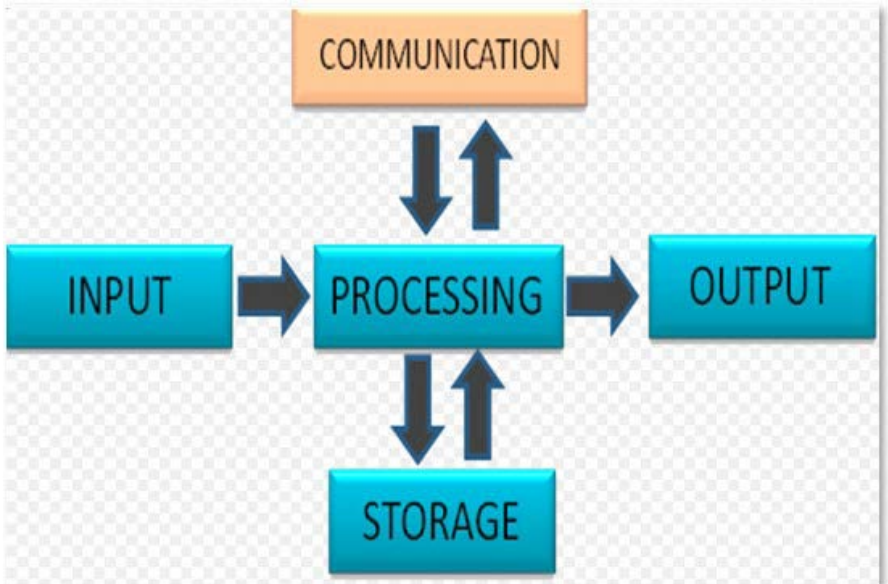
The five essential stages that power all computing devices are: input, processing, storage, output, and communication. These stages work together seamlessly to transform raw data into useful information.
Understanding how these stages connect and depend on each other will help you grasp how any computer system operates, from simple calculations to complex applications like social media platforms.
Input stage
The input stage is where your interaction with the computer begins. During this phase, information gets fed into the computer system through various input devices. You're probably familiar with many of these from everyday use - keyboards for typing, touchscreens for tapping and swiping, and microphones for voice commands.
When you press a key or speak into a microphone, something fascinating happens behind the scenes. The input device captures your action and converts it into binary code - a special language that computers understand, made up of only 1s and 0s.
Important
This conversion to binary code is crucial because computers can only process information in this digital format. Every letter, number, image, or sound you input gets transformed into patterns of 1s and 0s.
For example, when you type the letter 'A' on a keyboard, the computer doesn't actually see the letter 'A'. Instead, it receives a specific pattern of 1s and 0s that represents that letter.
Processing stage
Once the computer has the binary code from the input stage, the real magic begins in the processing phase. The Central Processing Unit (CPU) - often called the "brain" of the computer - takes control of this binary information.
The CPU performs all the necessary calculations and operations on the data. It works closely with the computer's memory to retrieve instructions about what to do with the information. During processing, the CPU converts the data into pixels (tiny dots of colour that make up everything you see on screen) and prepares it for display.
Note
This entire process happens incredibly quickly - in just a fraction of a second. The CPU can perform millions of calculations while preparing your information for the next stage.
Storage stage
Storage is where the computer keeps information safe for future use. This happens in several steps:
Step 1: The CPU initially writes data to the computer's Random Access Memory (RAM), which serves as temporary storage. Think of RAM as the computer's short-term memory - it's fast but only holds information whilst the computer is switched on.
Step 2: The computer waits for your command to save the information permanently. When you click 'Save' in a document, you're telling the computer to move the data from RAM to permanent storage.
Step 3: Finally, the computer saves your data to the hard drive or another storage device. You can choose where to save it, and once it's stored, you can access this information anytime, even after switching the computer off.
Important
Understanding the difference between temporary storage (RAM) and permanent storage is crucial. RAM is fast but temporary - everything stored there disappears when you turn off the computer. Permanent storage keeps your files safe even when powered down.
You can also use external storage devices like USB drives or external hard drives to keep your information safe and portable.
Output stage
The output stage is where the computer shows you the results of all its hard work. During this phase, the computer takes the processed pixels and displays them through output devices - equipment that makes the information visible, audible, or tangible.
Common output devices include computer screens that display text and images, printers that create physical documents, and speakers that produce sound. These devices transform the computer's processed data back into a form that humans can understand and use.
Note
The output stage essentially completes the transformation from raw data into useful information. Whether it's the words appearing on your screen as you type or music playing through headphones, the output stage makes computer processing meaningful to users.
Communication stage
Communication acts as the connecting thread that links all other stages in the information processing cycle. Each stage depends on the others, and communication enables this interconnection to work smoothly.
The most obvious example of communication is the immediate relationship between input and output. When you type on a keyboard (input), letters appear almost instantly on your screen (output). This rapid back-and-forth communication between user and computer creates the interactive experience we're used to.
Communication extends far beyond your individual computer. Through networks like the internet, your computer can communicate with millions of other computers worldwide. When you browse websites, your computer connects to servers around the globe. Companies also use intranets - private networks that allow their computers to communicate securely with each other.
Important
Communication is what makes all the other stages work together as a unified system. Without effective communication between stages, computers would be unable to provide the seamless, interactive experience we rely on daily.
Real-world example: sending a WhatsApp message
Example
Worked Example: The Information Processing Cycle in Action
Let's see how all five stages work together when sending a WhatsApp message to a friend:
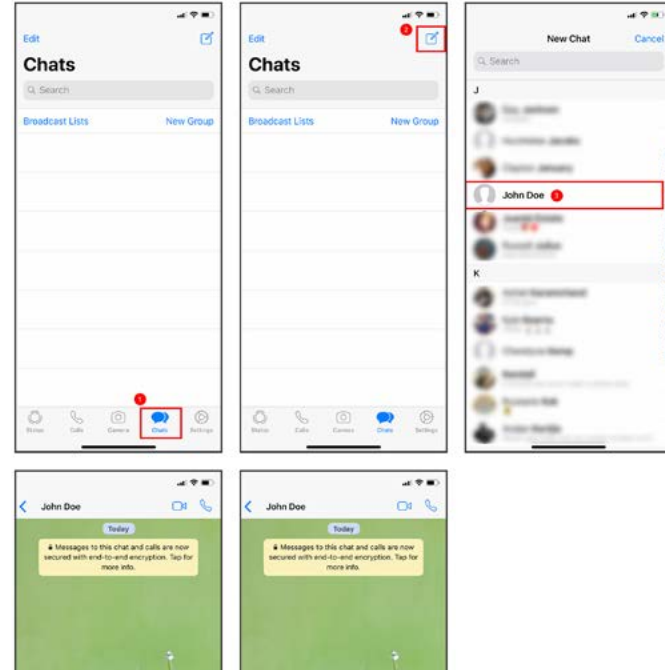
Input: You open WhatsApp and use the touchscreen keyboard to type your message. The phone converts your taps into binary code.
Processing: Your phone's CPU processes this binary code and prepares the message for sending.
Communication: WhatsApp communicates with servers to send your message across the network to your friend's phone.
Storage: The app stores a record of your conversation on your phone, your friend's phone, and WhatsApp's servers.
Output: The message appears in the conversation on both your screen and your friend's screen.
This example demonstrates how all five stages work together seamlessly. Each stage depends on the others, and the communication stage enables the entire process to work across different devices and networks.
Summary
Key Points to Remember:
-
All computers work using five basic stages: input, processing, storage, output, and communication - regardless of whether it's a smartphone or supercomputer
-
Binary code is the universal computer language: Everything you input gets converted to 1s and 0s that computers can understand and process
-
The CPU is the computer's brain: It handles all calculations and works with memory to process information at incredible speed
-
Storage happens in two phases: temporary storage in RAM first, then permanent storage when you save your work
-
Communication connects everything: It links all stages together and enables computers to work with networks and other devices, making modern computing possible