Collaboration and Communication Software (Grade 11 NSC Matric Computer Application Technology): Revision Notes
📚Revision Notes
Collaboration and Communication Software
Modern technology relies heavily on software that helps us work together and share information. Multimedia and communication applications have become essential tools that we use every day, whether for entertainment, work, or staying connected with others.
Note
These digital tools have fundamentally changed how we create content, communicate, and collaborate in both personal and professional settings.
Multimedia software
What is multimedia software?
Multimedia involves combining different types of media - such as text, images, audio, video, and animations - into a single digital product. Think of a PowerPoint presentation that includes videos and sound clips, a Word document with moving images, or a website with interactive features. This integration of multiple media types creates engaging and dynamic content.
When we talk about multimedia software, we're referring to the computer programmes that help us create and use these multimedia products. These applications fall into two main categories that serve different purposes.
Categories of multimedia software
Important
Understanding the distinction between media players and media creators is essential for choosing the right software for your needs.
Media players are programmes designed to play back multimedia files that already exist. These applications allow you to watch videos, listen to music, and view images stored on your computer or streamed from the internet. Media players can also display still images like photographs and illustrations.
Media creators are programmes used to produce new multimedia content. These tools let you combine text, audio, images, animations, video, and interactive elements to create original multimedia products.
Examples include VLC Media Player, YouTube, iTunes, and Adobe Flash Player. These programmes vary in their availability - some are open source (free to use and modify), others are web-based applications, and some come pre-installed on devices.
Examples of multimedia creation software
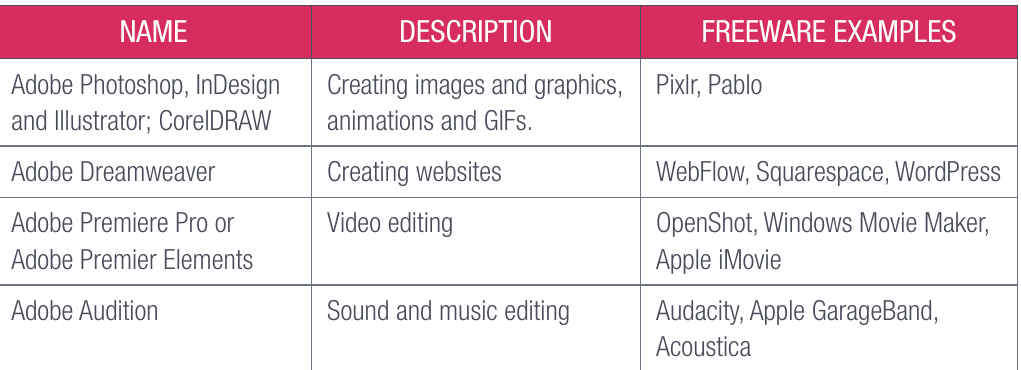
Professional multimedia creation often involves specialised software, though many free alternatives exist for students and casual users.
Note
This comparison shows how expensive professional software like Adobe's Creative Suite has free alternatives available. For example, if you can't afford Adobe Photoshop for image editing, you could use free programmes like Pixlr or Pablo instead.
Adobe has become a dominant name in multimedia creation software. The company started in 1982 and revolutionised digital publishing with PostScript, a computer language that allowed printers to reproduce digital pages exactly as they appeared on screen. This breakthrough made desktop publishing possible and transformed the advertising industry.
Adobe continued innovating with digital fonts and illustration software, making high-quality multimedia creation faster and easier than traditional methods. Each new version of their products introduces features that help creators produce professional-quality content more efficiently, which explains why Adobe software remains so popular in creative industries.
Communication software
Understanding communication software
Communication software encompasses all applications that enable users to share files, text, and audio or video messages through internet connections. While many people think communication software just means email, it actually includes much more than that.
Modern communication software includes:
- Email clients like Outlook for sending and receiving messages
- Voice over Internet Protocol (VoIP) systems like Skype and RingCentral for voice calls over the internet
- Chat applications like Slack and WhatsApp for instant messaging
Communication as collaboration
Most communication software today also functions as collaboration software. This means multiple people can use these tools to work together on projects or share their work in real-time. For instance, Skype doesn't just let you make video calls - it also allows you to share your computer screen with others during the call, enabling them to see what you're working on.
Important
The dual functionality of modern communication software makes it particularly valuable because it's often more cost-effective than traditional communication methods like telephone lines.
Installing and using internet-based communication tools typically costs less than maintaining separate phone systems, making them attractive options for schools, businesses, and individuals.
The collaborative features built into communication software have transformed how people work together. Team members can now easily share files, edit documents simultaneously, and hold virtual meetings regardless of their physical locations, making remote work and global collaboration much more practical.
Summary
Key Points to Remember:
- Multimedia software combines different types of media (text, images, audio, video) into single digital products
- Media players are for viewing existing content, while media creators are for producing new content
- Free alternatives exist for most expensive professional multimedia software
- Communication software includes email, VoIP calls, and chat applications
- Collaboration features in communication software allow multiple people to work together online
- Cost-effectiveness makes internet-based communication tools more attractive than traditional methods