General Concepts (Grade 12 NSC Matric Computer Application Technology): Revision Notes
📚Revision Notes
Computers and Their Uses

Introduction
Throughout history, many inventions have fundamentally changed how we live our lives, and the computer stands out as one of the most transformative. Computers have revolutionised our world by enabling us to make incredible technological and scientific breakthroughs, from exploring the deepest parts of our oceans to venturing into outer space. Most importantly, they help us stay connected with people across the globe, making our world feel smaller and more accessible.
Note
In today's world, most people interact with computers daily, whether through simple actions like stopping at a traffic light or more direct interactions like using a smartphone or laptop. Consider how many computer-controlled devices you encounter in just one day!
One thing is certain: without computers, our lives would be dramatically different!
Types of computers
Important
From your previous studies in Grades 10 and 11, you'll remember learning about different categories of computers. This recap is essential for understanding how different computing needs require different types of systems.
Let's briefly recap these important types:
Servers are powerful computers designed to serve multiple users simultaneously. They have robust processors, large hard drives, and substantial memory capacity. In network environments, servers store vast amounts of data that other computers can access and share. They also enable resource sharing, such as printers, across the network.
Workstations are high-performance computers designed for individual professional use. They're faster and more capable than regular personal computers, making them ideal for businesses and specialised applications used by engineers, architects, and graphic designers.
Personal computers (PCs or Desktops) were once called "microcomputers" because they were compact compared to the massive business systems of their time. These are the most common and affordable type of computer, physically smaller with relatively modest memory and processing power. They're designed for individual use and aren't built to be portable since they consist of separate components.
Laptops and Notebooks combine all computer components - display, keyboard, processor, memory, hard drive, and trackpad - into one portable package. They run on battery power, making them completely portable and convenient for users who need computing power on the go.
Tablets are even more portable than laptops, being smaller and lighter. While generally less expensive than brand new laptops, their processors and components are typically less powerful than traditional laptops, making them ideal for basic computing tasks and media consumption.
Smartphones are handheld computers that use flash memory instead of traditional hard drives for storage. They feature virtual keyboards and touch-screen technology, combining computing power with excellent portability and battery life.
Embedded systems are specialised computer systems built into other devices to perform specific tasks. You'll find them in everyday items like automatic teller machines (ATMs), MP3 players, and many other electronic devices.
Note
Computers generally provide significant economic benefits by saving paper, reducing labour costs, improving communication speed, and lowering overall operational expenses.
What is a computer and how does it work?
Whether you're holding a smartphone or working with a powerful server, all computers operate using the same five fundamental principles. These core functions work together seamlessly: input, processing, storage, output, and communication. Each component plays a vital role, but they all collaborate to make the computer function effectively.
The information processing cycle illustrates how computers transform raw data into useful information through these five interconnected stages. Understanding this cycle is crucial for comprehending how any computing device operates.
Note
Remember the mnemonic: IPSOC
- Input
- Processing
- Storage
- Output
- Communication
Input
The input stage is where data enters the computer system. There are numerous ways to input information, corresponding to the variety of input devices available. You're already familiar with input devices from Grade 10, such as keyboards, touchscreens, and microphones.
When you input data - whether by typing on a keyboard or speaking into a microphone - the computer receives this information and converts it into binary code (a series of 1s and 0s). This conversion is essential because computers can only understand and process information in this binary format.
Example
Worked Example: Input Process
Step 1: You type "Hello" on your keyboard
Step 2: The computer converts each letter into binary code:
- H = 01001000
- e = 01100101
- l = 01101100
- l = 01101100
- o = 01101111
Step 3: This binary code is now ready for processing by the CPU
Processing
The Central Processing Unit (CPU) serves as the computer's brain, taking the binary code from the input stage and performing the necessary calculations to transform it into meaningful information. The CPU collaborates with the computer's memory to receive instructions on how to display and manipulate the input data.
This processing involves storing information as pixels in the computer's memory, which can then be sent to output devices for display in a user-friendly format. Remarkably, this entire process happens in a fraction of a second, demonstrating the incredible speed of modern computers.
Storage
Storage is where the computer saves input data in its memory banks. This process follows several steps:
- Initially, the CPU writes data to the computer's temporary storage, known as Random Access Memory (RAM)
- The computer then waits for the user's instruction to transfer data from RAM to more permanent storage
- When commanded, the computer saves the data to the disc drive in either a default location or a user-specified location
- Users can retrieve this stored information at any time
Note
You can also store information using external storage devices such as USB drives or external hard drives, providing flexibility and portability for your data.
Output
During the output stage, the computer takes the processed pixels and displays them in a format that users can understand and interpret. Various output devices accomplish this task, including printers, screens, video displays, and audio devices.
These output devices transform raw computer data into usable, visible information that humans can understand. This transformation might result in sound waves from a song, text in a document, or images on a screen - essentially converting digital information back into formats we can perceive and use.
Communication
Communication enables computers to share information with users and connect with other computer systems. This stage facilitates the exchange of data across networks, enabling the global connectivity that defines modern computing.
Why do we use computers?
Computers have become integral to our daily lives because they excel in several key areas that significantly improve our productivity and quality of life:
- Enhancing productivity across various tasks and industries
- Assisting scientists in finding cures for diseases through data analysis and modelling
- Helping architects design and construct complex new buildings with precision
- Empowering people in developing countries by providing access to global opportunities and education
Let's explore some specific reasons why computers have become so essential in our modern world.
Saving time
One of the most significant advantages of modern computers is their ability to save enormous amounts of time and effort. From finding the quickest route to the mall using Google Maps to sending urgent emails to work colleagues, computers complete tasks much faster and with greater ease than traditional methods.
Note
Consider these time-saving applications:
- Online shopping allows you to purchase groceries from home and have them delivered, eliminating travel time, shopping time, driving back home, and unpacking groceries from your car
- Online banking means you no longer need to visit the bank for transactions - you can check balances, pay bills, and transfer money using your bank's online facilities
- Food ordering from restaurant websites eliminates waiting in queues at takeaway establishments
- Traffic navigation using online maps helps you find the quickest routes to specific locations
- Complex calculations can be performed much faster than manual computation
- Information searches on the internet or in databases provide instant access to vast amounts of knowledge
Communication costs
Computers have dramatically reduced the cost of communicating with people worldwide. Video conferencing is significantly cheaper than purchasing plane tickets for face-to-face meetings, and sharing files over the internet is more economical than traditional mailing methods.
Efficiency
Computers enable us to obtain, store, and retrieve data both quickly and efficiently. For instance, you can research any topic on the internet in less than an hour, a task that previously might have taken days in a library. Many repetitive human tasks can be time-consuming and prone to errors, but computer technology reduces completion time while minimising or eliminating mistakes.
Saving labour
The automotive industry provides an excellent example of how computers and automation reduce labour requirements. While a person might take two months to two years to assemble a car by hand, computer-controlled automation can produce a fully assembled and painted vehicle in approximately 8 hours.
Example
Worked Example: Automotive Manufacturing
Traditional Method:
- Time required: 2 months to 2 years per car
- Labour intensive: Multiple workers needed
- Human error potential: High
Computer-Controlled Automation:
- Time required: Approximately 8 hours per car
- Labour requirements: Minimal human supervision
- Accuracy: Consistently precise assembly
- Result: Dramatic increase in production efficiency
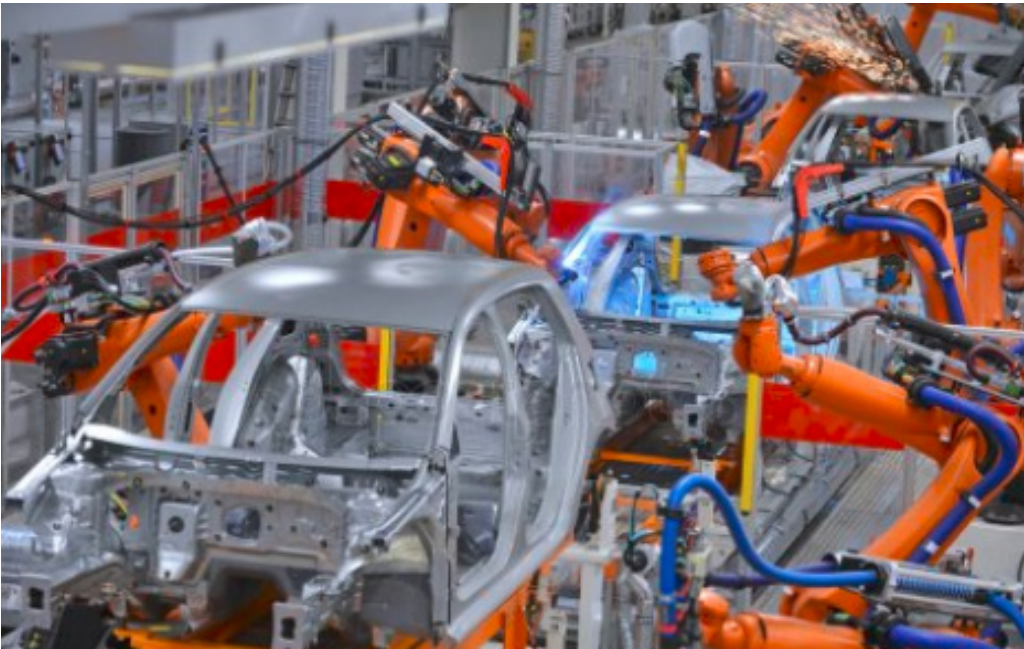
This dramatic reduction in production time demonstrates how computer technology and robotics have revolutionised manufacturing processes across numerous industries.
Accuracy and reliability
Humans are emotional beings who can be affected by various internal and external factors. We experience tiredness, make mistakes, and sometimes struggle with tasks we don't enjoy. In contrast, computers are programmed to perform specific tasks in precise ways for set durations, executing them accurately, efficiently, and reliably every time.
Important
In healthcare, technological advancements have significantly improved the accuracy and safety of medical procedures. Laser technology, surgical robots, and nano devices enhance surgeons' precision during operations. Similarly, in manufacturing industries, automated machines and robotics have increased both the accuracy and reliability of produced goods.
Effect on time and distance
The efficiency, accuracy, and reliability of computers have transformed how we communicate with each other, enabling us to:
- Have conversations with friends and family in other countries using Voice over Internet Protocol (VoIP)
- Conduct business meetings with colleagues in different cities using platforms like Skype
- Send instant messages to people across the world via email
- Access online banking services to pay bills, view account balances, transfer funds, and much more
Financial institutions have enhanced consumer security by adding features like the ability to freeze missing credit cards to prevent fraudulent charges. These technological controls will only expand as biometric and facial recognition technologies advance.
Note
Online shopping has become effortless, with consumers able to compare prices across different websites easily. The growth and competition in online retail have created more interesting shopping experiences due to the significant discounts companies offer customers.
The internet serves as an invaluable educational tool. Teachers can utilise YouTube channels to reach students globally, maintain blogs to share career experiences with recent graduates, and access numerous websites designed specifically for educational purposes.
Environmental benefits - saving paper
Computers enable users to compile data using spreadsheets, write letters using word processors, send messages via email, and complete forms through online applications. Each of these computer-based conveniences reduces the time and effort required for these activities while importantly reducing paper consumption.
Note
Environmental Impact: Since trees are the primary source of paper, reducing paper usage plays a vital role in decreasing carbon emissions in our atmosphere, contributing to environmental conservation efforts.
Global communication, including social networks and web tools
One of the most appreciated features of computers is their ability to connect and form networks. These networks can link computers in homes or offices, enabling users to share files. Networks can span great distances, with the internet being the largest network, consisting of hundreds of thousands of computers worldwide.
Computer networks have enabled users to discover new and exciting ways to upload and share information, including:
Social networks are specialised computer networks that facilitate social interactions between users by enabling them to share personal information, including likes, dislikes, videos, and photos. Popular social networks include Facebook, Twitter, Snapchat, and Instagram.
Web tools encompass various online platforms:
- Blogs function as online diaries where users share daily experiences with others. Examples include "Boing Boing" and "PlayStation Blog"
- Wikis are collaborative websites allowing users to share information on virtually any topic, from television show plots to photosynthesis processes. Wikipedia represents the most famous wiki, though many other topic-specific wiki websites exist
- Vlogs (video blogs) are blogs where content is primarily presented in video format rather than text
Summary
Key Points to Remember:
- IPSOC: Computers operate on five fundamental principles - Input, Processing, Storage, Output, and Communication
- Different computer types serve specific purposes: From powerful servers managing networks to portable smartphones enabling communication on-the-go
- Computers save time and increase efficiency: They perform tasks much faster than humans while reducing errors and improving accuracy
- Technology has revolutionised communication: We can now connect with people worldwide instantly and cost-effectively through various digital platforms
- Computers benefit the environment: By reducing paper consumption and enabling digital alternatives, they help decrease our carbon footprint
- Binary code is the fundamental language that all computers understand - everything is converted to 1s and 0s
- CPU and RAM work together during processing to transform input data into meaningful output
- Automation has revolutionised industries like manufacturing, reducing production times from months to hours