Internet Services (Grade 12 NSC Matric Computer Application Technology): Revision Notes
📚Revision Notes
Internet Services
Introduction to internet services
When you connect to the internet through an Internet Service Provider (ISP), you gain access to a wide range of services designed to help you communicate, share information, and accomplish various tasks online. These internet services have revolutionised how we work, learn, and interact with others around the world.
Note
Internet services can be grouped into several main categories, each serving specific purposes:
- Communication services - for connecting with other people
- Information-retrieval services - for finding and accessing data
- Web services - for browsing websites and online content
- World-wide web - the global network of interconnected web pages
- Video conferencing - for face-to-face online meetings
Each type of service transfers specific kinds of information and offers unique advantages for different situations.
Communication services
Instant messaging
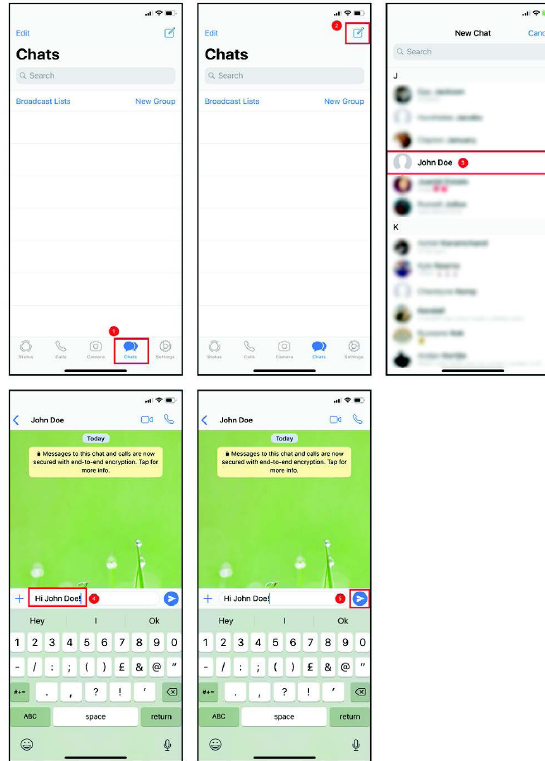
Instant messaging (often called IM) refers to online chat programmes that enable you to send real-time messages over the internet. This includes text messages as well as multimedia content like pictures, voice notes, and videos. While most instant messages happen between two people, you can also participate in group discussions with multiple users.
Example
Real-world Example: WhatsApp Group Chat
Imagine you're working on a group project with classmates. Instead of calling each person individually or waiting for email replies, you create a WhatsApp group where:
- You can instantly share ideas and updates
- Everyone sees messages immediately when online
- You can share photos of research materials
- Group decisions happen in real-time
Advantages of instant messaging:
- Enables real-time chat with anyone who has an IM client, regardless of their location
- Messages are delivered immediately when the recipient is online and connected
- You can see when your message has been read by the other person
- Connects people worldwide without geographical limitations
- Allows group conversations where multiple people can share ideas and reach conclusions together
Disadvantages of instant messaging:
- Messages are sent immediately, giving you no time to reflect or review before sending (unlike email where you can check drafts)
- Messages are not always saved permanently
- Removes the personal, face-to-face experience of speaking with someone in person
Popular instant messaging services include:
- WhatsApp - widely used on smartphones and computers
- Facebook Messenger - integrated into Facebook's social media platform
- iMessage - Apple's built-in messaging service for iOS devices
Voice over internet protocol (VoIP)
If you've travelled overseas, you've probably discovered that international phone calls can be very expensive. VoIP technology solves this problem by allowing you to make voice calls over the internet instead of traditional phone lines.

Important
How VoIP works: VoIP converts your voice (sound) into digital data, transmits this data over the internet to the recipient, then converts it back into sound on their end. Most modern VoIP services also support video calls, letting you see the person you're speaking to. This visual element adds important non-verbal communication through body language and facial expressions, making conversations much clearer and more effective.
Advantages of VoIP:
- Saves significant money when calling other countries for meetings or personal conversations
- Allows sharing of both audio and video information during calls
- Strengthens relationships between colleagues who work remotely or far from each other
- Much cheaper than traditional telephone calls
Disadvantages of VoIP:
- Expensive to set up and maintain the necessary equipment and software
- Requires an active internet connection to function
- Power failures can interrupt your communications completely
Examples of VoIP services:
- Google Hangouts - standard VoIP service provided by Google, now integrated into Android devices
- WhatsApp - allows both standard messaging and video calls over the internet
- Discord - popular among gamers for voice and text communication
- TeamSpeak - primarily used by gamers for team communication
- Skype - one of the most established VoIP services for voice, video, and instant messaging
File management services
File transfer protocol (FTP)
FTP is a standard network protocol that enables you to transfer files between your computer and a network server, typically over the internet. It establishes rules for how files can be uploaded to and downloaded from servers, sometimes requiring a username and password for secure access.
Advantages of using FTP:
- Easy to use once you receive proper training
- Can send multiple file directories simultaneously
- File transfer progress continues even if your connection temporarily fails
- File transfers can be scheduled for times that suit your needs best
Disadvantages of using FTP:
- Data, usernames, and passwords are shared as plain text, making it vulnerable to hackers
- Requires training to use effectively
- Difficult to monitor mishandled data and track the source of problems
- Not all FTP services encrypt your data, leaving it vulnerable to attacks
Important
While FTP was commonly used in the past, it's now primarily found in technical situations, such as uploading new files to web servers. FileZilla Server is one FTP server available for Windows users.
Cloud-based file sharing
The technology industry has moved away from local storage towards remote, server-based storage and processing - known as cloud computing. Cloud-based file sharing services help you store and share files, documents, photos, and videos online.
Advantages of cloud-based file sharing:
- Very easy to use - simply drag and drop files between your computer and the service
- Saves data and bandwidth since you can share files with multiple people without emailing copies to each person individually
- Access your files from any device connected to the internet
- Reduces time and effort needed to share information with multiple people
Disadvantages of cloud-based file sharing:
- Files might not be completely secure since multiple people can access them
- Risk of people accidentally misplacing or deleting files
- Requires internet connection to access your files
- Some services require you to download special software before accessing files
Note
Popular cloud-based file sharing services:
| Service | Description |
|---|---|
| Dropbox | The most widely used file-sharing service as of 2018 |
| MediaFire | File-sharing service compatible with Windows, MacOS, and Linux |
| Google Drive | File-sharing service provided by Google |
| iCloud | File-sharing service provided by Apple |
| Microsoft OneDrive | File-sharing service provided by Windows and MacOS |
These services provide seamless access to all your important data - Word documents, PDFs, spreadsheets, photos, and other digital files - from wherever you are. You no longer need to sit at your work computer to access work files. With cloud syncing, you can access them from your smartphone on the train, your tablet at home, or your laptop in a hotel room.
Computing services
Grid computing and cloud computing
As technology advances, our computing requirements grow beyond what single personal computers can handle. Alternative solutions have emerged in the form of cloud-based and grid computing systems.
Important
Key Definitions:
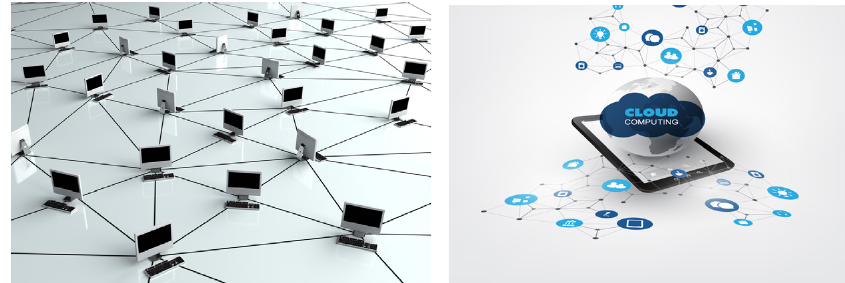
- Grid computing connects multiple computers to a network, giving them the ability to process large volumes of data by coordinating with other networked computers to solve problems together.
- Cloud computing involves using hardware or software located on servers connected to the internet. This allows you to use software or save data without worrying about storage space on your own device.
Advantages of grid computing:
- Helps solve larger, more complex problems in much shorter time periods
- You don't need to purchase more powerful hardware since you can make better use of existing equipment
- If one computer fails, other computers take over the work, making the system very reliable
Disadvantages of grid computing:
- Requires training to make full use of grid computing capabilities
- May need multiple people working together for the grid system to function properly
Advantages of cloud computing:
- Since the cloud platform is managed and updated professionally, it's much more reliable than personal systems
- Can be used from any device capable of connecting to the internet
Disadvantages of cloud computing:
- You may experience downtime if the cloud server undergoes maintenance
- Despite security measures to protect your data, there's always some risk of files being compromised
- You don't have complete control over the platform since it's owned and managed by the service provider
Example
Practical Example: Google Docs vs. Microsoft Word
Traditional approach (Microsoft Word):
- Install software on your computer
- Save documents to your hard drive
- Limited to accessing files from that specific computer
Cloud computing approach (Google Docs):
- Access software through your web browser
- Documents automatically save to Google's servers
- Access your documents from any device with internet connection
- Multiple people can edit the same document simultaneously
Examples of cloud and grid computing:
| Cloud Computing | Grid Computing |
|---|---|
| Amazon Web Services (AWS) | Berkeley Open Infrastructure for Network Computing |
| Microsoft Azure | Advanced Resource Connector |
| Google Cloud Platform | g-EclipseTechnology Project |
In an ideal grid computing system, every resource is shared, transforming a computer network into a powerful supercomputer. With proper user interfaces, accessing a grid computing system would feel no different from using a local computer, but you'd have access to enormous processing power and storage capacity.
Entertainment services
Streaming
Traditional broadcast, cable, and satellite television have supplied news and entertainment to households for many years. However, internet advances have created more diverse entertainment options through streaming services.
Streaming allows you to view live events, series, movies, and sporting events over the internet. This includes streaming to your smartphone, smart television, or computer.
Advantages of streaming:
- You control what you watch and when you want to watch it
- Streams can be paused, rewound, and resumed as you please
- Doesn't require storing shows on your computer, saving storage space
Disadvantages of streaming:
- Requires an active (and fast) internet connection to stream content
- Streaming uses significant amounts of data
- Easy to spend many uninterrupted hours watching series and shows, which can lead to health problems
Note
Examples of streaming services:
- Twitch - streaming platform dedicated to gamers, featuring gaming tournaments and "Let's Play" content
- Netflix - platform dedicated to series and movies, popular for releasing entire seasons at once for binge-watching
- Showmax - platform released in South Africa just before Netflix, offering content not available on Netflix, including local films and series

Government internet services
Government institutions traditionally had long queues where you might wait for hours. Thanks to the internet, many government institutions now offer quick and convenient online solutions. Government internet services allow you to skip queues by using government websites from your home to conduct business, pay bills, and obtain information.
Important
Advantages of government internet services: Government internet services save significant time and effort, which is not their only benefit. Here are other ways these services can make your life easier:
Paying your television licence: You can pay your TV licence online using credit card details, through your online banking website or app using TV licence account details, or visit the EasyPay website for a virtual payment solution.
Electoral information: Living in a democratic country gives you the right to vote for the people you want in charge of your city and country. To participate, you need to know:
- Who the people and parties running for office are
- Whether you're registered to vote
- Where to go to cast your vote
- What the election results were
This information can be obtained from various government websites accessible through the internet, such as the "Elections" website (www.elections.org.za), which you can use to confirm your voter registration.
Submitting tax returns: Tax season can be stressful, especially when SARS offices have long queues. SARS has developed e-filing as a solution.
Example
Electronic Filing (e-filing) Process:
Step 1: Visit the SARS e-filing website (www.sarsefiling.gov.za)
Step 2: Register for an e-filing profile using your ID number
Step 3: Complete your tax return online using the digital forms
Step 4: Submit your return electronically
Step 5: Receive confirmation and track your refund status online
Benefits: Available 24 hours a day, allows you to check your tax status, update your information, and make any required payments from home.
Smart ID and passport applications: Rather than standing in long queues at Home Affairs offices, you can complete online applications, upload supporting documents, make payments, and schedule collection times from a Home Affairs-enabled bank through the eHomeAffairs website.
Online tertiary applications: The Department of Higher Education and Training operates an online Central Applications Clearing House (CACH), open in January and February each year. Students who haven't secured places at tertiary institutions can submit online applications through CACH to receive assistance finding suitable institutions.
Summary
Key Points to Remember:
- Internet services are categorised into communication, information-retrieval, web services, world-wide web, and video conferencing, each transferring specific types of information
- Instant messaging enables real-time communication but removes reflexion time, while VoIP provides cheaper international calling through internet-based voice and video calls
- File management services include FTP for technical file transfers and cloud-based file sharing for easy access across multiple devices and users
- Grid and cloud computing distribute processing and storage across networks, offering greater reliability and power than single computers but requiring internet connectivity
- Streaming services provide on-demand entertainment with user control over viewing but require fast internet connections and use significant data amounts
- Government internet services save time and effort by allowing citizens to complete official tasks online from home