Social Implications: User-Centred Design (Grade 12 NSC Matric Computer Application Technology): Revision Notes
📚Revision Notes
Social Implications: User-Centred Design
What is user-centred design?
User-centred design (UCD) is a design approach that puts the needs and preferences of users at the heart of the development process. Rather than creating software based on what developers think might work, UCD focuses on understanding how real people will actually use the product. This approach helps create software that is more intuitive, accessible, and effective for its intended audience.
Note
The key difference between traditional design and user-centred design is the shift from developer assumptions to actual user research and feedback.
The four-phase UCD process
User-centred design follows a structured four-phase process that repeats in cycles to continuously improve the product. This iterative approach ensures that user feedback is constantly incorporated into the design.
Important
The UCD process is iterative, meaning you can return to any previous phase based on evaluation results. This flexibility is crucial for creating truly user-friendly products.
1. Understand context of use
The first phase involves researching and understanding how users will interact with the product in real-world situations. Designers need to consider:
- Who the users are and what their goals are
- What tasks they need to accomplish
- The environment where they'll use the product
- Any limitations or constraints they face
2. Specify user requirements
Based on the understanding gained in phase one, designers create detailed requirements that outline what the product needs to do to meet user needs. This includes both functional requirements (what the product does) and usability requirements (how easy it is to use).
3. Design solutions
In this phase, designers create prototypes and designs that address the specified requirements. Multiple design options may be explored and tested to find the most effective solution.
4. Evaluate against requirements
The final phase involves testing the design with real users to see how well it meets the original requirements. Based on this evaluation, the process may cycle back to any previous phase for improvements.
The beauty of this process is its flexibility - if evaluation shows that the design doesn't meet user needs, designers can return to earlier phases to make necessary adjustments.
Key advantages of user-centred design
Meeting customers' expectations
When products are designed with users in mind, they're more likely to satisfy customer needs and preferences. This leads to higher customer satisfaction, increased sales, and reduced costs from returns and customer support issues.
Creating safer products
By focusing on how users actually interact with products, UCD helps identify potential safety issues before they become problems. Products can be designed to reduce the risk of user error and misuse.
Reducing training requirements
Products designed using UCD principles are typically more intuitive and user-friendly. This means users require less training to use them effectively, reducing frustration and support costs.
Applying UCD to website design
User-centred design plays a crucial role in creating effective websites. Users need to navigate and find information easily without encountering problems.
Poor website design example

Example
Poor Design Characteristics:
Some websites fail to follow UCD principles, resulting in:
- Cluttered, confusing layouts
- Too much information presented in a disorganised manner
- Overwhelming visual elements that distract users from their goals
Good website design example
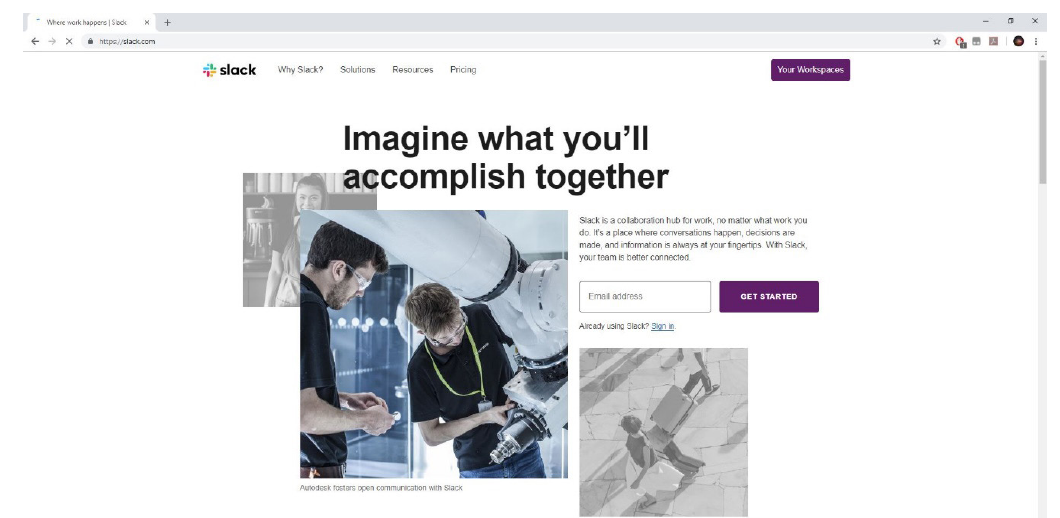
Example
Good Design Characteristics:
Well-designed websites demonstrate UCD principles through:
- Clean, uncluttered layouts
- Clear navigation systems
- Focused content that helps users accomplish their goals efficiently
Key factors for website design
When designing websites using UCD principles, consider these important factors:
Visibility: Information should be clearly visible and easy to find. Important elements shouldn't be hidden or hard to locate.
Accessibility: Websites should be usable by people with different abilities and needs. This includes considerations for users with visual, hearing, or motor impairments.
Legibility: Text should be easy to read with appropriate font sizes, colours, and contrast ratios.
Language: Content should be written in clear, understandable language that matches the target audience's reading level and terminology.
UCD for database design
Note
User-centred design principles apply beyond websites and software interfaces - they're equally important for database design to ensure efficient data entry and retrieval.
User-centred design also improves database interfaces by ensuring users can enter information correctly and efficiently. Consider these factors:
- Purpose of the database: Understanding why users need to store and retrieve information
- Type of data being stored: Ensuring the interface supports the specific data types users work with
- Data fields required: Including all necessary fields while avoiding unnecessary complexity
- Data validation techniques: Implementing checks that prevent errors without frustrating users
UCD for presentations
Note
Even presentations can benefit significantly from user-centred design principles, focusing on the audience's needs rather than the presenter's preferences.
Even presentations benefit from user-centred design principles. Effective presentations should:
- Keep bullet points and text to a minimum to avoid information overload
- Avoid using too many transitions that distract from the content
- Use high-quality images that support rather than distract from the message
- Utilise white space effectively to create clean, uncluttered slides
Summary
Key Points to Remember:
- User-centred design puts user needs first in the development process
- The four-phase process (understand, specify, design, evaluate) creates an iterative cycle of improvement
- UCD leads to products that are safer, more intuitive, and require less training
- Good design principles apply across websites, databases, and presentations
- Always evaluate designs with real users to ensure they meet actual needs rather than assumed requirements