Distance, Area, and Gradient (Grade 12 NSC Matric Geography): Revision Notes
📚Revision Notes
Distance, Area, and Gradient
Introduction to mapwork calculations
In geography examinations, you'll be required to perform various calculations using topographic maps and orthophotos. These calculations help us understand real-world measurements and relationships between different locations on maps. The three main types of calculations you need to master are distance, area, and gradient calculations.
Both topographic maps and orthophotos can be used for these calculations, but they have different scales. The mathematical methods remain the same for both types of maps, but you must use the correct scale conversion factors.
Note
Understanding the difference between topographic maps and orthophotos is crucial for accurate calculations, as each uses different scale conversions that will affect your final answers.
Distance calculations
Understanding distance types
Distance calculations in mapwork can involve two different types of measurements:
- Straight line distance: The direct measurement from one point to another point
- Actual distance: The measurement following a specific path such as a road, railway line, hiking trail, or any curved route
When an exam question asks for "the distance along a road", you need to measure the line as if you were actually walking or driving on that route, following all its curves and bends.
The distance formula
The fundamental formula for converting map measurements to real-world distances is:
This can be written as:
Example
Worked Example: Distance Calculation
Step 1: Measure the map distance using a ruler = 4.2 cm Step 2: Identify the map type (topographic map with 1:50,000 scale) Step 3: Apply the formula: Step 4: Calculate: km
Therefore, the actual distance is 2.1 kilometres.
Method for calculating distance
Follow these steps for accurate distance calculations:
Step 1: Measure the map distance in centimetres using a ruler Step 2: Apply the correct conversion factor based on your map type:
- For topographic maps: multiply the map distance by 0.5 to get kilometres, or by 500 to get metres
- For orthophotos: multiply the map distance by 0.1 to get kilometres, or by 100 to get metres
Scale differences between map types
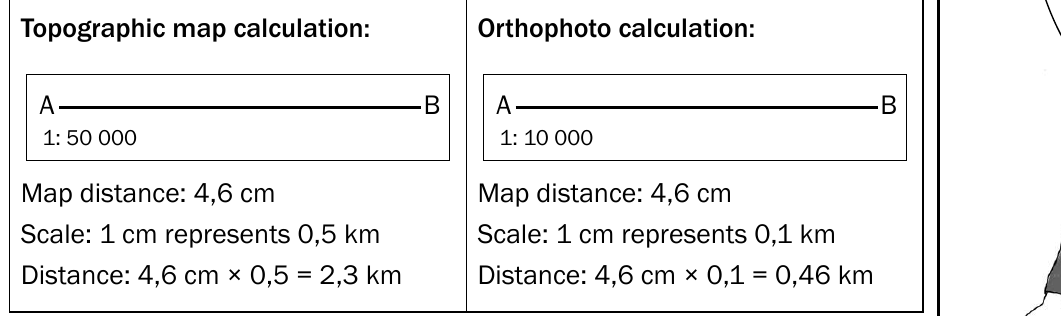
Different map types use different scales, which affects your final calculations:
- Topographic maps typically use a 1:50,000 scale (1 cm represents 0.5 km)
- Orthophotos typically use a 1:10,000 scale (1 cm represents 0.1 km)

Important
Always check the map scale before beginning your calculations, as using the wrong conversion factor will give you incorrect results. This is one of the most common mistakes students make in mapwork calculations.
Area calculations
Understanding area
Area represents the amount of surface space that a two-dimensional shape covers. In mapwork, we calculate area to determine how much land is covered by features like agricultural fields, urban developments, or natural areas.
A two-dimensional shape has both length and breadth dimensions, which we use in our area calculations.
The area formula
The basic formula for calculating rectangular areas is:
This can be written as:
Example
Worked Example: Area Calculation
Step 1: Measure the length = 3.0 cm, convert to km = km
Step 2: Measure the breadth = 2.4 cm, convert to km = km
Step 3: Apply the formula:
Step 4: Calculate: km²
Therefore, the area is 1.8 square kilometres.
Method for calculating area
Follow these systematic steps:
Step 1: Measure the length in centimetres and convert to kilometres or metres Step 2: Measure the breadth in centimetres and convert to kilometres or metres Step 3: Apply the formula Step 4: Express your answer in square kilometres (km²) or square metres (m²)

Note
Remember to always include the area formula in your written answer, as this demonstrates your understanding of the calculation process and can earn you valuable marks.
Gradient calculations
Understanding gradient
Gradient measures the steepness of a slope by examining the relationship between height change and horizontal distance. This calculation helps us understand how steep or gentle a particular slope is on the landscape.
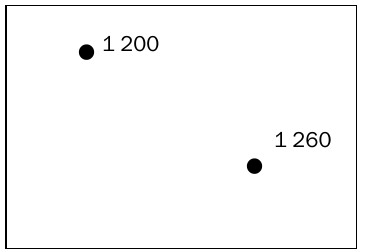
We use gradient calculations to determine the steepness between different elevation points, such as spot heights or contour lines on topographic maps.
The gradient formula
The formula for calculating gradient is:
This can be written as:
Example
Worked Example: Gradient Calculation
Step 1: Calculate height difference = 150m - 90m = 60m
Step 2: Measure horizontal distance = 2.4 cm
Step 3: Convert distance to metres = m
Step 4: Write as ratio = 60:1200
Step 5: Simplify by dividing by height =
Step 6: Final gradient = 1:20
Therefore, the gradient is 1:20.
Method for calculating gradient
Follow these steps for accurate gradient calculations:
Step 1: Calculate the height difference by subtracting the lowest height from the highest height. Express this answer in metres
Step 2: Measure the horizontal distance in centimetres
Step 3: Convert the distance to metres by multiplying by 500 (for topographic maps) or by 100 (for orthophotos)
Step 4: Write both measurements as a ratio
Step 5: Divide both parts of the ratio by the height to get a ratio of 1 to a relative number
Step 6: Express your final answer as the gradient ratio
For example, if you have a height difference of 60 metres and a horizontal distance of 1,200 metres, your calculation would show a gradient of 1:20.
Summary
Key Points to Remember:
- Always write the relevant formula in your answer ( for distance, for area, for gradient) - this earns you marks
- Check whether you're working with a topographic map or orthophoto, as they use different scale conversions
- For distance calculations, distinguish between straight line distance and actual distance along a curved path
- When measuring actual distance, follow the curves of roads or paths rather than drawing straight lines
- Area calculations require you to convert measurements and then multiply length by breadth
- Gradient calculations involve finding height differences and horizontal distances, then expressing them as a ratio