Calculating Elapsed Time (Grade 12 NSC Matric Mathematical Literacy): Revision Notes
📚Revision Notes
Calculating Elapsed Time
What is elapsed time?
Elapsed time (also called duration) is the measurement of how much time has passed between two points. When calculating elapsed time, we work with different units of time such as hours, minutes, and seconds, and we must add these units separately.
Note
The key principle is: always be careful when working with remainders - when minutes exceed 60, we convert them to hours and minutes.
Basic method for calculating elapsed time
When calculating elapsed time, it's essential to follow a systematic approach to avoid common mistakes. The method ensures accuracy and helps you organise your calculations clearly.
Note
Step-by-Step Method:
- Add the hours first
- Add the minutes separately
- Convert any excess minutes (60 minutes = 1 hour)
- Combine your final answer
Example
Worked Example: School Bell Time
Problem: School starts at 07:45. You are in class for 2 hours 30 minutes. What time will the bell ring for first break? Give your answer in 24-hour format.
Solution:
- Start with the hours: 07:00 + 2 hours = 09:00
- Add the minutes: 45 minutes + 30 minutes = 75 minutes
- Convert excess minutes: 75 minutes = 60 minutes + 15 minutes = 1 hour 15 minutes
- Calculate total elapsed time: 09:00 + 1 hour 15 minutes = 10:15
- Answer: The bell will ring at 10:15
Converting between time formats
Understanding how to convert between 12-hour format and 24-hour format is crucial for solving time problems accurately. Each format has specific rules that must be followed carefully.
12-hour format to 24-hour format
Important
Conversion Rule: For p.m. times, add 12 hours (except for 12:00 p.m.)
- Morning times (a.m.): Keep the same
- Afternoon/evening times (p.m.): Add 12 hours
- Exception: 12:00 p.m. stays as 12:00 in 24-hour format
24-hour format to 12-hour format
Rule: For times after 12:00, subtract 12 hours and add p.m.
- Times 00:00 to 11:59: Add a.m.
- Times 12:00 to 23:59: Subtract 12 hours and add p.m.
- Exception: 12:00 becomes 12:00 p.m.
Example
Worked Example: Cooking Dinner
Problem: Palesa starts cooking dinner at 6:00 p.m. She has to leave for choir practice in 1 hour and 45 minutes. (i) What time must she leave? (Give your answer in 12-hour format) (ii) Convert your answer to 24-hour format.
Solution:
(i) Add the time: 6:00 p.m. + 1 hour = 7:00 p.m. Add minutes: 0 minutes + 45 minutes = 45 minutes
Answer: 7:45 p.m.
(ii) Convert to 24-hour format: 7:45 p.m. + 12 hours = 19:45
Answer: 19:45
Working with calendars
Calendars are useful tools that help us track events and plan our time effectively. They provide a visual representation of time over longer periods and are essential for planning and organising activities.
We can use calendars to:
- Calculate the number of days between dates
- Plan ahead for important events
- Convert between days, weeks, and months
Important
Important Calendar Facts
- 4 weeks ≠ 1 month exactly
- 4 weeks = 28 days
- Most months have 30 or 31 days (February has 28 or 29 days)
- When calculating time periods using calendars, count carefully and include all relevant days
Example
Worked Example: Planning with Calendars
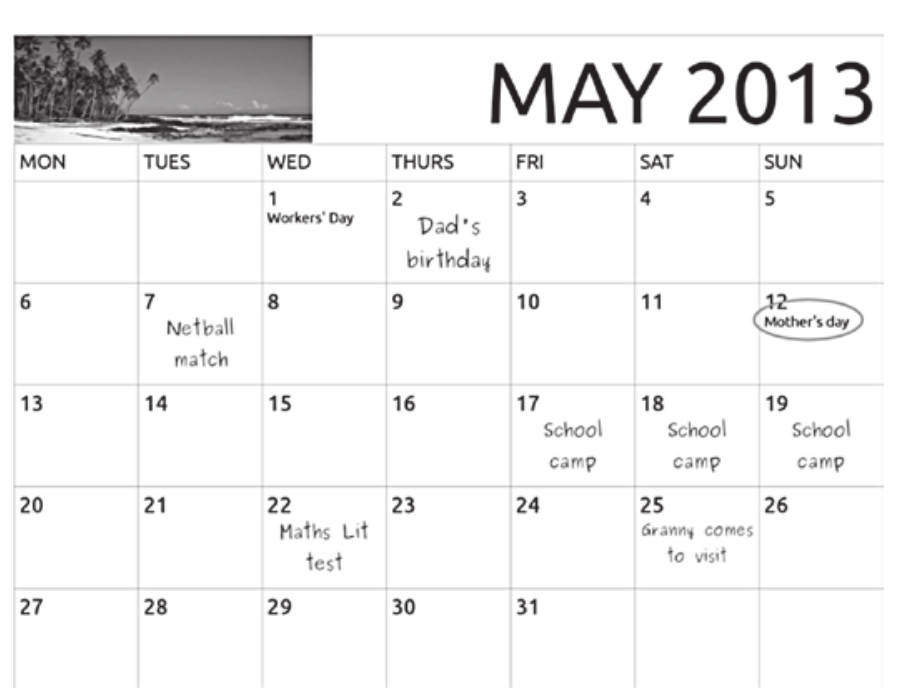
Problem: If it is Monday 6 May, calculate how many days it is until Mother's Day.
Solution: Count the days from May 6 to May 12: May 7, 8, 9, 10, 11, 12 = 6 days Answer: 6 days
Reading and interpreting timetables
Timetables are schedules that help us plan shorter periods of time like hours, days, and weeks. They provide structured information that allows us to organise our daily activities efficiently.
They are commonly used for:
- School subjects and activities
- Television programmes
- Transport schedules
- Daily routines
Example
Worked Example: TV Programme Timing
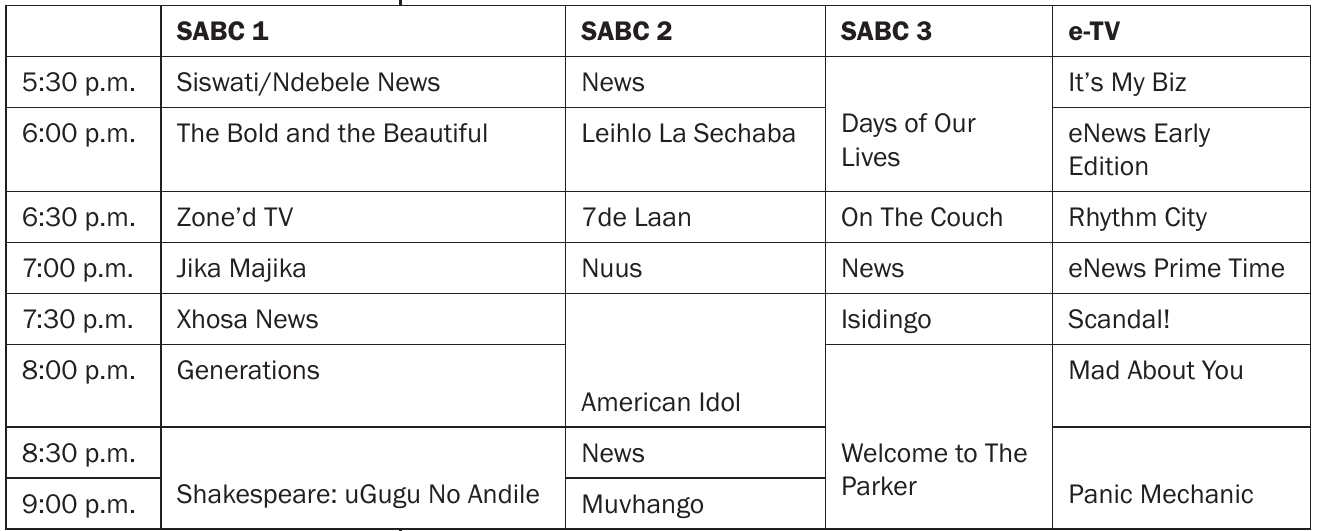
Problem: Look at the TV timetable. What is the difference in time between the English News at 5:30 p.m. and the English News at 8:30 p.m. on SABC 2?
Solution: Calculate the time difference: 8:30 p.m. - 5:30 p.m. = 3 hours
Answer: 3 hours
Creating a personal timetable
When creating your own timetable, follow these guidelines:
- List all your activities with their durations
- Arrange them in a logical time order
- Use clear time formats consistently
- Leave space for breaks and transitions
Note
Example Timetable Format:
| Time | Event |
|---|---|
| 15:30 - 16:30 | Soccer practice |
| 18:00 | Feed dogs and wash dishes |
| 19:00 | Watch news for history assignment |
| 19:30 - 20:15 | Complete Life Orientation task |
Common exam tips and pitfalls
Understanding common mistakes and exam expectations will help you avoid losing marks unnecessarily and demonstrate your knowledge effectively.
Important
Essential Exam Tips:
- Always check your time format - make sure you're using 12-hour or 24-hour format as requested
- Convert excess minutes to hours - remember that 60+ minutes must be converted
- Count calendar days carefully - include start and end days when specified
- Read timetables systematically - check column headings and time intervals
- Show your working clearly - examiners want to see your calculation steps
Typical exam question types
- Basic elapsed time calculations - adding time periods
- Format conversions - between 12-hour and 24-hour formats
- Calendar problems - calculating days/weeks between dates
- Timetable interpretation - finding information from schedules
- Planning scenarios - creating schedules that avoid conflicts
Summary
Key Points to Remember:
- Elapsed time is the measurement of time that has passed between two points
- Always add hours first, then minutes when calculating time differences
- 60 minutes = 1 hour - convert excess minutes to avoid errors
- Use calendars for long-term planning and timetables for daily schedules
- Check your time format - 12-hour uses a.m./p.m., 24-hour uses 00:00 to 23:59