The Reciprocal Transformation (VCE SSCE General Mathematics): Revision Notes
📚Revision Notes
The Reciprocal Transformation
What is a reciprocal transformation?
A reciprocal transformation is a type of stretching transformation used to linearise non-linear data. It works by compressing the upper end of the scale on either the -axis or -axis. This compression is more dramatic than what you get with a logarithmic transformation.
The reciprocal transformation takes a variable and transforms it by calculating its reciprocal (one divided by the variable). For example:
- If you have a variable , the reciprocal transformation gives you
- If you have a variable , the reciprocal transformation gives you
When to use reciprocal transformations
Note
Use reciprocal transformations when you have a curved relationship between two variables that needs to be straightened out so you can fit a linear regression line. You can apply the transformation to either the explanatory variable () or the response variable (), depending on the shape of your data.
How reciprocal transformations work
The transformation
When you apply a reciprocal transformation to the explanatory variable (the -axis):
-
Effect on scale: The transformation compresses larger values relative to smaller values. This compression is stronger than what you'd get with a logarithmic transformation.
-
Straightening curves: This transformation is particularly good at straightening out certain types of curved patterns in scatterplots.
-
Data reversal: An important property to remember is that the transformation reverses the order of your data values. Values of that were less than 1 become greater than 1, and values that were greater than 1 become less than 1. Think of it as flipping the data around the value of 1.
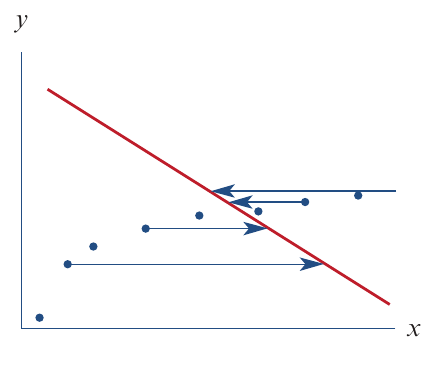
The transformation
When you apply a reciprocal transformation to the response variable (the -axis):
-
Effect on scale: The transformation compresses larger values relative to smaller values.
-
Straightening curves: This transformation straightens out different types of curved patterns compared to the transformation.
-
Data reversal: Just like with , the order of the data values is reversed around the value of 1.
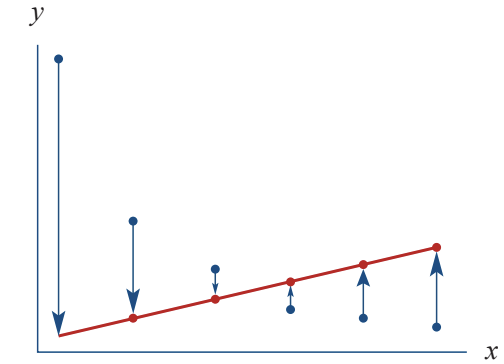
Important
Remember the Reversal Property
Both and transformations reverse the order of data values around 1. This means:
- Values less than 1 become greater than 1
- Values greater than 1 become less than 1
This reversal property is crucial for understanding how the transformation affects your data!
Worked example: Applying the transformation
Let's look at a real-world example to understand how the transformation works.
Context: Ben started a healthy eating and exercise plan and recorded his weekly weight loss over 10 weeks. When we plot this data, we see a curved relationship between the length of the diet and weekly weight loss.
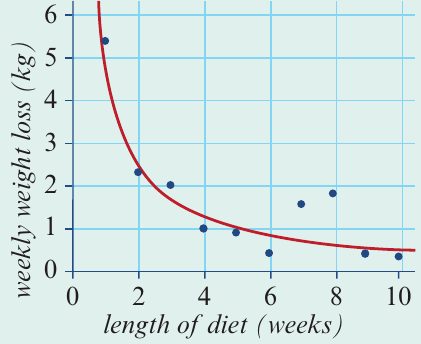
The scatterplot shows a strong negative association, but it's clearly not linear. As the diet continues for more weeks, the weekly weight loss decreases, but the relationship is curved.
Example
Worked Example: Linearising Diet Data
Step 1: Apply the reciprocal transformation
To linearise this data, we transform the explanatory variable (length of diet) by calculating for each data point.
After applying this transformation, the new scatterplot plots weekly weight loss against :
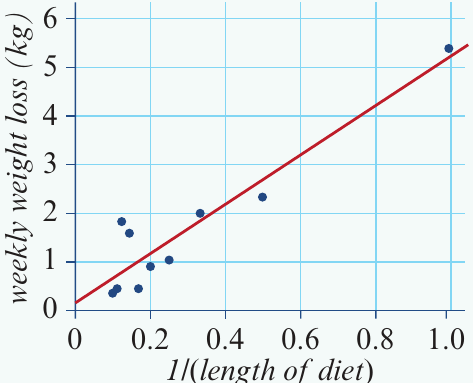
Notice how the data points now form a much straighter pattern! The transformation has successfully linearised the relationship.
Step 2: Fit a least squares regression line
Now that the data is linear, we can fit a least squares regression line. For this example, the equation is:
Step 3: Make predictions
We can use this equation to make predictions. For example, to predict the weight loss in week 11:
Notice how we substitute the original value (week 11) directly into the equation, not its reciprocal.
Worked example: Applying the transformation
Now let's see how the transformation works with a different example.
Context: A homeware company makes rectangular sticky labels with various lengths and widths. The table below shows the dimensions of eight different labels:
| Length (cm) | 6.8 | 5.6 | 4.6 | 4.2 | 3.5 | 4.0 | 5.0 | 5.5 |
|---|---|---|---|---|---|---|---|---|
| Width (cm) | 1.8 | 2.0 | 2.5 | 3.0 | 3.5 | 2.6 | 2.0 | 1.9 |
When we plot width against length, we see a curved relationship:
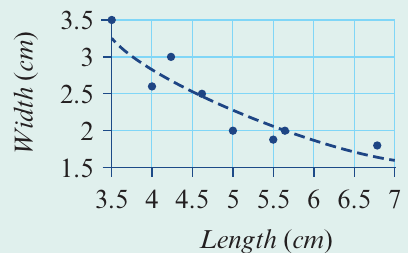
There's a strong negative association, but it's clearly non-linear.
Example
Worked Example: Linearising Sticky Label Data
Step 1: Apply the reciprocal transformation
This time, we transform the response variable (width) by calculating for each data point.
After applying this transformation, we plot against length:
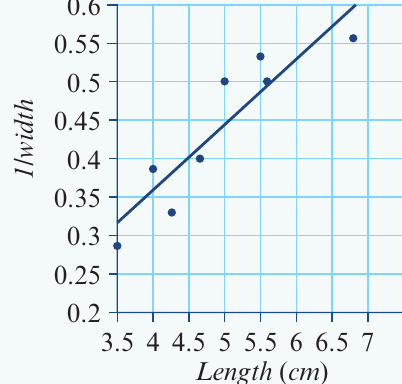
The relationship is now linear!
Step 2: Fit a least squares regression line
The equation of the least squares line fitted to the transformed data is:
Step 3: Make predictions
To predict the width of a sticky label that is 5 cm long:
First, substitute into the equation:
Then, to find the actual width, take the reciprocal of both sides:
Important
Critical Step: Back-Transformation Required!
When you transform the response variable (), you must back-transform your prediction to get the answer in the original units. This means taking the reciprocal of your calculated value.
Forgetting this step is a common mistake that will cost you marks in exams!
Key differences between and transformations
Understanding which transformation to use is important:
Note
Use transformation when:
- The curve in your scatterplot bends in a particular way where larger values need to be compressed
- You can substitute directly into the equation without back-transformation
Use transformation when:
- The curve in your scatterplot requires compression of larger values
- You need to remember to back-transform (take the reciprocal) of your final answer
Exam tips
Note
Essential Exam Tips
-
Check the shape of the curve: Look carefully at your scatterplot to decide whether you need to transform or .
-
Remember the back-transformation: If you transform , you must take the reciprocal of your calculated value to get the final answer in the original units.
-
Show your working: Always write out each step clearly, especially when back-transforming.
-
Use correct units: Make sure your final answer has the appropriate units from the original data.
-
Understand the reversal effect: Remember that reciprocal transformations reverse the order of data values around 1. This can help you check if your transformation makes sense.
Summary
Summary
Key Points to Remember:
-
Reciprocal transformations compress the upper end of the scale on either the -axis or -axis, providing stronger compression than logarithmic transformations.
-
The transformation compresses larger values and reverses the data order. You can use the transformed equation directly for predictions.
-
The transformation compresses larger values and reverses the data order. You must back-transform predictions by taking the reciprocal to get the final answer.
-
Both transformations are used to linearise curved data so that a least squares regression line can be fitted and used for predictions.
-
Always check your scatterplot after transformation to ensure the relationship has become linear before fitting a regression line.