Substitution of Values Into a Formula and Constructing a Table of Values (VCE SSCE General Mathematics): Revision Notes
📚Revision Notes
Substitution of Values Into a Formula and Constructing a Table of Values
What is a formula?
A formula is a mathematical relationship that connects two or more variables. Variables are letters that represent values that can change or are unknown.
Common examples of formulas include:
- relates the cost ( dollars) of hiring a plumber for hours
- finds the perimeter of a square, where is the perimeter and is the side length
Understanding formulas is essential because they allow us to calculate unknown values when we know some of the other variables in the relationship.
Note
Formulas are powerful tools in mathematics and real-world applications. They provide a systematic way to calculate values based on known information, making them invaluable in fields ranging from engineering to finance to everyday problem-solving.
Substituting values into a formula
When we substitute values into a formula, we replace the known variables with their numerical values to find the unknown variable. This process involves careful calculation and attention to the order of operations.
Steps for substitution
Follow these steps when working with formulas:
- Write down the formula you are using
- Substitute the known values into the formula
- Evaluate the expression using the correct order of operations
- Write your answer with appropriate units
Important
Common Mistake to Avoid: Many students forget to use the proper order of operations (BODMAS/PEMDAS) when evaluating formulas. Always remember:
- Brackets/Parentheses
- Orders/Exponents
- Division and Multiplication (left to right)
- Addition and Subtraction (left to right)
Worked example: Windsurfer hire
A windsurfer rental company charges according to the formula:
where is the cost in dollars and is the time in hours. Let's calculate the cost of hiring a windsurfer for hours.
Example
Worked Example: Calculating Windsurfer Hire Cost
Step 1: Write the formula
Step 2: Substitute into the formula
Step 3: Evaluate
Step 4: Write the answer
It will cost $90 for a 2-hour hire.
Important
Exam Tip: Always check that you've substituted into the correct variable and used the proper order of operations (BODMAS/PEMDAS).
Worked example: Perimeter with π
The perimeter of this compound shape can be calculated using the formula:
where is the length of the rectangle and is the height. Find the perimeter to one decimal place if cm and cm.
Note
About π (pi): (pi) is the ratio of the circumference of any circle to its diameter. It is an irrational number approximately equal to . Calculators have a special π key for accurate calculations.
Example
Worked Example: Finding the Perimeter with π
Step 1: Write the formula
Step 2: Substitute and into the formula
Step 3: Evaluate
Step 4: Give the answer with correct units
The perimeter is cm.
Important
Exam Tip: When working with π, use the calculator's π button rather than typing 3.14 to ensure accuracy in your final answer.
Constructing a table of values
A table of values displays the relationship between variables in an organized format. We can create these tables by repeatedly substituting different values into a formula.
Creating tables by hand
To construct a table of values manually:
- Set up a table with rows for each variable
- Choose appropriate values for the independent variable
- Substitute each value into the formula
- Calculate and record the corresponding output values
Note
Creating tables by hand helps you understand the relationship between variables and develops your calculation skills. While technology can automate this process, understanding the manual method is crucial for developing mathematical intuition.
Worked example: Temperature conversion
The formula for converting degrees Celsius to degrees Fahrenheit is:
Let's construct a table of values for using values of in intervals of between and .
Example
Worked Example: Creating a Temperature Conversion Table
Method:
We substitute each value of into the formula to find the corresponding value:
If :
If :
Continue this process for all values.
Complete table:
| C | 0 | 10 | 20 | 30 | 40 | 50 | 60 | 70 | 80 | 90 | 100 |
|---|---|---|---|---|---|---|---|---|---|---|---|
| F | 32 | 50 | 68 | 86 | 104 | 122 | 140 | 158 | 176 | 194 | 212 |
Using technology to create tables
Modern calculators can automate the process of creating tables of values, saving time and reducing calculation errors.
Using the TI-Nspire calculator
To create a table of values on the TI-Nspire:
- Start a new document and select Add Lists & Spreadsheet
- Name your columns (lists) appropriately - for example, 'c' for Celsius and 'f' for Fahrenheit
- Enter your input values in the first column
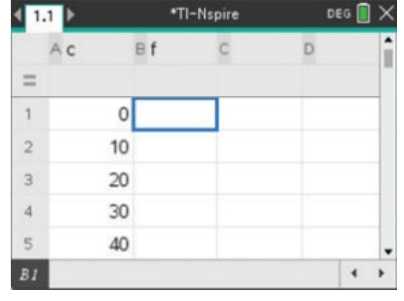
- In the formula cell of the second column, type your formula (e.g., = 9 ÷ 5 × c + 32)
- Press enter to calculate all values automatically
Note
Helpful Hint: When typing variable names like 'c', you may need to select 'Variable Reference' when prompted, or press the var key to avoid confusion with column names.
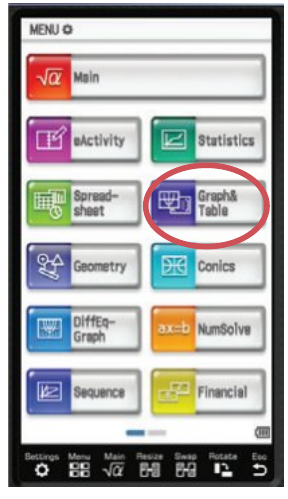
Using the ClassPad calculator
To create a table of values on the ClassPad:
- Open the Graph & Table application from the menu
- Enter your formula next to y1= (for example: )
- Tap the Table Input icon to set your starting value, ending value, and step size
- Tap the table icon to display the complete table of values
Note
In the Graph & Table application, y1 represents your output variable (like ) and x represents your input variable (like ).
Summary
Key Points to Remember:
- A formula is a mathematical relationship connecting two or more variables
- Substitution means replacing variables with known numerical values
- Always follow the correct order of operations (BODMAS/PEMDAS) when evaluating formulas
- Include appropriate units in your final answer
- A table of values organizes the relationship between variables systematically
- Technology can automate table creation, but understanding the manual process is essential for learning