Determining Normal Probabilities (VCE SSCE Mathematical Methods): Revision Notes
📚Revision Notes
Determining Normal Probabilities
Introduction to calculator methods
A CAS calculator is an essential tool for finding probabilities associated with normal distributions. While we can easily calculate probabilities for values that are exactly one, two, or three standard deviations from the mean, calculators allow us to work with any range of values.
Note
Mastering calculator functions for normal distributions is crucial for efficiently solving probability problems in exams and real-world applications. These tools eliminate the need for manual table lookups and complex calculations.
The calculator has two main functions for working with normal distributions:
Normal CDF (Cumulative Distribution Function): This calculates the probability that a random variable falls within a specified range.
Inverse Normal: This works backwards from a probability to find the corresponding value (percentile).
The examples below demonstrate these functions using the standard normal distribution, but the same procedures apply to any normal distribution by entering the appropriate values for mean () and standard deviation ().
Finding probabilities using normal CDF
The Normal CDF function calculates probabilities by finding the area under the normal curve between two values.
Example
Worked Example: Finding probabilities with standard normal distribution
Suppose that is a standard normal random variable (with mean and standard deviation ). Find:
a)
b)
Solution:
Part a:
To find this probability using your calculator:
Access the Normal CDF function through the probability menu:
- On TI-Nspire: menu > Probability > Distributions > Normal Cdf
- On Casio ClassPad: Interactive > Distribution > Continuous > normCDf (or use Statistics > Calc > Distribution > Normal CD)
Enter the values:
- Lower Bound:
- Upper Bound:
- Mean ():
- Standard deviation ():
Part b:
For a right-tail probability (values greater than a certain point):
Enter the values:
- Lower Bound:
- Upper Bound: (use the infinity symbol from your calculator)
- Mean ():
- Standard deviation ():
Note
You can type the command directly if you prefer. For example: normCdf(-1, 2.5, 0, 1). The commands are not case sensitive.
Finding percentiles using inverse normal
The inverse normal function is used to find values when you know the probability. This is particularly useful for finding percentiles.
A percentile is a value below which a certain percentage of observations fall. For example, the 95th percentile is the value below which 95% of observations lie.
Example
Worked Example: Finding a percentile
Suppose is normally distributed with mean and standard deviation .
Find such that .
Solution:
We need to find the value that has 95% of the distribution below it (the 95th percentile).
Access the Inverse Normal function:
- On TI-Nspire: menu > Probability > Distributions > Inverse Normal
- On Casio ClassPad: Interactive > Distribution > Inverse > InvNormCDf (or use Statistics > Calc > Inv. Distribution > Inverse Normal CD)
Enter the values:
- Area (probability):
- Mean ():
- Standard deviation ():
For the Casio ClassPad, set the 'Tail setting' to 'Left' to indicate that 95% of the area lies to the left of the value we're finding.
The value of is 109.869.
This means that 95% of the values in this distribution are below 109.869.
Note
The command can be entered directly as: invNorm(0.95, 100, 6)
Finding symmetric intervals with equal tail areas
Sometimes we need to find an interval that contains a specific percentage of the distribution. By convention, we choose the interval that leaves equal areas in each tail.
Important
Equal Tail Areas Convention
When finding a symmetric interval containing a specified probability, we always use the convention of leaving equal areas in each tail. This standardized approach is fundamental for confidence intervals and hypothesis testing.
Example
Worked Example: Finding a symmetric interval
Suppose is normally distributed with mean and standard deviation .
Find and such that .
Solution:
There are infinitely many intervals that could enclose 95% of the distribution. However, we use the convention of choosing the interval that leaves equal areas in each tail.
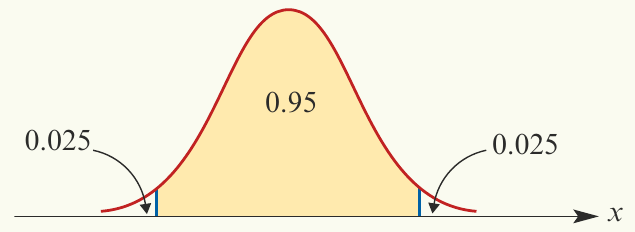
If 95% of the distribution is in the middle, then 5% is split equally between the two tails:
- Left tail area: 0.025 (2.5%)
- Central area: 0.95 (95%)
- Right tail area: 0.025 (2.5%)
Finding (lower bound):
Use the inverse normal function with area = :
Finding (upper bound):
Use the inverse normal function with area = (this is ):
Therefore, the interval (88.240, 111.760) contains 95% of the distribution, with 2.5% in each tail.
Important
Exam tip: When finding symmetric intervals, always calculate the cumulative probabilities carefully. For , use the left tail area. For , use minus the right tail area (or equivalently, the left tail area plus the central area).
Symmetry properties of normal distributions
The normal distribution is perfectly symmetric about its mean. This symmetry allows us to simplify many probability calculations.
For the standard normal distribution (where and ), we can use these properties:
Important
Three Key Symmetry Properties
Property 1: Complement rule
The probability of being above a value equals one minus the probability of being at or below that value.
Property 2: Symmetry about the mean
The probability of being below equals the probability of being above (mirror image about the mean).
Property 3: Symmetric intervals
This can also be written as:
The probability within a symmetric interval equals one minus twice the tail probability.
Using symmetry properties
These properties are particularly useful when:
- You need to find a left-tail probability but only have right-tail values
- You want to check your calculator answers
- You're working with symmetric intervals
Example
Worked Example: Using symmetry
If , then:
- (using Property 1)
- (using Property 2)
- (using Property 3)
Summary
Key Points to Remember:
-
Normal CDF calculates probabilities (areas under the curve) when you know the values. Use it to find .
-
Inverse Normal finds values (percentiles) when you know the probability. Use it to find the value such that .
-
For symmetric intervals containing a specified probability, always leave equal areas in both tails. If the central area is 95%, each tail contains 2.5%.
-
The symmetry of the normal distribution means that probabilities on opposite sides of the mean are equal, which can simplify calculations.
-
Always specify the correct parameters: mean () and standard deviation () for any normal distribution. The standard normal distribution has and .