Communication Basics (AQA A-Level Computer Science): Revision Notes
📚Revision Notes
Communication Basics
Introduction to communication in computing
Communication is fundamental to how computers work. Inside a computer, different components need to exchange information constantly - the processor needs to communicate with memory, the hard disk needs to send data to the processor, and input devices like keyboards and mice need to transmit user actions. This internal communication happens through the transmission of data and instructions.
Beyond individual computers, communication also occurs between different computers and peripheral devices across local and global networks, including the Internet. Understanding how data moves between devices and across networks is essential for grasping how modern computing systems function.
Data can travel through various transmission media. You might use physical cables of different types, or wireless connections such as microwave links for mobile devices and Wi-Fi. Regardless of the medium, data is transmitted as a series of signals. These signals represent binary codes, which in turn can represent text, numbers, sound, images, or any other type of information a computer processes.
Note
A key concept to understand is the difference between analogue and digital transmission. Most modern communication methods involve converting between these two forms. Data might be transmitted in digital form (as distinct on/off signals) or modulated into analogue waves (continuous signals that vary in frequency or amplitude).
Serial and parallel transmission
There are two fundamental methods for transmitting data: serial and parallel transmission. Understanding the difference between these approaches is important because each has specific uses and trade-offs.
Serial transmission
Serial transmission sends data one bit at a time in sequence down a single wire. Think of it like cars travelling along a single-lane road - they must go one after another.
Serial connections are commonly used to connect peripheral devices to computers. For example, your mouse and keyboard use serial connections to send information to the computer. Serial cables are also used to connect computers together to form networks.
The transmission speed depends on the type of cable being used. Modern serial connections like USB (Universal Serial Bus) are surprisingly fast despite being serial. For instance, USB 3.0 can achieve transmission rates of up to 1 Gbps (1000 million bits per second), making it a high-speed serial connection that's sufficient for connecting many peripheral devices to your computer.
Parallel transmission
Parallel transmission sends multiple bits simultaneously using multiple wires. Imagine a multi-lane motorway where several cars can travel side by side at the same time - that's how parallel transmission works.
The key advantage is speed: the more wires you have available, the more data can be transmitted in one go. Inside your computer, parallel connections are commonly used for critical high-speed links. For example, a 32-bit parallel connection might link the processor and memory, allowing 32 bits to be transferred simultaneously.
Note
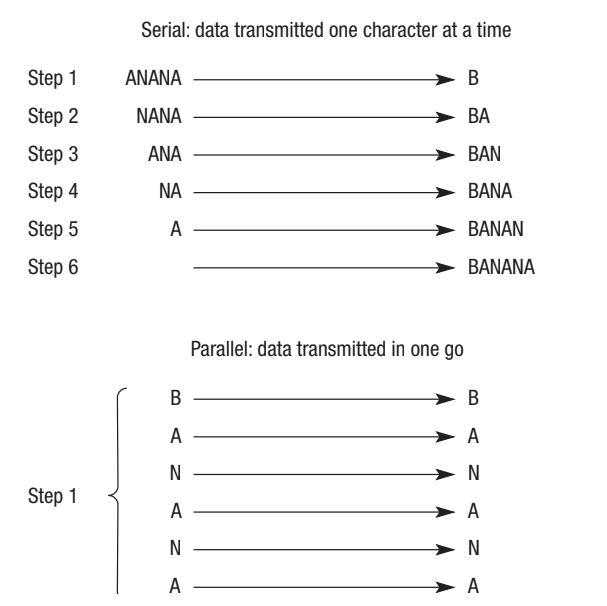
The diagram above illustrates the difference between serial and parallel transmission using the word "BANANA" as an example. In serial transmission, each character is sent one at a time in sequence, taking six steps. In parallel transmission, all six characters can be sent simultaneously in a single step.
Trade-offs between serial and parallel
Whilst parallel transmission is faster for sending multiple bits, it comes with significant disadvantages:
Important
Cost: Parallel cables require more wires, making them more expensive to produce than serial cables. If you need to transmit 32 bits in parallel, you need at least 32 separate wires.
Signal degradation: The electrical signals degrade over distance and at higher speeds. With multiple wires running in parallel, interference can occur between the lines, corrupting the data.
Synchronisation challenges: A major problem with parallel transmission is ensuring that all the bits arrive at the destination at exactly the same time and in the correct sequence. This timing coordination is called synchronisation, and it becomes increasingly difficult as the number of wires increases. If the bits don't arrive together, the data will be corrupted.
Because of these challenges, serial transmission is often preferred for longer distances and connections between separate devices, whilst parallel transmission is used for short, high-speed connections inside the computer where precise synchronisation can be maintained.
Bandwidth
When we talk about the capacity of a communication channel, we use the term bandwidth. Bandwidth describes the range of frequencies that can be carried on the carrier wave used for data transmission.
Bandwidth is measured in hertz (Hz), which represents cycles per second. The range is calculated as the difference between the upper and lower frequencies available. As the range of frequencies increases, more data can be transmitted within the same time period.
Note
Think of bandwidth like the width of a pipe: a wider pipe allows more water to flow through it. Similarly, greater bandwidth allows more data to flow through a communication channel.
For example, network cabling might have a bandwidth of 500 MHz, meaning there are 500 million cycles per second available. As the number of cycles increases, more data can be carried.
Like many aspects of computing, bandwidth has increased significantly over time. Modern communication channels can transmit data much more quickly than older technology, and this improvement continues with each passing year.
Important
It's important to understand that bandwidth represents the capacity of the channel - it's about what the channel is theoretically capable of carrying, rather than what's actually being transmitted at any given moment.
Bit rate
Whilst bandwidth describes the capacity of a channel, bit rate tells us the actual speed at which data is being transmitted over that channel.
Bit rate is measured in bits per second (bps). This measurement tells you how many bits of data are actually being transferred each second during transmission.
Bit rate is closely related to bandwidth, but they're not the same thing. Bandwidth represents the frequencies available and therefore the theoretical capacity. Bit rate represents the actual speed of data transfer. You can think of it this way: bandwidth is like the size of the pipe, whilst bit rate is like the actual flow of water through that pipe.
Important
The bit rate that can be achieved is directly proportional to the available bandwidth. The more bandwidth you have, the higher the bit rate you can achieve. However, the actual bit rate may be limited by other factors even when bandwidth is available.
Key distinction: Bandwidth describes the range of frequencies that can be transmitted (measured in Hz), whilst bit rate describes the actual number of bits being transferred per unit of time (measured in bps).
Baud rate
Baud rate is another way to measure transmission speed, but it's different from bit rate in an important way.
Baud rate measures the number of electronic state changes per second. Each state change is called a "baud". An electronic state change could be a change in frequency of the carrier wave, a change in voltage, a change in amplitude, or a shift in the waveform.
Traditionally, one bit was sent with each state change, which meant that one baud roughly equated to one bit per second. However, modern transmission methods can be more efficient than this. It's possible to send more than one bit per state change by using different voltage levels to represent groups of bits.
Example
Encoding Multiple Bits per Symbol
Instead of just having two states (high voltage = 1, low voltage = 0), you could use four different voltage levels to represent the symbols "00", "01", "10", and "11". In this case, each state change (each baud) carries two bits of data.
If 4 bits were encoded into each symbol, the data would be transferred in a quarter of the time compared to sending one bit per state change, assuming the baud rate stays constant.
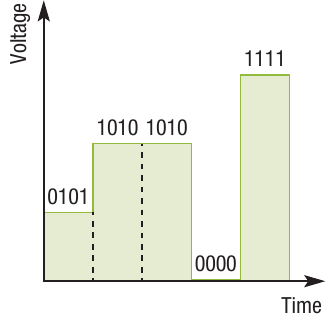
The diagram above shows how different voltage levels can represent different bit patterns. At each time interval (each electronic state change), a different combination of bits is transmitted based on the voltage level.
Note
The concept of baud rate originated in the late 1800s for use on telegraph machines, long before computers became widespread. This historical context explains why the term persists, even though it's now more common to quote transmission speeds in bits per second, which is generally easier to understand.
Important
Key point: Baud rate measures state changes per second, whilst bit rate measures bits per second. When multiple bits are encoded per state change, the bit rate will be higher than the baud rate.
Latency
Latency refers to time delays that occur during the transmission of data between devices. Even though data travels very quickly, there are still tiny delays at various stages of the communication process.
When you press a key on your keyboard, there's a latency of fractions of a microsecond as the signal travels down the cable, through the buses and registers in the processor, and along another cable to the screen. These delays are so brief that you typically won't notice them.
However, when using the Internet, latency becomes more noticeable. The data must pass through many more connections and components, which increases the total delay. Even if you have a high-speed connection, you might experience noticeable latency due to the number of devices and networks your data must travel through.
Three causes of latency
There are three main types of latency that affect data transmission:
Note
1. Propagation latency: This is the time it takes for a signal to travel through the physical medium. Even at the speed of light, signals take time to travel along cables or through the air. Logic gates within circuits also introduce tiny propagation delays.
2. Transmission latency: This is the time it takes for data to pass through a particular communication medium. For example, fibre optic cables have lower transmission latency than copper cables because light signals travel faster and with less interference than electrical signals.
3. Processing latency: This is the time it takes for data to pass through network devices such as servers, routers, and switches. The more devices your data must pass through, the greater the processing latency. Each device must receive, process, and forward the data, which takes time.
Ping tests and latency
You might be familiar with ping tests, which are often used to measure the performance of Internet connections. A ping test works by sending a small data packet to another point on the network and measuring how long it takes to receive a response.
Note
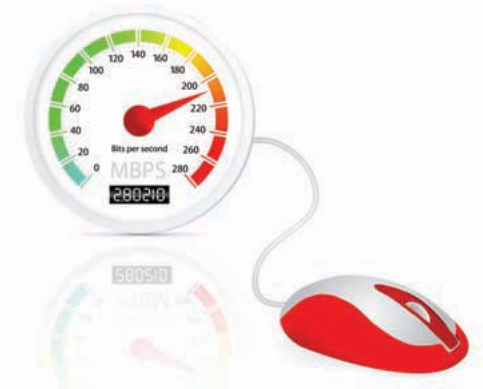
Even if you have a notional connection speed of 8 Mbps, you might only be getting 4 Mbps in practice. Part of this reduction can be attributed to latency - the various delays that occur as data travels to its destination and back again. The ping test helps identify how much latency is affecting your connection.
Important
Latency is particularly important for applications that require real-time responses, such as online gaming, video calls, or remote control systems. High latency can make these applications feel sluggish even when bandwidth is adequate.
Synchronous and asynchronous data transmission
Devices must coordinate their transmission and reception of data to avoid errors. There are two main approaches to this coordination: synchronous and asynchronous transmission.
Synchronous transmission
The word "synchronous" means "occurring at the same time" or "having the same speed". In the context of data transmission, synchronous communication means that the two devices synchronise their transmission signals to stay in time with each other.
Using the system clock, the sending device controls the transmission rate to stay in time with the receiving device. If the two devices don't maintain synchronisation, data could be lost during transmission.
Once the devices are synchronised, they can continuously send and receive data without needing any additional coordination information. The shared timing means both devices know when to expect data.
Note
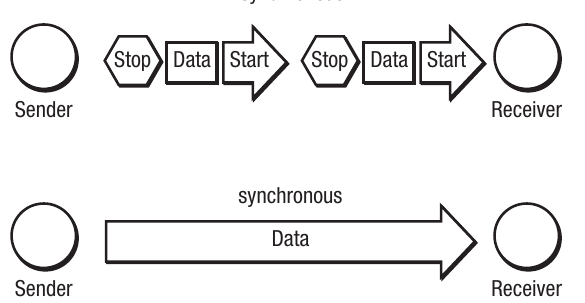
The diagram above compares asynchronous and synchronous transmission. Notice that synchronous transmission (shown at the bottom) has a simpler, continuous flow of data without the need for start and stop signals between each data unit.
Asynchronous transmission
Asynchronous transmission takes a different approach. Instead of requiring the sender and receiver to maintain permanent synchronisation using their system clocks, asynchronous transmission only synchronises for the duration of each data unit being transmitted.
This is achieved by sending additional control bits with the data: start bits and stop bits.
How asynchronous transmission works:
When sending a character (which typically requires 8 bits), asynchronous transmission adds extra bits to create a complete data frame:
- Start bit: A special bit is sent at the beginning to signal that data is about to arrive. This causes the receiver to synchronise its clock with the sender's clock just for this transmission.
- Data bits: The actual data (commonly 7 or 8 bits) is then transmitted.
- Parity bit (optional): An additional bit used for basic error checking may be included.
- Stop bit: A special bit is sent at the end to signal that the data unit is complete.
Note
The start bit serves multiple purposes. It tells the receiver to synchronise its clock with the sender, and both devices must have agreed beforehand on several parameters: how many data bits will follow (usually 7 or 8), whether a parity bit is being used and what type, and how many stop bits to expect.
Once the stop bit arrives, the processor on the receiving device can process the received data (for example, by copying it into memory). The stop bit also allows the receiver to identify when the next start bit arrives, as stop and start bits always have different values.
Advantages of asynchronous transmission:
The sender's device can transmit data as soon as it's available, rather than waiting for a clock pulse or synchronisation signal from the receiving device. This makes asynchronous transmission well-suited for situations where data is generated at irregular intervals, such as keyboard input.
Important
Disadvantage of asynchronous transmission:
To send an 8-bit character requires an 11-bit code (1 start bit + 8 data bits + 1 parity bit + 1 stop bit). This means only 8 out of 11 bits carry actual data - the other 3 bits are overhead used for coordination. This reduces the effective data transfer rate within a given time frame. Transfer rates are measured in bits per second, so these additional control bits reduce efficiency.
With synchronous data transmission, all 11 bits could be used for actual data, making it more efficient for continuous data streams.
Protocols
One of the biggest challenges in computer communications is enabling different computers, networks, and peripheral devices to communicate with each other effectively.
Consider the complexity of accessing a website: your mouse must transmit data to the serial port, the processor must communicate with the router, the router must transmit data over the telephone system (probably via satellite) to your Internet Service Provider, and so on. Many different transmissions occur, involving different manufacturers' hardware and different methods of sending data.
Why protocols are necessary
With so many different hardware manufacturers and methods of transmitting data, it's essential to have agreed standards. Think of protocols like the way people from different countries communicate. We all have our own languages and customs, but when we interact, we agree on common rules of communication - perhaps speaking the same language or following certain social conventions.
Note
Protocols serve the same purpose for computers. They are sets of rules that define how transmission should take place. These rules ensure that different systems can understand each other.
Common protocols
A protocol is a set of rules that define aspects such as:
- The format in which data should be transmitted
- How different items of data are identified
- How devices should signal the start and end of transmissions
- How errors should be detected and handled
If you've used the Internet, you've already encountered several important protocols:
Note
TCP/IP (Transmission Control Protocol/Internet Protocol): This is actually two protocols that work together and are usually referred to as one. TCP/IP provides the set of rules that govern how data is transmitted around the Internet. Data sent across the Internet is divided into small units called packets. TCP/IP handles the routing and reassembly of these packets, ensuring that data reaches its destination correctly.
Note
HTTP (Hypertext Transfer Protocol): You may have seen "http://" at the beginning of web addresses (for example, http://www.aqa.org.uk), though modern browsers often hide this. HTTP is the protocol that governs how different types of files that make up web pages are exchanged and displayed. It defines the rules for requesting web pages from servers and transferring the multimedia content (text, images, videos) that makes up those pages.
Note
FTP (File Transfer Protocol): This protocol is similar to HTTP but is specifically designed for transferring files across the Internet. FTP is commonly used when you need to download program files or when you create a web page and need to upload it to your Internet Service Provider's server. It provides rules for how files should be requested, uploaded, and downloaded.
These protocols ensure that when you request a web page, the web server knows how to send it to you, your browser knows how to interpret what it receives, and all the data arrives in the correct format.
Remember!
Summary
Key Points to Remember:
-
Serial transmission sends data one bit at a time down a single wire, making it cost-effective and suitable for connections between devices. Parallel transmission sends multiple bits simultaneously using multiple wires, making it faster but more expensive and prone to synchronisation issues.
-
Bandwidth measures the capacity of a communication channel (in hertz), representing the range of frequencies available. Bit rate measures the actual transmission speed (in bits per second). Bit rate is directly proportional to bandwidth, but they measure different things.
-
Baud rate measures electronic state changes per second, which is different from bit rate. Modern systems can encode multiple bits per state change, meaning bit rate can be higher than baud rate.
-
Latency is the delay in data transmission caused by three main factors: propagation latency (time for signals to travel through the medium), transmission latency (time to pass through specific media like cables), and processing latency (time to pass through network devices like routers and servers).
-
Asynchronous transmission uses start bits and stop bits to coordinate data transfer without requiring devices to share a synchronised clock, allowing data to be sent whenever it's available. Synchronous transmission requires devices to maintain synchronised clocks, enabling continuous data flow without start/stop bits, making it more efficient for sustained data transfer.