Structured Query Language (SQL) (AQA A-Level Computer Science): Revision Notes
📚Revision Notes
Structured Query Language (SQL)
Introduction to SQL
Structured Query Language (SQL) is a specialised programming language designed for managing and manipulating relational databases. It allows you to perform a wide range of operations on database tables, including creating structures, inserting data, updating records, deleting information, and retrieving specific data through queries.
SQL is widely used across different database systems because it provides a standardised way to interact with data. Rather than using graphical interfaces, SQL works by typing commands in lines of code, giving you precise control over database operations. This makes it an essential skill for anyone working with databases in professional settings.
Note
Key SQL Operations
The fundamental operations you can perform with SQL include:
- Defining structures: Creating tables with specified attributes and data types
- Manipulating data: Adding, modifying, and removing records
- Querying data: Searching for and retrieving specific information
- Controlling access: Managing who can view or modify the database
Defining a table
When creating a new table in a database, you need to specify the table's name along with its structure. The structure includes each attribute (column) with its name, data type, and maximum length where applicable. This process is accomplished through the CREATE TABLE command.
Example
Basic Table Definition Syntax
CREATE TABLE Customer
(
CustomerID varchar (5),
CustomerName varchar (255),
CustomerAddress varchar (255),
PRIMARY KEY (CustomerID)
);
This example demonstrates several important elements:
- Each attribute is defined with its data type and length in parentheses
- The PRIMARY KEY constraint identifies which field uniquely identifies each record
- You can assign the primary key from existing attributes rather than creating a new one
SQL data types
Understanding data types is crucial because they determine what kind of information can be stored in each field and how much space it will occupy. Here are the main data types you'll encounter:
Each data type serves a specific purpose:
- Character(n) stores text of exactly n characters, padding with spaces if necessary
- Varchar(n) stores variable-length text up to n characters, which is more space-efficient
- Boolean stores only True or False values, useful for yes/no situations
- Int stores whole numbers without decimal places
- Decimal(p,s) stores decimal numbers where p is the total number of digits and s is how many are after the decimal point
- Real stores floating-point numbers with up to 7 decimal places
- Date stores calendar dates in day, month, year format
- Time stores time values in hour, minutes, seconds format
Important
Choosing the Right Data Type
Selecting the appropriate data type is essential for:
- Maintaining data integrity - ensuring only valid data can be stored
- Optimising storage space - using efficient data types saves memory
- Improving query performance - appropriate types speed up operations
For instance, using varchar instead of character for names saves space since names vary in length.
Entering and updating data
Inserting new records
To add data to a table, you use the INSERT INTO statement. You must specify which table you're adding to and which columns you're filling.
Example
Inserting Data with Column Names
INSERT INTO Customer (CustomerID, Name, Address)
VALUES ("1", "John Smith", "1 High Street");
This creates a new row in the Customer table with the specified values. The values must appear in the same order as the column names listed.
Alternative Syntax (All Columns)
INSERT INTO Customer
VALUES ("1", "John Smith", "1 High Street");
If you're filling every column in the table, you can omit the column names. However, specifying column names is better practice as it makes your code clearer and helps prevent errors if the table structure changes.
Modifying existing records
To change data that already exists in a table, you use the UPDATE statement. This requires identifying both what you want to change (using SET) and which record to change (using WHERE):
Example
Updating Existing Records
UPDATE Customer
SET Address = "29 Wellington Street"
WHERE CustomerID = "1";
The WHERE clause ensures you're updating the correct record by identifying it through a unique identifier (like CustomerID) rather than a potentially non-unique field (like a name).
Important
Always Use WHERE with UPDATE
Without a WHERE clause, you would update every record in the table, which is rarely what you want. Always use a unique identifier to target specific records.
Deleting data
Removing data follows a similar pattern to updating it. You need to specify the table and identify which records to delete:
DELETE FROM Customer
WHERE CustomerID = "1";
Again, using a unique identifier in the WHERE clause prevents accidentally deleting the wrong records. If there were multiple customers named John Smith, using the name alone could delete the wrong one.
Using wildcards
SQL allows you to use wildcards to affect multiple records at once. The asterisk (*) wildcard represents "all":
DELETE * FROM Customer;
This removes all records from the Customer table whilst keeping its structure intact. Alternatively, you can achieve the same result without the wildcard:
DELETE FROM Customer;
Important
Critical Warning About DELETE
Be extremely careful with DELETE statements that don't have WHERE clauses, as they will remove all your data! Always double-check before executing such commands. The table structure remains, but all records are lost.
Querying data
A query is essentially a search and/or sort operation performed on database tables to retrieve specific information. Queries are the most common database operation and can range from simple to highly complex.
Basic SELECT queries
The fundamental structure of a query involves four main components:
Example
Basic Query Structure
SELECT CustomerName, CustomerAddress
FROM Customer
WHERE CustomerName = "John Smith"
ORDER BY CustomerName DESC;
Let's break down each component:
SELECT: Identifies which columns you want to retrieve. When fields come from multiple tables and share the same name, prefix the field name with the table name and a full stop (e.g., Customer.CustomerName).
FROM: Specifies which table or tables contain the data you need. If querying multiple tables, list them all separated by commas.
WHERE: Sets the conditions that records must meet to be included in the results. If no conditions are needed, you can omit this clause entirely.
ORDER BY: Determines how results are sorted. DESC means descending order (Z to A, 9 to 0), whilst ascending order is the default.
Complex conditions
You can create more sophisticated queries using logical operators. The WHERE clause supports AND and OR operations:
SELECT *
FROM Customer
WHERE CustomerName = "John Smith" OR CustomerName = "Mary Jones";
The asterisk (*) wildcard in the SELECT statement means "all attributes", so this query retrieves every field from records matching either name.
Multi-table queries
Real-world databases often require joining data from multiple tables. Here's a worked example using a movie download database:

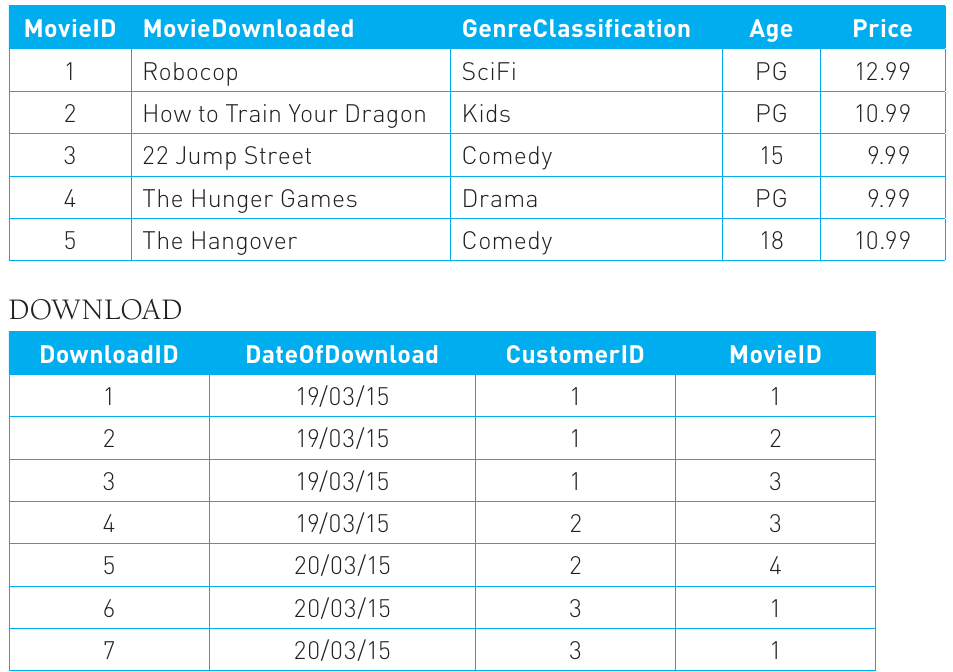
Suppose we want to find all customers who downloaded movies on a specific date, showing their details along with the movies and prices, sorted by customer name. This requires combining data from three tables: Customer, Download, and Movie.
Example
Multi-Table Query with Joins
SELECT CustomerName, Address, DateOfDownload,
Movie.MovieID, MovieDownloaded, Price
FROM Customer, Download, Movie
WHERE Download.DateOfDownload = "19/03/15" AND
Customer.CustomerID = Download.CustomerID AND
Movie.MovieID = Download.MovieID
ORDER BY CustomerName DESC;
Key Concepts Demonstrated:
- Table names precede field names when multiple tables share field names (Movie.MovieID)
- The WHERE clause links tables through their relationships (foreign keys)
- Multiple conditions are combined with AND
- The result combines information from all three tables into a single output
The resulting output would look like this:

Notice how the data is sorted in descending order by customer name (DESC keyword), as specified in the ORDER BY clause. This query successfully extracted and combined relevant information from multiple tables to answer a specific question about the business.
Client-server databases
Understanding the client-server model
In many organisational settings, databases aren't stored on individual computers but rather on dedicated database servers. This arrangement is called a client-server database architecture. The database server is a powerful computer that holds and manages the database, whilst various users access it from their own workstations (the clients).
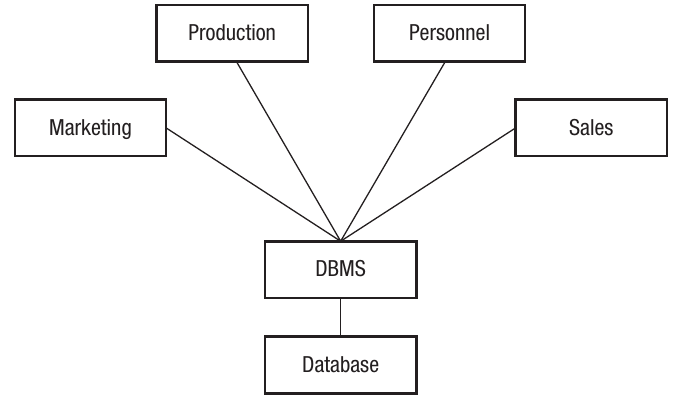
This diagram illustrates how multiple departments (Production, Personnel, Marketing, and Sales) all access the same centralised database through a Database Management System (DBMS), without having direct access to the database files themselves.
Database management systems
A Database Management System (DBMS) is specialised software that sits between users and the database itself. It controls all aspects of the database, including:
- Managing data storage and organisation
- Processing queries from users or programs
- Adding, updating, and deleting data
- Controlling who can access what data
- Maintaining data integrity and consistency
Note
DBMS Benefits
The DBMS ensures that there's only ever one version of each piece of data, preventing inconsistencies. It also manages the physical location of data on storage devices, which users don't need to know about. This abstraction layer simplifies database interaction and improves security.
Benefits and challenges
One significant advantage of databases is that they can be accessed by many different users or programs simultaneously, and the data can be used in various ways. However, this multi-user access creates potential problems.
Consider what happens if two programs try to access and modify the same data item at exactly the same time. Or imagine a program adding a new attribute to an entity whilst other programs are accessing that same dataset but don't know about the extra attribute. These scenarios can lead to data corruption or loss if not properly managed.
The DBMS addresses these issues through various control mechanisms, but understanding the problems helps you appreciate why these systems are necessary.
Issues with concurrent access on shared databases
The nature of the problem
When multiple users can access the same database simultaneously, problems arise mainly when two or more users want to write data to the same location at the same time. If users are only reading data, there's no issue. But write operations can create conflicts.
Important
Understanding Write Conflicts
Imagine two users both want to save data to the same location:
- The first user presses save, and their updated data is written to the file
- A few seconds later, the second user presses save
- Their data now overwrites the first person's changes
The critical question: How do you determine which version is the most current and correct?
Key Insight: Problems only occur with simultaneous write operations, not read operations.
Solutions for concurrent access problems
Database systems employ several techniques to manage concurrent access and maintain data integrity:
Record locks
Record locking prevents access conflicts by temporarily restricting access to specific data items. When a user begins working with a particular record, a lock is placed on that data. No other user can modify that location until the first user finishes and releases the lock. The second user attempting to save will receive notification that the data may have been modified by someone else.
This technique works across networks too. Two users might both load the same document, but only the first person to access it gets write permissions. The other user can only view a read-only version of the file.
Serialisation
Serialisation ensures that only one transaction occurs on a database at a time, processing them sequentially (one after another). The DBMS manages this process, making sure each transaction completes in the correct sequence to avoid compromising data integrity.
Example
How Serialisation Works
A typical transaction might involve reading data to or from a record. If another transaction is accessing that record simultaneously:
- The DBMS identifies which transactions need serialising
- It creates a schedule for processing them
- Each transaction completes in the proper order
- Data integrity is maintained throughout
This prevents two transactions from interfering with each other when working on the same record.
Timestamp ordering
Every transaction that occurs on the database receives both a read and write timestamp indicating when the record was last accessed. This provides a method of sequencing transactions to prevent concurrency conflicts.
When two transactions are taking place on the same record simultaneously, the DBMS examines the timestamps to identify which action occurred most recently. It then uses a protocol to decide whether to execute the current transaction based on the timestamp. This prevents conflicting operations from corrupting the data.
Commitment ordering
This system evaluates each command the database receives in terms of both when the request was made and whether it should take precedence over other simultaneous requests. The decision depends on the nature of the command and its potential impact on the database.
Where one user's command could cause deadlock (where processes are blocked waiting for each other), it would be held until the dependent action completes. This is implemented by building a graph showing transaction dependencies. The DBMS uses this graph to determine the optimal order for executing concurrent transactions.
Note
Exam Tip
When answering questions about concurrent access problems:
- Always distinguish between reading and writing operations
- Remember that problems only occur when multiple users want to write to the same data location simultaneously
- Being able to explain why each solution works and give examples will earn you higher marks
- Use specific technical terms like "serialisation" and "timestamp ordering"
Summary
Key Points to Remember:
-
SQL is a specialised programming language for managing relational databases through typed commands rather than graphical interfaces
-
The main SQL operations are CREATE TABLE (defining structure), INSERT INTO (adding data), UPDATE (modifying data), DELETE (removing data), and SELECT (querying data)
-
Data types must be specified when creating tables, with common types including varchar (variable text), int (whole numbers), decimal (numbers with decimal places), boolean (true/false), and date/time formats
-
Queries use SELECT to choose columns, FROM to specify tables, WHERE to set conditions, and ORDER BY to sort results; complex queries can combine multiple tables using matching foreign keys
-
Client-server databases use a DBMS (Database Management System) to control access and maintain data integrity when multiple users access the same database simultaneously
-
Concurrent access problems when multiple users write to the same data can be solved through record locks, serialisation, timestamp ordering, or commitment ordering techniques