Boolean Expression Operations (AQA GCSE Computer Science): Revision Notes
📚Revision Notes
Boolean expression operations
Boolean expressions are mathematical statements that use logic operators to combine inputs and produce outputs. Understanding how to work with these expressions and convert them into physical logic circuits is a crucial skill in computer science.
Boolean operators and their symbols
When writing Boolean expressions, we use special symbols to represent different logic gates. These symbols make it easier to write complex expressions without having to draw out entire circuits.
The main operators you need to know are:
- . (dot) - represents the AND gate
- + (plus) - represents the OR gate
- ⊕ (circle with plus) - represents the XOR gate
- overbar - represents the NOT gate (shown as a line above the input)
These symbols allow us to combine multiple logic operations in a single expression. For example, instead of drawing a complex circuit diagram, we can write expressions like:
- C AND (A OR B) becomes
- (A AND B) OR (NOT C) becomes
Note
Using symbolic notation makes complex Boolean expressions much more compact and easier to work with than drawing full circuit diagrams for every operation.
Creating logic circuits from expressions
Converting Boolean expressions into actual logic circuits is like translating from one language to another. The expression tells you what gates you need and how to connect them together.
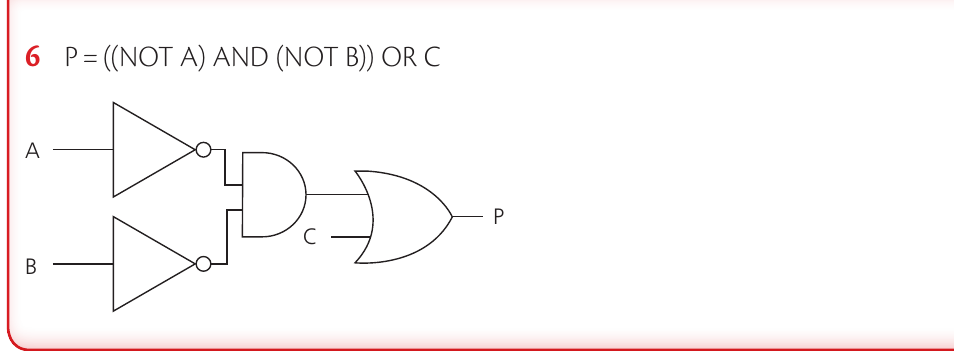
The key principle is working from the inside out, just like solving mathematical equations with brackets. You need to identify which operations happen first and build your circuit accordingly.
Understanding order of operations
Just like in mathematics, Boolean expressions follow rules about which operations to perform first.
Important
Order of Operations in Boolean Expressions:
- Operations in brackets always take priority
- NOT operations are applied next
- AND operations follow
- OR operations are performed last
When you see an expression like , you need to:
- Look for brackets first - in this case
- Apply any NOT operations to the result
- Then handle any remaining AND or OR operations
Worked example: Building a circuit step by step
Example
Worked Example: Creating a Logic Circuit
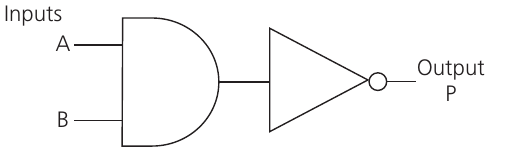
Let's work through creating a logic circuit for the expression .
Step 1: Identify what's in brackets The expression is in brackets, so this must be calculated first. We need an AND gate with inputs A and B.
Step 2: Apply the NOT operation The NOT gate is applied to the entire result of , not to the individual inputs A or B. This means the NOT gate comes after the AND gate in our circuit.
Step 3: Complete the final operation Finally, we need to AND the result of with input C. This requires another AND gate.
Important
The NOT gate affects the output of the first AND gate, not the individual inputs A and B. This is a common mistake that students make - always check what the NOT operation is actually applied to.
Exam tips
Note
Essential Exam Strategies:
- Always work through Boolean expressions step by step, following the order of operations
- When drawing circuits, make sure NOT gates are placed correctly - they affect what comes before them in the expression
- Practice converting between expressions and circuits in both directions
- Remember that brackets in expressions become separate sections in your circuit
- Double-check your circuit by tracing through some example inputs
Summary
Summary
Key Points to Remember:
- Boolean operators use symbols: for AND, for OR, for XOR, and overbar for NOT
- Order matters - always follow brackets first, then NOT, then AND/OR operations
- NOT gates are applied to the output of whatever expression comes before them, not individual inputs
- Practice converting both ways - from expressions to circuits and circuits to expressions
- Check your work by testing your circuit with different input combinations