Network Topologies (AQA GCSE Computer Science): Revision Notes
📚Revision Notes
Network topologies
What is a network topology?
A network topology describes how devices in a computer network are arranged and connected to each other. Think of it as the "shape" or layout of the network. Each device that connects to a network is called a node. Understanding network topologies is essential because the way devices are connected affects how well the network performs, how secure it is, and how much it costs to set up.
Note
A network topology is like a blueprint that shows how all the devices in a network are connected. Just as architects use blueprints to show how rooms in a building connect, network topologies show how computers, printers, and other devices link together.
There are two main types of network topologies you need to know about for your GCSE: star topology and bus topology.
Star network topology
In a star network topology, each device (like computers, printers, or servers) connects individually to a central point. This central point is usually a switch or hub that acts like the "heart" of the network, receiving data and forwarding it to the correct destination.
How star networks work
When you want to send data from one computer to another in a star network, the data first travels to the central switch. The switch then examines where the data needs to go and forwards it to the correct device. This means all communication goes through the central node, creating a star-like pattern of connections.
The central switch can also screen data packets, rejecting any that are damaged or corrupted. This helps improve security and reduces data collisions (when two pieces of data try to use the network at the same time).
Note
Think of the central switch as a traffic controller at a busy intersection. It receives messages from all directions and makes sure they get to the right destination without crashes or confusion.
Advantages of star topology
- Fast and reliable: Each device has its own dedicated connection to the central switch, so there's less network traffic and fewer delays
- Easy to add new devices: You simply connect them to the switch - no need to modify existing connections
- Secure: The switch can philtre out corrupt data and control access to the network
- Fault tolerant: If one device or cable fails, the rest of the network continues working normally
Disadvantages of star topology
- Expensive: Requires lots of cabling since each device needs its own cable to the central switch
- Single point of failure: If the central switch fails, the entire network stops working
- Limited by central device: The network's performance depends on how powerful the central switch is
Important
The biggest weakness of star topology is that if the central switch fails, the entire network goes down. This is called a "single point of failure" and it's something you must consider when designing networks.
Where you'll find star networks
Star networks are commonly used in:
- Schools and businesses (especially larger organisations)
- Home networks, particularly wireless ones where all devices connect to a central router
- Any situation where network reliability is important and cost isn't the main concern
Bus network topology
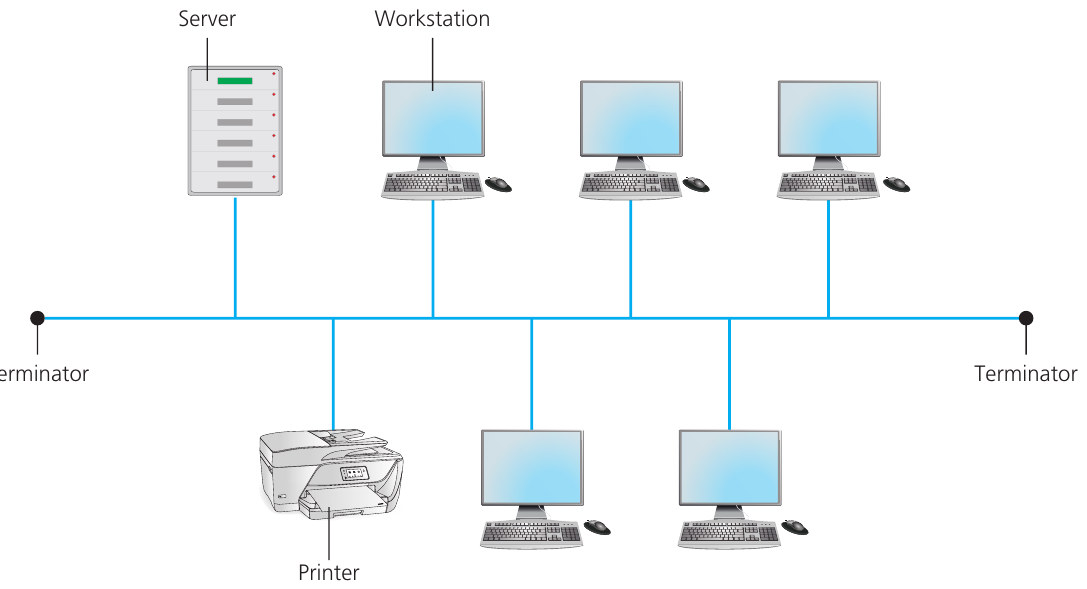
In a bus network topology, all devices connect to a single main cable called the backbone. The backbone has special devices called terminators at both ends to prevent data signals from bouncing back and causing problems.
How bus networks work
When a device wants to send data, it places the information onto the main backbone cable. This data travels along the cable and reaches every device on the network. Each device checks the destination address (called a MAC address) to see if the data is meant for them. If it is, they accept it; if not, they ignore it.
Only one device can successfully send data at any time. If two devices try to transmit simultaneously, the data will collide and both devices must wait a random amount of time before trying again. This slows down the network.
Note
Bus networks work like a single-lane road where only one car can pass at a time. If two cars try to use the road simultaneously, there's a traffic jam and both have to back up and try again later.
Advantages of bus topology
- Cheap to set up: Requires much less cabling compared to star networks since all devices share one main cable
- Easy to connect devices: Simply attach them to the main backbone cable
- Simple to remove: Devices can be easily disconnected when no longer needed
- Good for temporary setups: Perfect for small, temporary networks in single rooms
Disadvantages of bus topology
- Network failure: If the backbone cable fails, the entire network stops working
- Slow performance: Only one device can transmit at a time, and data collisions slow things down further
- Security concerns: All data travels to every device, making it easier to intercept
- Limited scalability: Performance gets worse as you add more devices
Important
Bus networks have a major security weakness: since all data travels to every device, it's much easier for someone to intercept and read network traffic. This makes bus topology unsuitable for networks handling sensitive information.
Where you'll find bus networks
Bus networks are suitable for:
- Small, temporary networks in single rooms
- Situations where cost is more important than performance
- As part of hybrid network designs (combining different topologies)
- Older network installations (though they're rarely used as standalone networks today)
Key terms you need to know
- Network topology: The way devices in a network are arranged and connected together
- Node: Any device that connects to a network (computer, printer, server, etc.)
- Switch/Hub: A central device that connects multiple devices in a wired network and forwards data to the correct destination
- Data collision: When two separate data packets are transmitted at the same time, causing them to interfere with each other
- Backbone: The main cable in a bus network that all devices connect to
- Terminator: Special devices placed at both ends of a bus network's backbone to prevent signal reflexion
- MAC address: A unique identifier for each network device that helps determine where data should be sent
Summary
Key Points to Remember:
- Star topology has each device connecting individually to a central switch - it's fast and reliable but expensive and has a single point of failure
- Bus topology has all devices sharing one main cable - it's cheap and simple but slow and the whole network fails if the main cable breaks
- Network performance depends heavily on the chosen topology - star networks are generally faster while bus networks are cheaper
- Fault tolerance varies between topologies - star networks can survive individual device failures better than bus networks
- Cost considerations are important - star networks need more cables and equipment, while bus networks minimise cabling costs