CPU Components (AQA GCSE Computer Science): Revision Notes
📚Revision Notes
CPU components
What makes up a CPU?
The Central Processing Unit (CPU) is often called the "brain" of the computer, and just like a brain, it's incredibly complex inside. Understanding what components make up a CPU will help you grasp how computers actually process information and carry out instructions.
A CPU is built from billions of tiny electronic switches called transistors. These transistors work together like an enormous network of on-off switches to create logic circuits that can process data, perform calculations, and control other parts of the computer. This fundamental design follows something called Von Neumann architecture, which is the blueprint that all modern computers are based on.
Note
The number of transistors in modern CPUs is truly staggering - some processors contain over 50 billion transistors, all working together in a space smaller than your thumbnail!
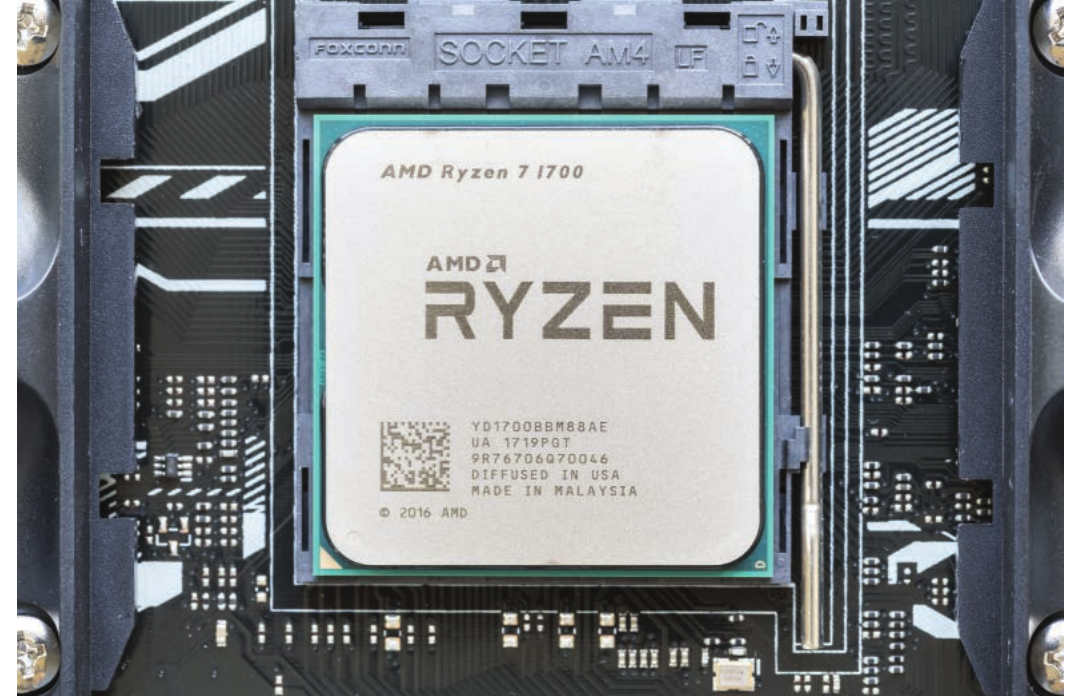
The physical CPU you see above might look simple from the outside, but inside that small chip are billions of components working together at incredible speeds.
The main components inside a CPU
Every CPU contains several essential components that work together to process information. Think of these as different departments in a factory, each with their own specific job to do.
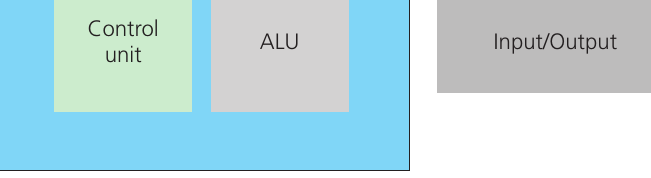
Arithmetic logic unit (ALU)
The Arithmetic Logic Unit, or ALU for short, is like the mathematician of the CPU. This component handles all the number crunching and decision-making that programmes need. The ALU is responsible for three main types of operations:
Arithmetic operations are the basic maths that computers need to do constantly - adding, subtracting, multiplying, and dividing numbers. Every time you use a calculator app or a computer game calculates your score, the ALU is doing this work.
Logical operations involve comparing information and making decisions based on the results. These include operations like AND, OR, and NOT, plus comparisons like "is this number bigger than that number?" or "are these two values equal?". The ALU also handles operations like "less than", "greater than", and "equal to" comparisons that programmes use to make decisions.
Binary shift operations involve moving the binary digits (0s and 1s) that make up data either left or right. This might sound strange, but it's actually a very fast way for computers to multiply or divide by powers of 2.
Note
The ALU performs millions of these operations every second, but each individual operation happens incredibly quickly - typically within a single clock cycle.
The ALU takes the calculations and logical decisions required by programme instructions and processes them, then sends the results back to be used by the rest of the CPU.
Control unit
The Control Unit acts like the supervisor or manager of the entire CPU. Its main job is to coordinate all the activity happening inside the processor and make sure everything works together properly.
The Control Unit has two main responsibilities. First, it obtains and decodes instructions from memory. When your computer runs a programme, that programme consists of thousands or millions of individual instructions stored in memory. The Control Unit fetches these instructions one by one and figures out what each instruction is asking the computer to do.
Second, the Control Unit sends out control signals to coordinate how data moves around between different parts of the CPU and memory. It makes sure that data gets to the right place at the right time so that instructions can be executed properly. Without the Control Unit organising everything, the different parts of the CPU would just be working randomly instead of cooperating.
Important
The Control Unit is essential for the Fetch-Execute cycle - the fundamental process where the CPU repeatedly fetches instructions from memory and then executes them. Without proper coordination, this cycle would break down completely.
Clock
The Clock is like the heartbeat of the CPU - it keeps everything synchronised and working at the same pace. The clock is actually a tiny vibrating crystal that generates regular electrical pulses at a constant speed.
Every "tick" of the clock represents one step in what's called the Fetch-Execute cycle, where the CPU fetches an instruction from memory and then executes it. The faster the clock ticks, the more instructions the CPU can process every second.
Modern computers typically have clock speeds measured in gigahertz (GHz), which means billions of cycles per second. A CPU running at 4 GHz can theoretically process up to 4 billion instructions every second! The clock synchronises all CPU activity to make sure that data moves around the processor in an organised way rather than causing chaos.
Registers
Registers are like the CPU's personal notebook - they're tiny memory locations right inside the processor that can hold data temporarily. Registers are incredibly important because they can be accessed much faster than main memory.
The role of registers is to accept, store, and transfer data and instructions for immediate use by the CPU. When the CPU needs to work with a piece of data, it first loads that data into a register. Then it can access and manipulate that data very quickly without having to wait for slower main memory.
Note
Registers are the fastest type of memory in a computer system - they can be accessed in less than one clock cycle, making them essential for high-performance computing.
Think of registers as the CPU's workspace. Just like you might write important numbers on a piece of paper while solving a maths problem, the CPU uses registers to keep track of important data while it's processing instructions.
Buses
Buses are the communication highways that connect different parts of the computer system together. They're called buses because, like a city bus route, they carry information from one place to another along a fixed path.
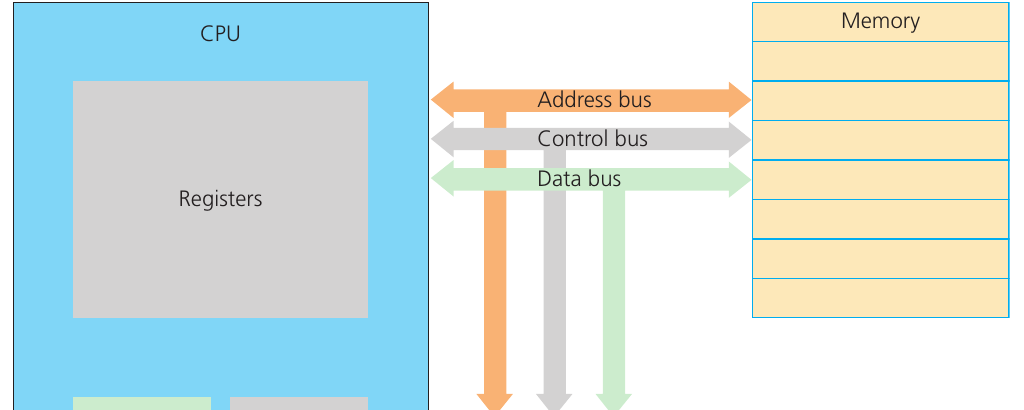
There are three main types of buses that work together to enable communication between the CPU and memory:
The Data bus carries the actual information (data) that needs to be processed. This could be numbers, text, images, or any other type of data that the CPU is working with. Data flows in both directions along this bus - from memory to CPU and from CPU back to memory.
The Control bus carries control signals that coordinate how the CPU and memory work together. These signals tell different components when to read data, when to write data, and how to interpret the information being sent.
The Address bus carries memory addresses, which are like postal addresses that tell the CPU exactly where in memory it should read from or write to. When the CPU needs specific data, it sends the memory address along this bus to specify the exact location.
Important
Remember the three bus types:
- Data bus = carries the information
- Address bus = carries the location
- Control bus = carries the coordination signals
All three must work together for the CPU to communicate effectively with memory.
CPU performance factors
Understanding what makes one CPU faster than another is important for both exams and real-world computing. Two key factors determine how well a CPU performs.
Clock speed
The CPU is constantly fetching instructions from memory and executing them, and the speed at which this happens is determined by the clock. Each tick of the clock represents one step in the Fetch-Execute cycle.
Clock speed is measured in gigahertz (GHz), and the faster the clock speed, the more instructions the CPU can execute every second. A typical modern computer might run at speeds of up to 4 GHz, which means it can potentially process 4 billion instructions per second.
However, it's important to understand that clock speed alone doesn't determine overall performance. Different CPUs can do different amounts of work per clock cycle, so a CPU with a lower clock speed might still be faster overall if it's more efficient.
Important
Clock speed isn't everything! A CPU with a lower clock speed but better architecture might outperform a CPU with a higher clock speed. This is why you can't compare CPUs based on clock speed alone.
Cache memory
Cache memory is special high-speed memory that sits between the main memory and the CPU. Its purpose is to store data that the CPU needs to access very quickly, particularly instructions and data that are used repeatedly or are likely to be needed next.
The cache works because accessing main memory is relatively slow compared to the CPU's processing speed. When the CPU needs data, the control unit first checks the cache to see if the required information is already stored there. If it is, the CPU can access it much faster than if it had to fetch it from main memory.
Cache memory significantly improves performance because programmes often use the same instructions and data repeatedly. By keeping frequently-used information in the ultra-fast cache, the CPU spends less time waiting for data and more time actually processing it.
Note
Modern CPUs often have multiple levels of cache (L1, L2, L3) with different sizes and speeds. The closest cache to the CPU cores is the fastest but smallest, while further levels are larger but slightly slower.
Remember!
Summary
Key Components and Functions:
- The CPU contains four main components: ALU (does calculations), Control Unit (coordinates everything), Clock (provides timing), and Registers (fast temporary storage)
- Three types of buses connect the CPU to memory: Data bus (carries information), Control bus (carries control signals), and Address bus (carries memory locations)
- Clock speed determines processing speed - measured in GHz (billions of cycles per second), with each cycle representing one step in instruction processing
- Cache memory improves performance by storing frequently-used data closer to the CPU, reducing the time spent waiting for information from slower main memory
- Von Neumann architecture is the fundamental design that all modern CPUs follows, with separate components working together through bus connections