CPU Performance (AQA GCSE Computer Science): Revision Notes
📚Revision Notes
CPU performance
Understanding what makes a CPU fast is essential for GCSE Computer Science. The Central Processing Unit's performance depends on several key factors that work together to determine how quickly your computer can process information and run programmes.
What affects CPU performance?
A CPU's performance isn't just about one single factor - it's about how several different elements work together. Think of it like a racing car: the engine speed matters, but so does the fuel system, the number of cylinders, and how efficiently everything works together. For CPUs, the main performance factors are clock speed, cache memory size, and the number of processor cores.
Note
Just like a racing car needs all its components working in harmony, CPU performance is the result of multiple factors working together efficiently. Understanding each factor individually helps you see the bigger picture of computer performance.
Clock speed
The clock speed is one of the most important factors affecting how fast a CPU can work. Every CPU has an internal clock that acts like a metronome, keeping everything in time. Each "tick" of this clock represents one step in processing instructions.
The faster the clock speed, the more instructions the CPU can handle every second. Modern computers typically run at speeds measured in Gigahertz (GHz), which means billions of cycles per second. For example, a CPU running at 4 GHz can potentially process up to 4 billion instructions every second!
Important
Common Misconception: Clock speed alone doesn't tell the whole story. A CPU running at 3 GHz might actually be faster than one running at 4 GHz if it can do more work in each clock cycle. This is why other factors are equally important.
Size of cache memory
Cache memory is like having a small, super-fast storage area right next to the CPU. It's much faster to access than the main memory (RAM) but also much more expensive to produce, which is why there's usually only a small amount of it.
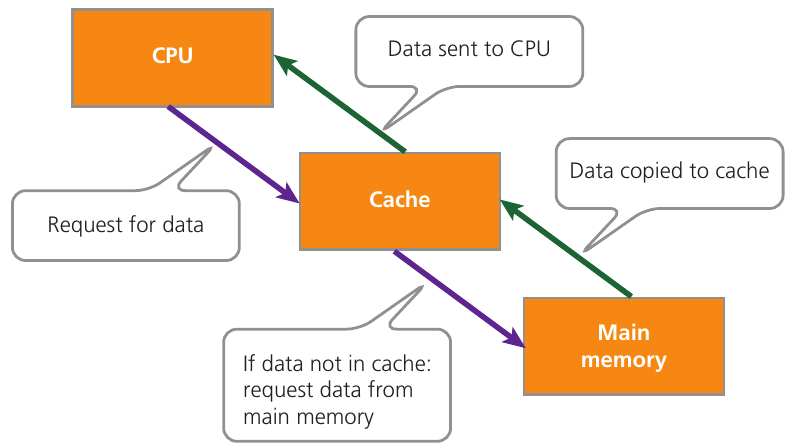
The cache works by storing data and instructions that the CPU is likely to need soon. When the CPU needs information, it first checks the cache. If the data is there (called a "cache hit"), it can be accessed almost instantly. If not (a "cache miss"), the CPU has to fetch the data from the much slower main memory.
Note
Cache Memory Analogy: Think of cache like keeping your most-used textbooks on your desk rather than walking to a bookshelf across the room every time you need them. The bigger your desk (cache), the more books you can keep close by, and the less time you spend walking back and forth.
More cache memory means better performance because:
- The CPU spends less time waiting for data from slow main memory
- Frequently used instructions and data stay readily available
- The computer can work more efficiently overall
A typical laptop might have 8 GB of main memory but only a few MB of cache memory. Even though cache is much smaller, its speed makes a huge difference to performance.
Number of processor cores
Modern CPUs often have multiple processor cores, which are like having several CPUs working together in one chip. Each core can handle instructions independently, allowing the processor to work on multiple tasks simultaneously.
This is called parallel processing. Instead of doing one thing at a time, a multi-core processor can do several things at once. For example, a quad-core processor has four cores and can potentially handle four different instruction streams simultaneously.
Important
When Multiple Cores Help vs. When They Don't:
Multiple cores only provide benefits if:
- The software is written to take advantage of multiple cores
- The tasks can be split up and done in parallel
- The computer has multiple programmes running at the same time
It's like having a team of workers instead of just one person - they can get more done overall, but only if there's enough work that can be divided among them.
The Fetch-Execute cycle
The Fetch-Execute cycle is the fundamental process that every CPU follows continuously. Understanding this helps explain why the other performance factors matter so much.
Example
The Fetch-Execute Cycle in Action:
The processor constantly repeats these steps:
Step 1: Fetch - Instructions are retrieved from memory
Step 2: Decode - These instructions are interpreted to understand what to do
Step 3: Execute - The required operations are carried out
This cycle happens billions of times per second in modern computers!
The faster each step can be completed, and the more efficiently the cycle can run, the better the overall performance.
Clock speed affects how quickly each step happens. Cache memory reduces the time needed to fetch instructions and data. Multiple cores allow several Fetch-Execute cycles to run in parallel.
Important
Critical Exam Point: When answering questions about CPU performance, remember that:
- All factors work together - don't just focus on one
- Higher numbers aren't always better (a 4 GHz CPU isn't necessarily faster than a 3 GHz one)
- Think about real-world applications - more cores help with multitasking, larger cache helps with complex programmes
- Be specific about units (GHz for clock speed, MB/GB for cache size, number for cores)
Summary
Key Points to Remember:
- Clock speed (measured in GHz) determines how many instruction cycles happen per second - faster clock speeds can process more instructions
- Cache memory acts as ultra-fast storage between the CPU and main memory - more cache means less waiting for data and better performance
- Multiple processor cores enable parallel processing - more cores allow multiple tasks to be handled simultaneously
- The Fetch-Execute cycle is the continuous process of fetching, decoding and executing instructions - performance factors affect how efficiently this cycle runs
- All factors work together - CPU performance depends on the combination of clock speed, cache size, and number of cores, not just one factor alone