Iteration (AQA GCSE Computer Science): Revision Notes
📚Revision Notes
Iteration - GCSE programming concepts
What is iteration?
Iteration is a programming concept that allows you to repeat sections of code multiple times. Think of it like telling the computer to do the same task over and over again until a specific goal is reached. This repetition is commonly called looping, and it's one of the most powerful tools in programming.
Instead of writing the same code many times, iteration lets you write it once and tell the computer how many times to run it, or under what conditions it should keep running.
Note
Iteration is fundamental to programming efficiency. Without loops, programmers would need to copy and paste the same code hundreds or thousands of times, making programmes much longer and harder to maintain.
Types of loops
There are two main categories of loops you need to understand for your GCSE:
- Definite loops - when you know exactly how many times the code should repeat
- Indefinite loops - when the code repeats based on a condition, and you don't know in advance how many times it will run
Note
The key difference is predictability. With definite loops, you can calculate exactly how many iterations will occur before the programme runs. With indefinite loops, the number of iterations depends on conditions that change during execution.
Definite loops (FOR loops)
Definite loops use the FOR keyword in pseudocode and are perfect when you want to repeat code a specific number of times. These loops use a counter variable that automatically increases (or increments) by one each time the loop runs.
The basic structure in AQA pseudocode looks like this:
FOR counter ← start_value TO end_value
    // code to repeat goes here
ENDFOR
Example
Worked Example: How a FOR loop executes
Here's how a FOR loop works step by step:
- The counter variable gets set to the starting value
- The computer checks if the counter has reached the end value
- If not, it runs the code inside the loop
- The counter automatically increases by 1
- Steps 2-4 repeat until the counter reaches the end value
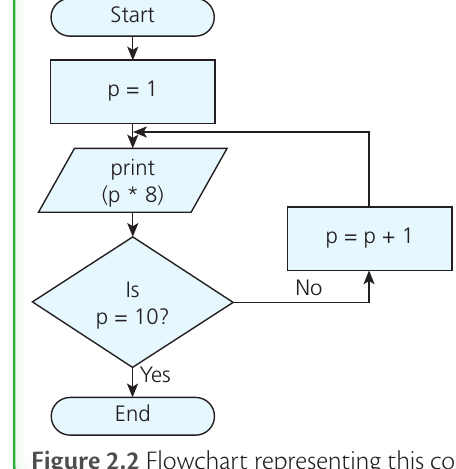
This flowchart shows a practical example where the loop prints out the 8 times table from 1 to 10. The variable p starts at 1, and each time through the loop, it prints p * 8, then increases p by 1. When p reaches 10, the loop ends.
FOR loops in high-level programming languages
Different programming languages write FOR loops slightly differently, but they all work the same way:
Python uses the range keyword:
for x in range(10):
    print(x)
VB.Net syntax is very similar to pseudocode:
For x = 0 To 9
    Console.WriteLine(x)
Next x
C# uses a three-part structure:
for (int x=0; x<10; x++)
{
    Console.WriteLine(x);
}
All these examples will print the numbers 0 through 9.
Indefinite loops
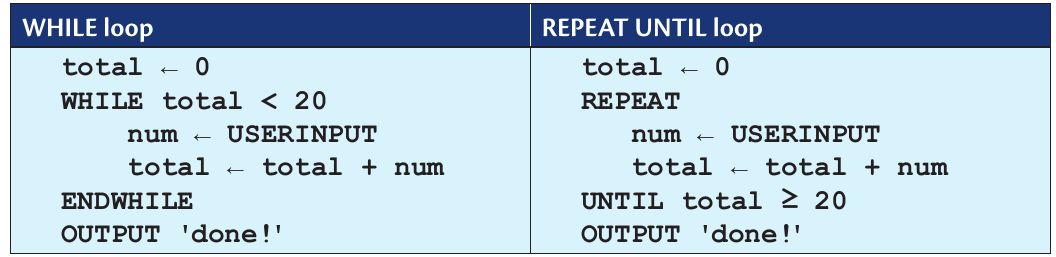
Indefinite loops don't know in advance how many times they'll repeat. Instead, they check a Boolean condition each time to decide whether to continue or stop. This makes them perfect for situations like "keep asking for input until the user enters a valid answer" or "keep adding numbers until the total reaches 100".
There are two main types of indefinite loops: WHILE loops and REPEAT UNTIL loops.
WHILE loops
A WHILE loop checks its condition before running the code inside the loop. If the condition is true, it runs the code and then checks again. If the condition is false from the start, the code inside might never run at all.
The structure is:
WHILE condition_is_true
    // code to repeat
ENDWHILE
REPEAT UNTIL loops
A REPEAT UNTIL loop works the opposite way - it runs the code first, then checks the condition at the end. This means the code inside will always run at least once, even if the condition is already met.
The structure is:
REPEAT
    // code to repeat
UNTIL condition_is_true
Key difference between WHILE and REPEAT UNTIL
Important
Critical Difference Between Loop Types
Think of it this way:
- WHILE says "keep going while this is true" (checks condition first)
- REPEAT UNTIL says "keep going until this becomes true" (checks condition after)
This difference is crucial because REPEAT UNTIL loops always execute at least once, while WHILE loops might not execute at all if their condition is false from the beginning.
High-level language examples
Python only has WHILE loops:
total = 0
while total < 20:
    num = int(input("enter number"))
    total = total + num
print("done!")
VB.Net and C# have both types of loops, with slight syntax variations.
Nested loops and selection
You can combine loops with selection statements (IF/ELSE) or even put loops inside other loops. This is called nesting, and it's incredibly useful for complex programming tasks.
Nested FOR loops
When you have one FOR loop inside another, the inner loop completes all its iterations for each single iteration of the outer loop. For example:
FOR a ← 1 TO 4
    FOR b ← 1 TO 3
        OUTPUT a * b
    ENDFOR
ENDFOR
This creates 12 lines of output () because the inner loop runs 3 times for each of the 4 iterations of the outer loop.
Note
Understanding Nested Loop Multiplication
With nested loops, you multiply the iterations: if the outer loop runs 4 times and the inner loop runs 3 times, the total number of operations is . This is crucial for understanding programme efficiency.
Combining loops with selection
You can also put IF statements inside loops to make decisions about what to do in each iteration. This is perfect for checking user input or processing data that meets certain conditions.
For example, a programme might use a WHILE loop to keep asking for ages, and then use IF statements inside the loop to give different messages based on whether someone can vote, drive, or neither.
Exam tips and common mistakes
Summary
Key Points to Remember:
- FOR loops are count-controlled - use them when you know exactly how many times to repeat
- WHILE loops are condition-controlled - use them when you need to repeat based on a changing condition
- WHILE checks the condition first, REPEAT UNTIL checks it after
- Always include ENDFOR, ENDWHILE, and UNTIL in your pseudocode
- Counter variables in FOR loops increment automatically - you don't need to add this manually
- Nested loops multiply the number of iterations - inner loop runs completely for each outer loop iteration
Important
Common exam mistakes to avoid:
- Forgetting to increment variables in WHILE loops (causing infinite loops)
- Mixing up WHILE and REPEAT UNTIL condition checking
- Not understanding that nested loops multiply iterations
- Forgetting END statements in pseudocode
Remember!
Summary
Essential Iteration Concepts:
- Iteration means repeating code - it's essential for avoiding writing the same instructions multiple times
- FOR loops are definite (fixed number of repetitions) and automatically increment a counter variable
- WHILE loops check conditions before running and might not execute at all
- REPEAT UNTIL loops always run at least once because they check conditions after execution
- Nested loops allow complex repetition patterns where inner loops complete fully for each outer loop iteration