Sequence and Selection (AQA GCSE Computer Science): Revision Notes
📚Revision Notes
Sequence and selection
The building blocks of programming
Note
Every computer programme, no matter how complex, is built using just three fundamental constructs: sequence, selection, and iteration. Think of these as the basic building blocks that programmers use to create any software programme you can imagine!
In this section, we'll focus on the first two: sequence and selection.
Sequence
Sequence means executing programme statements one after another, in order. When you run a programme, it starts at the top and works its way down, completing each instruction fully before moving on to the next one.
This might sound simple, but the order of instructions is crucial - changing the sequence can completely change what your programme does!

Example
Worked Example: Programme Execution Order
Let's look at this example comparing two programmes. Both programmes use the same instructions, but in different orders:
Program A performs these steps:
- Set x to 10
- Multiply x by 3 (x becomes 30)
- Add 1 to x (x becomes 31)
- Output x (prints 31)
Program B performs these steps:
- Set x to 10
- Add 1 to x (x becomes 11)
- Output x (prints 11)
- Multiply x by 3 (x becomes 33, but this happens after the output)
Even though both programmes have the same instructions, Programme A outputs 31 while Programme B outputs 11. This shows why sequence matters so much in programming!
Important
Exam tip: Always trace through code step by step in the exact order it's written to understand what it will do.
Selection
Selection is how programmes make decisions. It allows your programme to choose different paths based on whether certain conditions are true or false.
Boolean conditions
Before we dive into selection, you need to understand Boolean conditions. A Boolean condition is a statement that can only be evaluated as either True or False.
Note
For example:
- "Do I want pizza for lunch?" can only be answered with True (Yes, I do) or False (No, I don't)
- "Is the temperature greater than 20 degrees?" - either True or False
- "Does the inputted name equal 'George'?" - either True or False
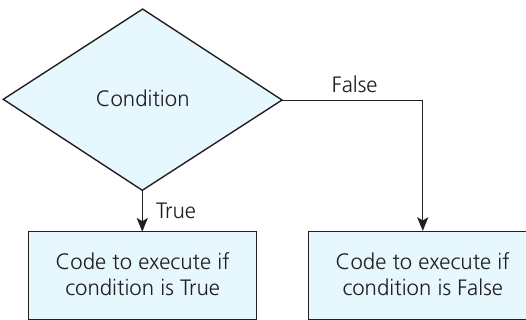
This flowchart shows how selection works. The programme reaches a decision point (the diamond shape) where it evaluates a condition. Based on whether the condition is True or False, the programme follows different paths and executes different code.
IF statements
The most common way to implement selection is using IF statements. Here's the basic structure:
IF condition is true THEN
    execute this code
ENDIF
Example
Basic IF Statement Example
name ← USERINPUT
IF name = 'George' THEN
    OUTPUT 'Hello George'
ENDIF
In this programme:
- The user enters their name
- The programme checks if the name equals 'George'
- If it does (condition is True), it prints 'Hello George'
- If it doesn't (condition is False), the programme skips that line and continues
Adding ELSE
What if we want the programme to do something different when the condition is false? We can use the ELSE keyword:
name ← USERINPUT
IF name = 'George' THEN
    OUTPUT 'Hello George'
ELSE
    OUTPUT 'Hello stranger'
ENDIF
Now the programme will always print something - either 'Hello George' if the condition is true, or 'Hello stranger' if it's false.
Multiple conditions with ELSE IF
Sometimes you need to check multiple different conditions, each with their own code to execute. This is where ELSE IF (sometimes written as ELSIF) comes in handy:
Example
Multiple Condition Example
name ← USERINPUT
IF name = 'George' THEN
    OUTPUT 'Hello George'
ELSE IF name = 'Lorne' THEN
    OUTPUT 'Great work Lorne'
ELSE IF name = 'Kirstie' THEN
    OUTPUT 'Nice to see you again'
ELSE
    OUTPUT 'Hello stranger'
ENDIF
The programme checks each condition in sequence:
- First, is the name 'George'? If yes, print the first message and skip the rest
- If not, is the name 'Lorne'? If yes, print the second message and skip the rest
- If not, is the name 'Kirstie'? If yes, print the third message
- If none of the above conditions are true, print 'Hello stranger'
Note
The conditions are checked in the order they're written, and once one condition is true, the rest are skipped.
A common mistake to avoid
Important
Common Pitfall: Incorrect Condition Order
Here's a worked example showing a common error when using multiple conditions:
OUTPUT 'Enter a score out of 20'
mark ← USERINPUT
IF mark > 5 THEN
    OUTPUT 'Could do better'
ELSE IF mark > 10 THEN
    OUTPUT 'Average mark'
ELSE IF mark > 15 THEN
    OUTPUT 'Excellent'
ENDIF
What happens if someone gets 19 out of 20? Unfortunately, the programme would display 'Could do better' because 19 is greater than 5, so the first condition is true. The other conditions won't even be checked!
Example
Corrected Example: Proper Condition Order
The fix: Always check conditions from highest to lowest (or most specific to least specific) when using ranges:
IF mark > 15 THEN
    OUTPUT 'Excellent'
ELSE IF mark > 10 THEN
    OUTPUT 'Average mark'
ELSE IF mark > 5 THEN
    OUTPUT 'Could do better'
ENDIF
Different programming languages
Different programming languages use slightly different syntax for IF statements, but the concept is the same:
- Python uses
if,elif, andelsewith colons and indentation - VB.Net uses
If,ElseIf,Else, andEnd If - C# uses
if,else if, andelsewith curly brackets
Note
The important thing is understanding the concept - once you do, you can adapt to any programming language!
Remember!
Summary
Key Points to Remember:
- Sequence means instructions are executed one after another in order - changing the order changes the result
- Selection allows programmes to make decisions using Boolean conditions (True or False)
- IF statements are the most common way to implement selection
- Use ELSE to specify what happens when the condition is false
- Use ELSE IF to check multiple different conditions in sequence
- Always check conditions in the right order - usually from most specific to least specific
- Boolean conditions can only evaluate to True or False, never anything else