Variables, Constants and Assignments (AQA GCSE Computer Science): Revision Notes
📚Revision Notes
Variables, constants and assignments
What are variables?
Think of variables as labelled storage boxes in your computer's memory. When you're writing a programme, you often need to store information that might change as your programme runs. Variables are perfect for this job!
A variable is a named storage location that holds a single piece of data. The key thing about variables is that their contents can change (or "vary") while your programme is running. For example, if you're creating a game, you might use a variable called score to keep track of the player's points. As the player progresses, this score value will change.
When you create a variable, the programming language sets aside a small area of the computer's memory to store the data. The variable's name acts like a label on that memory location, making it easy for you to find and use the stored information later.
Variable identifiers and naming rules
Every variable needs a name, which programmers call an "identifier." Just like you can't name your pet anything you want (you wouldn't call it "123" or use spaces), there are specific rules for naming variables that you must follow.

The naming rules exist for good reasons. Programming languages need to distinguish between different parts of your code, so they're quite strict about what counts as a valid identifier. Here are the main rules you need to remember:
- No spaces allowed: Variable names must be written as one continuous word
- Can't start with a number: Numbers are fine within the name, but not at the beginning
- Avoid reserved keywords: These are special words that the programming language already uses for its own purposes
It's also good practice to choose meaningful names for your variables. Instead of calling a variable x or abc, use descriptive names like userScore or playerName. This makes your code much easier to understand, both for yourself and for other programmers who might read it later.
Most programming languages are case-sensitive, which means score and Score would be treated as completely different variables. This is something to watch out for when writing your programmes!
What are constants?
While variables are designed to change, constants are quite the opposite. A constant is like a variable, but once you give it a value, that value stays fixed throughout the entire programme. Think of it as a labelled box that you seal shut after putting something inside.
Constants are incredibly useful for storing values that you know will never change during your programme's execution. For example, if you're writing a programme that calculates areas of circles, you might create a constant called PI with the value 3.14159. This value will never change, no matter what your programme does.
The main difference between variables and constants is flexibility. Variables give you the freedom to update their contents whenever needed, while constants provide stability and prevent accidental changes to important values. Both have their place in programming, and choosing the right one depends on whether you expect the data to change or stay the same.
Assignment operations
Assignment is the process of putting a value into a variable or constant. It's like placing an item into your labelled storage box. In programming, we use special symbols to show when assignment is happening.
In pseudocode (which is like a rough draught of a programme), we use the arrow symbol ← to show assignment. The arrow points from the value towards the variable, showing the direction that data flows. So score ← 30 means "put the value 30 into the variable called score."
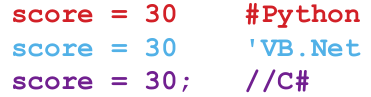
When writing actual programmes in languages like Python, VB.Net, or C#, we use the equals sign = for assignment instead. Don't confuse this with mathematical equality - in programming, score = 30 means "assign the value 30 to the variable score," not "score equals 30."
One important thing to understand is that variables can be assigned new values multiple times. Each time you assign a new value, the old value gets completely replaced and is lost forever. Constants, on the other hand, can typically only be assigned a value once, usually when the programme first starts.
Declaration in different programming languages
Different programming languages have their own ways of creating and using variables. Some languages require you to announce or "declare" your variables before using them, while others are more flexible. Let's look at how three popular languages handle variables and constants.
Python examples
Python is quite relaxed about variable declarations. You don't need to announce your variables beforehand - you can just start using them by assigning values. Python is smart enough to figure out what type of data you're storing based on the value you provide.
score = 20
playerName = "Kirstie"
When you write score = 20, Python automatically understands that score should store numbers. Similarly, when you write playerName = "Kirstie", Python knows this variable will hold text (called a string).
For constants in Python, there isn't a built-in way to create them. By convention, programmers use CAPITAL LETTERS to indicate that a variable should be treated as a constant, but there's nothing stopping the value from being changed.
VB.Net examples
VB.Net gives you more control over your variables. You can declare variables before using them with the Dim keyword, and you can specify exactly what type of data they'll store.
Dim score As Integer = 20
Dim playerName As String = "Kirstie"
For constants, VB.Net has a special Const keyword that creates true constants:
Const maxScore As Integer = 100
C# examples
C# is quite strict and requires you to declare variables before using them. You must specify the data type when creating each variable.
int score = 20;
string playerName = "Kirstie";
For constants, C# uses the const keyword:
const int maxScore = 100;
Notice that C# also requires semicolons at the end of each statement, which is different from Python and VB.Net.
Key differences between variables and constants
Understanding when to use variables versus constants is an important skill in programming. Here are the key differences:
Variables are flexible storage locations that can have their values changed throughout the programme. They're perfect for data that you expect to modify, like player scores, user input, or calculation results. You can assign new values to variables as many times as needed.
Constants are fixed storage locations that maintain the same value throughout the entire programme. They're ideal for values that never change, like mathematical constants (π = 3.14159), maximum limits (like the highest possible score), or configuration settings. Most programming languages prevent you from changing a constant's value once it's been set.
The choice between variables and constants isn't just about functionality - it's also about making your code clearer and safer. When you use a constant for a value that shouldn't change, you're communicating to other programmers (and your future self) that this value is meant to stay fixed. It also helps prevent bugs that might occur if you accidentally try to change an important value.
Remember!
• Variables store data that can change during programme execution, while constants store data that stays fixed throughout the programme
• Variable names (identifiers) must follow specific rules: no spaces, can't start with numbers, and can't be reserved keywords
• Assignment uses different symbols: ← in pseudocode and = in most programming languages, with the value flowing from right to left
• Different languages handle declarations differently: Python is flexible and doesn't require declarations, while VB.Net and C# require you to declare variables before using them
• Choose meaningful variable names like playerScore instead of x to make your code easier to understand and debug