Correcting Errors in Algorithms and Programs (AQA GCSE Computer Science): Revision Notes
📚Revision Notes
Correcting errors in algorithms and programmes
When you write code, it's rare to get it perfect the first time. That's completely normal! The process of finding and fixing problems in your programmes is a crucial skill that all programmers need to master.
Note
Making mistakes in programming is part of the learning process. Even experienced programmers rarely write perfect code on their first attempt. The key is learning how to systematically find and fix these issues.
What is algorithm refinement?
Algorithm refinement is the process of improving your code after testing has revealed errors or issues. Think of it like editing an essay - you write your first draught, then go back to make improvements based on what you've learned.
When testing reveals problems in your programme, the obvious next step is to fix these issues. This might involve changing the logic, adjusting conditions, or correcting syntax mistakes.
Note
Definition: Refining an algorithm means to improve it. If testing has picked up any errors, an obvious improvement would be to fix the problem.
The testing and refinement process
Let's look at a practical example to understand how this works in real programming situations.
Example
Worked Example: Testing and Refining a Validation Program
Original code example:
Consider this code that should only allow values between 1 and 10:
OUTPUT 'Enter a value between 1 and 10'
num ← USERINPUT
IF num > 1 AND num < 10 THEN
    OUTPUT 'Allowed'
ELSE
    OUTPUT 'Not allowed'
ENDIF
This code looks reasonable at first glance, but thorough testing reveals some problems.
Testing with different types of data:
Good programmers test their code with three different types of test data:
- Normal data: Typical values that should work correctly
- Boundary data: Values at the edges of what should be acceptable
- Erroneous data: Values that should definitely be rejected
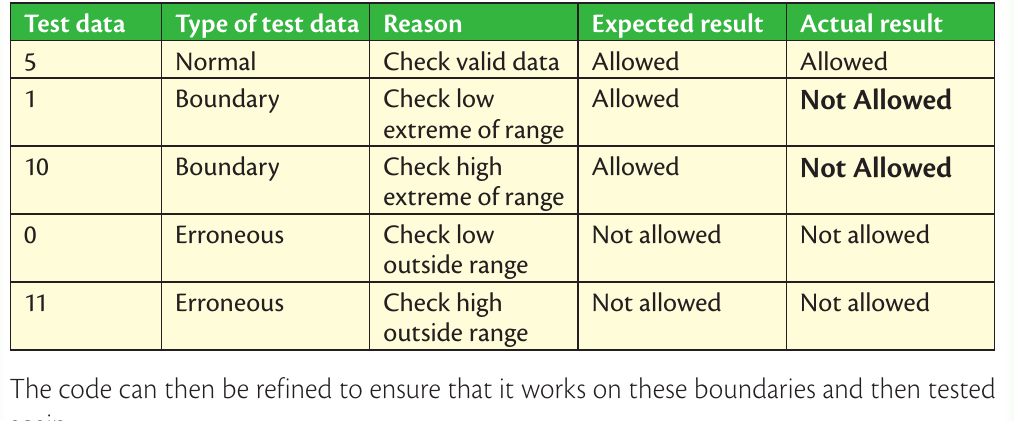
Looking at the test results, we can see that the boundary values (1 and 10) are being rejected when they should be allowed. The values 1 and 10 should be acceptable according to the problem requirements, but our current code treats them as invalid.
Refining the code:
Based on the test results, we need to adjust our condition. The problem is with our comparison operators - we're using and when we should be using and :
OUTPUT 'Enter a value between 1 and 10'
num ← USERINPUT
IF num ≥ 1 AND num ≤ 10 THEN
    OUTPUT 'Allowed'
ELSE
    OUTPUT 'Not allowed'
ENDIF
This refined code now correctly includes the boundary values 1 and 10 as acceptable inputs.
Retesting after refinement
After making changes to your code, it's essential to test it again. You might need to create new test data depending on what changes you made. Don't assume that your original test plan will still be sufficient - sometimes code changes require different testing approaches.
Important
Always retest your code after making changes. Code modifications can sometimes introduce new errors or affect parts of the programme you didn't expect.
Understanding different types of errors
When errors are discovered during testing, they typically fall into two main categories:
Syntax errors
Important
Syntax Error Definition: A syntax error breaks the grammatical rules of the programming language in some way, such as missing off a quotation mark, misspelling a keyword or using assignment incorrectly. A syntax error will cause the programme to stop running (or not run in the first place) because the translator does not understand the instruction given.
Common examples include:
- Missing quotation marks around text
- Misspelling keywords (like writing OUTPT instead of OUTPUT)
- Using the wrong symbols for operations
- Forgetting to close brackets or statements
The good news about syntax errors is that they're usually easy to spot because they prevent your programme from running at all. The translator (compiler or interpreter) will refuse to process code with syntax errors.
Logic errors
Logic errors are trickier because the code runs without crashing, but it doesn't do what you intended. These errors are in your thinking and problem-solving approach rather than in the language rules.
In our example above, the original code had a logic error - it used the wrong comparison operators, which meant boundary values were incorrectly rejected.
Note
Key Difference: Syntax errors stop programmes from running entirely, while logic errors allow programmes to run but produce incorrect results.
Exam tips for error correction
Here are some essential strategies for success in examinations:
- Always test your code with normal, boundary, and erroneous data
- When you find errors, make sure you understand why they occurred before fixing them
- After making changes, always retest your code
- Syntax errors stop programmes from running, while logic errors produce wrong results
- Keep detailed records of your testing process - this helps you track what you've checked
Summary
Key Points to Remember:
- Algorithm refinement means improving your code after testing reveals problems
- Test with three types of data: normal (typical values), boundary (edge cases), and erroneous (invalid inputs)
- Syntax errors break language rules and stop programmes from running
- Logic errors make programmes run incorrectly but don't cause crashes
- Always retest your code after making changes to ensure fixes work properly