Identifying Syntax and Logic Errors (AQA GCSE Computer Science): Revision Notes
📚Revision Notes
Identifying syntax and logic errors
When you write programmes, things don't always work perfectly the first time. Understanding how to spot and identify different types of errors is a crucial skill for any programmer. There are two main types of errors you'll encounter: syntax errors and logic errors.
What are programming errors?
Note
Programming errors are mistakes in your code that prevent it from working as intended. These errors can either stop your programme from running completely or cause it to produce incorrect results.
Learning to identify these errors quickly will make you a much more effective programmer. The ability to debug efficiently separates experienced programmers from beginners.
Syntax errors
A syntax error happens when you break the rules of the programming language. Think of it like making a grammar mistake when writing - the computer can't understand what you're trying to say.
How syntax errors work
Syntax errors will stop your programme from running entirely. The translator (the part of the computer that converts your code into instructions) gets confused and can't process your code. This actually makes syntax errors easier to spot because your programme simply won't start.
Common examples of syntax errors
Here are some typical syntax errors you might make:
Example
Example: Common Syntax Errors
num ← USERINJPTU
10 ← x
OUTTPU num + x
In this code example, there are several syntax errors:
- USERINPUT is misspelt as USERINJPTU
- The assignment 10 ← x is the wrong way around (should be x ← 10)
- OUTPUT is misspelt as OUTTPU
Any one of these mistakes would prevent the entire programme from running.
Key characteristics of syntax errors
- They prevent programmes from running at all
- They're usually caught immediately by the programming environment
- They involve breaking the grammar rules of the programming language
- Examples include missing punctuation, misspelt keywords, or incorrect assignment
Logic errors
A logic error is much trickier to spot. This happens when your code follows all the grammar rules correctly, but the instructions don't do what you actually intended them to do.
How logic errors work
Logic errors allow your programme to run without crashing, but the results will be wrong. This makes them harder to detect because everything appears to be working fine on the surface.
Important
Logic errors are particularly dangerous because your programme appears to work correctly, but produces incorrect results. Users might not notice the problem immediately, leading to incorrect decisions based on flawed output.
Example of a logic error
Example
Example: Logic Error in Addition Function
SUBROUTINE addup(a, b)
    RETURN a * b
ENDSUBROUTINE
This subroutine is supposed to add two numbers together, but instead it multiplies them. The syntax is perfectly correct, so the programme runs without problems. However, when you call addup(3, 4), you'll get 12 instead of the expected 7.
Key characteristics of logic errors
- Programmes run normally but produce incorrect results
- They're caused by flawed thinking in your algorithm design
- They might only show up with certain types of input data
- They require careful testing to identify
Using testing to identify errors
The best way to find errors in your code is through systematic testing. This involves running your programme with different types of test data and checking if the results match what you expect.
Types of test data
When testing your programmes, you should use three main types of test data:
Note
Three Essential Test Data Types:
- Normal data: Typical values that users would normally enter
- Boundary data: Values at the edges of what should be acceptable
- Erroneous data: Invalid values that should be rejected
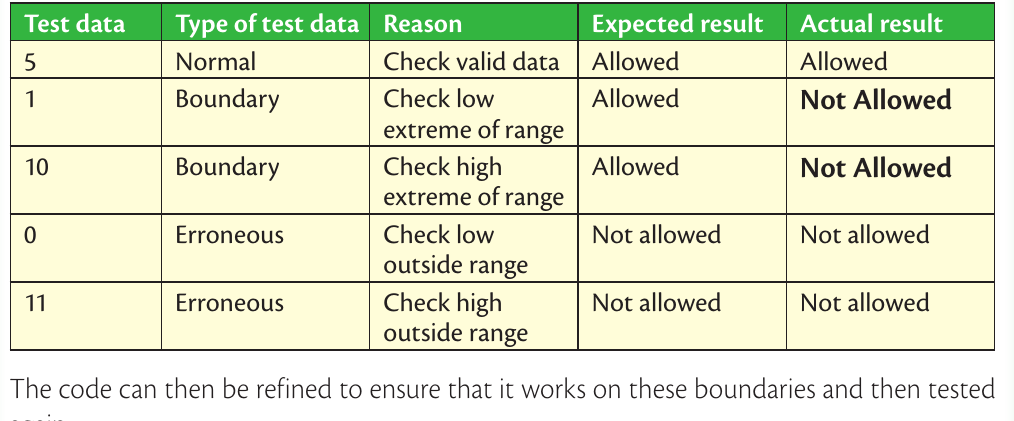
This testing table shows how different types of test data can reveal problems in your code. Notice how the boundary values (1 and 10) should be allowed but the programme incorrectly rejects them. This reveals a logic error in the validation code.
What the testing reveals
From systematic testing, you can identify:
- Syntax errors: These will stop your tests from running at all
- Logic errors: These show up when your actual results don't match the expected results
- Boundary problems: When your programme handles normal cases correctly but fails at the edges
The importance of thorough testing
Important
Logic errors are particularly sneaky because they might not show up immediately. A programme could work perfectly with some inputs but fail with others. That's why it's essential to test with all three types of data - you might discover that your programme only fails in specific situations.
Key differences between syntax and logic errors
Understanding the differences between these error types will help you debug more effectively:
Syntax errors:
- Stop programmes from running
- Break programming language rules
- Usually easy to spot and fix
- Caught by the programming environment
Logic errors:
- Allow programmes to run but produce wrong results
- Follow language rules but use flawed algorithms
- Much harder to detect and fix
- Only found through careful testing
Summary
Key Points to Remember:
- Syntax errors break language rules and stop programmes from running completely - they're like grammar mistakes that make your code unreadable to the computer
- Logic errors follow language rules but contain flawed thinking - your programme runs but gives wrong answers
- Testing with different data types (normal, boundary, and erroneous) is essential for identifying logic errors that might only appear in specific situations
- Syntax errors are easier to find because they prevent your programme from running, while logic errors are sneaky and require systematic testing to discover
- Both types of errors need fixing - syntax errors for your programme to run at all, and logic errors for your programme to work correctly