String-handling Operations (AQA GCSE Computer Science): Revision Notes
📚Revision Notes
String-handling operations: Length, substring and character codes
What are string-handling operations?
When you're programming, you'll often need to work with text data (called strings). Just like you can do maths with numbers using operators like + and -, you can manipulate strings using special string-handling operations. These operations let you find out information about your text, extract parts of it, or convert between characters and their computer codes.
Think of strings as a chain of individual characters, each sitting in a specific position. Your computer can count these characters, find specific ones, extract sections, and even convert characters into secret number codes that computers understand!
Core string operations you need to know
There are five essential string operations that every programmer needs to understand. These operations work with any piece of text, from single words to entire sentences.
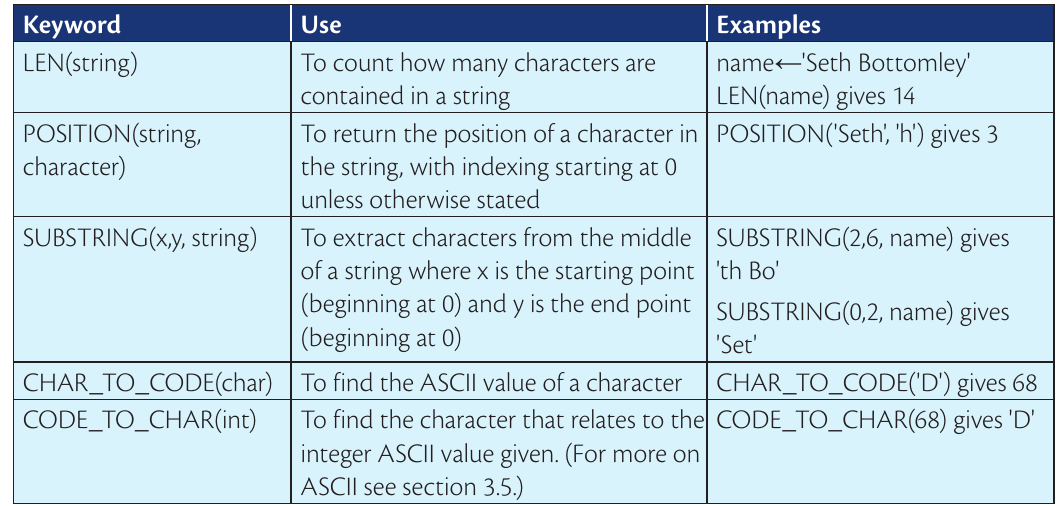
Let's break down each operation using clear explanations:
Finding string length
The LEN operation (short for "length") counts how many characters are in your string. This includes letters, spaces, punctuation marks - everything! It's like counting each link in a chain.
Example
Worked Example: Finding String Length
Using the name "Seth Bottomley":
- S-e-t-h- -B-o-t-t-o-m-l-e-y
- Counting each character: 1,2,3,4,5,6,7,8,9,10,11,12,13,14
- LEN("Seth Bottomley") = 14 characters
For example, if you have the name Seth Bottomley, the LEN operation would count all 14 characters (including the space between the first and last name). This is incredibly useful when you need to know how much text you're working with.
Finding character positions
The POSITION operation helps you locate where a specific character appears in your string. Remember that computers start counting from 0, not 1! This is called zero-based indexing.
Important
Critical Concept: Zero-Based Indexing
Computers start counting from 0, not 1! This means:
- The first character is at position 0
- The second character is at position 1
- The third character is at position 2
- And so on...
Example
Worked Example: Finding Character Positions
Using "Seth Bottomley" to find the letter 'h':
Position: 0 1 2 3 4 5 6 7 8 9 10 11 12 13 String: S e t h B o t t o m l e y
POSITION('h', "Seth Bottomley") = 3
Using Seth Bottomley again, if you wanted to find the letter 'h', the POSITION operation would tell you it's at position 3 (counting: S=0, e=1, t=2, h=3). This is like having a GPS for individual characters in your text.
Extracting substrings
SUBSTRING is like using scissors to cut out a specific section of your text. You tell it where to start cutting (x) and where to stop (y), and it gives you everything in between.
Example
Worked Example: Extracting Substrings
Using SUBSTRING(2,6,"Seth Bottomley"):
Position: 0 1 2 3 4 5 6 7 8 9 10 11 12 13 String: S e t h B o t t o m l e y ↑-------↑ start end (exclusive)
Result: "th Bo"
For instance, SUBSTRING(2,6,"Seth Bottomley") would extract th Bo - it starts at position 2 and goes up to (but doesn't include) position 6. This is perfect for grabbing specific parts of longer pieces of text.
Converting characters to codes
Every character on your keyboard has a secret number code called an ASCII code. The CHAR_TO_CODE operation reveals this hidden number. For example, the letter 'D' has the ASCII code 68.
Note
Why ASCII Codes Matter
Computers actually store all text as numbers! When you see letters on your screen, the computer is really working with these number codes behind the scenes. This is how computers can process and manipulate text efficiently.
Why does this matter? Computers actually store all text as numbers! When you see letters on your screen, the computer is really working with these number codes behind the scenes.
Converting codes back to characters
CODE_TO_CHAR does the opposite - it takes an ASCII number and tells you which character it represents. So if you give it the number 68, it will return the letter 'D'.
This is like being a secret code breaker, translating between the computer's number language and human-readable text.
Python string operations
Python, one of the most popular programming languages, has its own way of doing these operations. Here are the Python equivalents:

Python length function
In Python, you use len(string) to find the length of any text. It works exactly like the LEN operation we discussed earlier.
Python string slicing
Python uses square brackets with a colon to extract substrings. The format string[2:7] means "give me characters from position 2 up to (but not including) position 7". This is Python's version of SUBSTRING.
Python ASCII conversion
Python uses two special functions for ASCII conversion:
Note
Python ASCII Functions
- ord(char) converts a character to its ASCII number (like CHAR_TO_CODE)
- chr(int) converts an ASCII number back to its character (like CODE_TO_CHAR)
The names might seem odd, but think of "ord" as "order" (what number order is this character in?) and "chr" as short for "character".
Real-world applications
These string operations are everywhere in programming! Here are some practical examples:
- Password validation: Checking if a password is long enough using length operations
- Text processing: Extracting usernames from email addresses using substring operations
- Data cleaning: Finding and removing unwanted characters using position operations
- Encryption: Converting text to numbers for secure communication using ASCII operations
Common exam mistakes to avoid
Important
Critical Mistakes to Avoid
-
Forgetting zero-based indexing: Remember that the first character is at position 0, not 1!
-
Mixing up substring parameters: The end position in SUBSTRING is usually exclusive (not included in the result).
-
Confusing ASCII functions: CHAR_TO_CODE takes a character and gives a number; CODE_TO_CHAR takes a number and gives a character.
-
Not accounting for spaces: Spaces count as characters in length calculations and positioning.
Exam tips
Note
Essential Exam Tips
- Practice with the name Seth Bottomley as it's commonly used in exam questions
- Draw out the positions above characters when working with POSITION or SUBSTRING problems
- Remember that ASCII codes for uppercase letters (A-Z) are different from lowercase letters (a-z)
- When writing pseudocode, use the exact keywords: LEN, POSITION, SUBSTRING, CHAR_TO_CODE, CODE_TO_CHAR
Summary
Key Points to Remember:
- LEN counts all characters in a string, including spaces and punctuation
- POSITION finds where a character appears, starting from position 0
- SUBSTRING extracts a section of text between two position markers
- CHAR_TO_CODE converts any character into its ASCII number code
- CODE_TO_CHAR converts ASCII numbers back into readable characters