Subroutines (AQA GCSE Computer Science): Revision Notes
📚Revision Notes
Subroutines
What are subroutines?
A subroutine is a separate block of code that you can define once and then use multiple times throughout your programme. Think of it like creating a mini-program within your main programme that performs a specific task.
When you write larger programmes, they can become really difficult to manage and understand. Instead of writing one huge block of code, programmers break their programmes down into smaller, more manageable pieces called subroutines. This makes the code much easier to read, debug, and maintain.
Note
Breaking down large programmes into subroutines is one of the most important programming practices. It's like organising your bedroom - instead of throwing everything into one big pile, you organise items into different drawers and containers, making everything much easier to find and manage!
How do subroutines work?
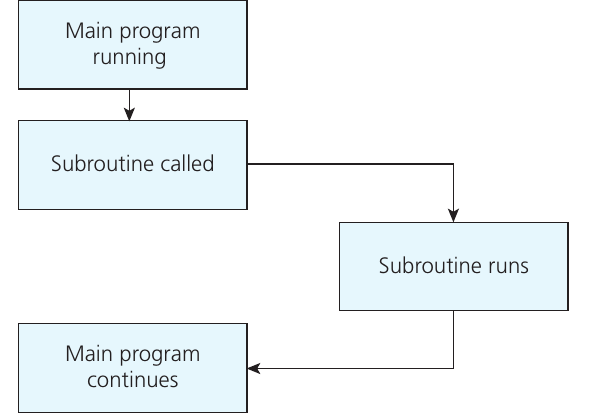
When your main programme is running and encounters a subroutine call, something interesting happens with the control flow:
- The main programme temporarily stops what it's doing
- Control passes to the subroutine
- The subroutine runs and completes its task
- Control returns back to the main programme
- The main programme continues from where it left off
Note
This process happens seamlessly - your programme jumps to the subroutine, executes it completely, then jumps back to continue the main programme. The main programme has no idea how long the subroutine takes or what exactly it does - it just waits patiently for the subroutine to finish its job.
Defining subroutines
To create a subroutine, you need to define it outside of your main programme. Every subroutine needs:
- A unique identifier (name) so you can call it later
- The keyword SUBROUTINE to start the definition
- The keyword ENDSUBROUTINE to mark the end
Here's the basic structure:
SUBROUTINE identifier()
    # Your code goes here
ENDSUBROUTINE
Example
Worked Example: Creating a Times Table Subroutine
Here's a simple subroutine that creates a times table:
SUBROUTINE timestableuser()
    OUTPUT 'enter times table'
    num ← USERINPUT
    FOR x ← 1 TO 10
        OUTPUT num * x
    ENDFOR
ENDSUBROUTINE
Once you've defined this subroutine, you can call it (use it) in your main programme simply by writing its name:
timestableuser()
Using parameters to make subroutines flexible
The real power of subroutines comes when you use parameters. A parameter is a value that you pass into the subroutine to make it more flexible and reusable.
Notice the brackets after the subroutine name? These can be empty, or they can contain parameters. When you include parameters, you're telling the subroutine what values to work with.
Example
Worked Example: Adding Parameters for Flexibility
Let's improve our times table subroutine by adding parameters:
SUBROUTINE timestable(tt, nums)
    FOR x ← 1 TO nums
        OUTPUT tt * x
    ENDFOR
ENDSUBROUTINE
Now when we call this subroutine, we need to provide values for both parameters:
timestable(8, 10)
timestable(9, 12)
Here's what happens:
- The first call passes the values 8 and 10 into the subroutine
- Inside the subroutine, tt becomes 8 and nums becomes 10
- This prints the 8 times table from 8 × 1 to 8 × 10
- The second call passes 9 and 12, printing the 9 times table from 9 × 1 to 9 × 12
Important
When calling a subroutine with parameters, you must provide the correct number of values in the correct order. If your subroutine expects two parameters but you only provide one, or if you provide them in the wrong order, your programme will not work as expected!
Benefits of using subroutines
Using subroutines in your programmes provides several important advantages:
Code reusability: Write the code once, use it many times. Instead of copying and pasting the same code throughout your programme, you can simply call the subroutine.
Easier maintenance: If you need to change how something works, you only need to update the subroutine code in one place, rather than hunting through your entire programme.
Better organisation: Breaking your programme into logical chunks makes it much easier to understand and debug.
Flexibility: By using parameters, you can make your subroutines work with different values, making them much more versatile.
Teamwork: Different programmers can work on different subroutines, making collaboration easier.
Note
Think of subroutines like having a toolbox full of specialised tools. Instead of reinventing the wheel every time you need to hammer a nail, you just reach for your hammer. Similarly, instead of rewriting the same code over and over, you just call the appropriate subroutine!
Important
Common Exam Mistakes to Avoid:
- Forgetting to use SUBROUTINE and ENDSUBROUTINE keywords correctly
- Providing the wrong number of parameters when calling a subroutine
- Mixing up the order of parameters
- Trying to use variables from inside a subroutine in the main programme (or vice versa)
- Not understanding the flow of control between main programme and subroutines
Summary
Key Points to Remember:
- Subroutines are reusable blocks of code that help break large programmes into manageable pieces
- Control flows from main programme to subroutine and back - the main programme pauses while the subroutine runs
- Define subroutines once, call them many times using their identifier name
- Parameters make subroutines flexible by allowing you to pass different values into them
- Use SUBROUTINE and ENDSUBROUTINE keywords to properly define your subroutines
- Always provide the correct number and order of parameters when calling subroutines