Efficiency of algorithms (Edexcel GCSE Computer Science): Revision Notes
📚Revision Notes
Efficiency of algorithms
When writing computer programmes, choosing the right algorithm can make a huge difference in how well your programme performs. Think of it like choosing the best route to get somewhere - you could take the scenic route through every back street, or you could take the highway. Both will get you there, but one is much more efficient!
The efficiency of an algorithm depends on several important factors:
- Type of data you're working with
- Whether the data is already sorted or not
- Time available to write and run the programme
- Whether the program will be used once or many times
Understanding these factors helps you pick the best algorithm for each situation, just like a mechanic chooses the right tool for each job.
Searching algorithms
Searching algorithms help you find specific items in lists of data. There are two main types you need to know about, each with their own strengths and weaknesses.
Note
Understanding the difference between these searching methods is crucial because the choice between them can dramatically affect your programme's performance, especially with large datasets.
Linear search
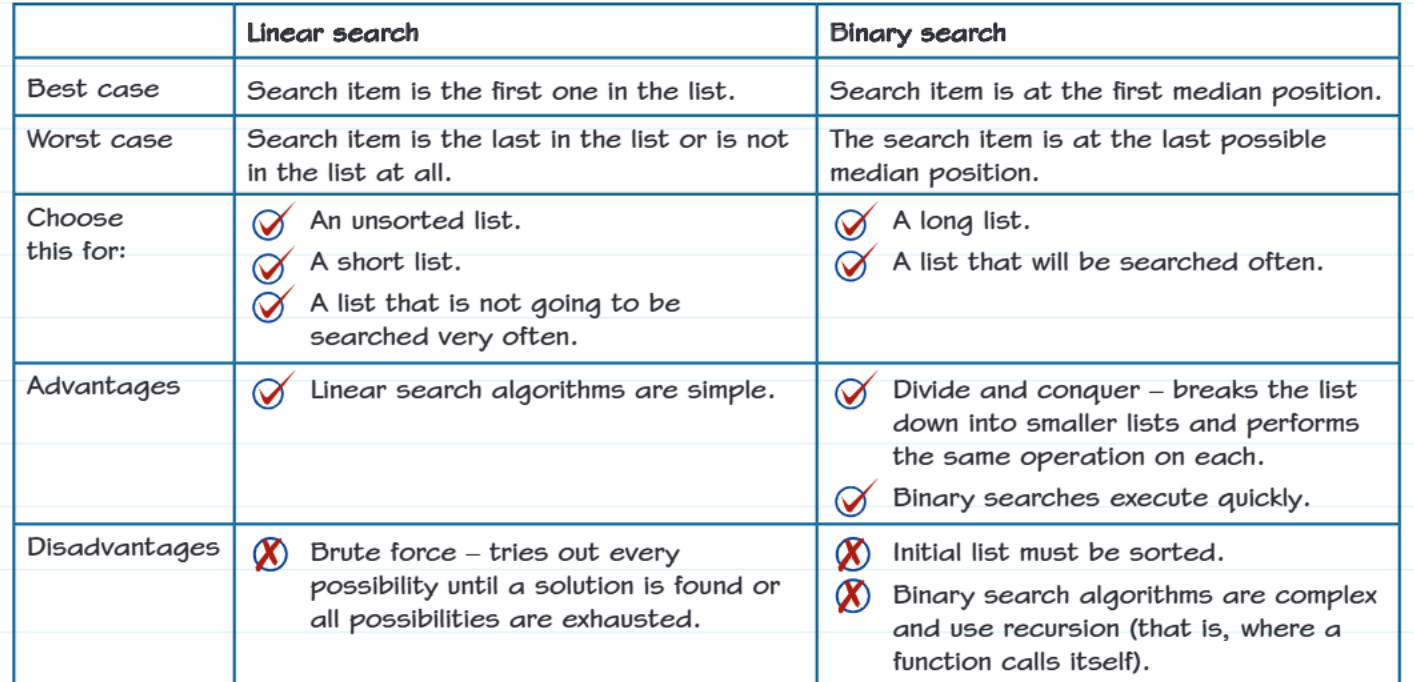
Linear search is the simplest way to find something in a list. It works like looking for a book by checking every single book on a shelf from left to right until you find the one you want.
How it works:
- Starts at the beginning of the list
- Checks each item one by one
- Stops when it finds the target item or reaches the end
Note
When to use linear search:
Linear search is your best choice when you have:
- An unsorted list (items aren't in any particular order)
- A short list with only a few items
- A list you won't be searching very often
Best case scenario: The item you're looking for is the very first one in the list - lucky you! You find it immediately.
Worst case scenario: The item is either the last one in the list, or it's not there at all. This means you have to check every single item.
Binary search
Binary search is much cleverer than linear search, but it comes with some conditions. It's like opening a dictionary to find a word - you don't start from page 1, you open it roughly in the middle and decide whether to look in the first half or second half.
How it works:
- Starts by looking at the middle item
- If that's not the target, eliminates half the remaining items
- Repeats this process on the remaining half
- Continues dividing the list in half until the item is found
Important
Critical requirement for binary search:
The list must already be sorted! Binary search will not work correctly on unsorted data.
Note
When to use binary search:
Binary search works best when you have:
- A long list with many items
- A list that will be searched frequently
- A list that is already sorted or can be sorted once
Best case scenario: The item you're looking for happens to be right in the middle position when you first check.
Worst case scenario: The item is in the last possible position you'd check using the divide-and-conquer method.
Sorting algorithms
Sometimes you need to put your data in order before you can work with it effectively. Different sorting algorithms work better in different situations.
Bubble sort
Bubble sort is like organising a line of students by height - you keep swapping adjacent students until everyone is in the right order. It's called "bubble sort" because smaller items "bubble" to the top like air bubbles in water.
How it works:
- Compares adjacent items in the list
- Swaps them if they're in the wrong order
- Repeats this process multiple times until no more swaps are needed
Note
When to use bubble sort:
Choose bubble sort when you have:
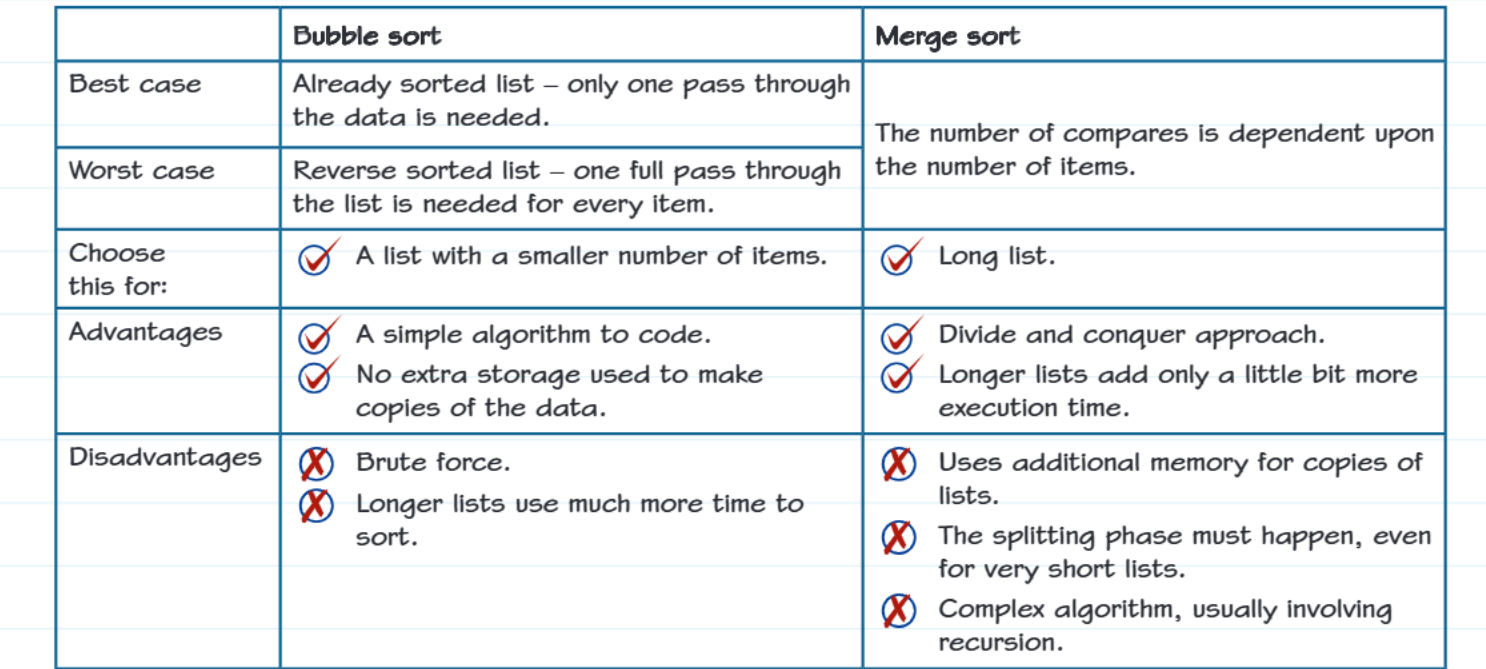
- A list with a small number of items
- Simple programming requirements (it's easy to code)
- Memory limitations (it doesn't need extra storage space)
Best case scenario: The list is already sorted - you only need to go through it once to confirm everything is in order.
Worst case scenario: The list is in reverse order - you need to make a full pass through the list for every single item.
Merge sort
Merge sort uses a "divide and conquer" approach. Think of it like organising a messy deck of cards by splitting it into smaller piles, sorting each pile, then combining them back together in order.
How it works:
- Divides the list into smaller and smaller pieces
- Sorts each small piece
- Merges the sorted pieces back together
- Uses recursion (the algorithm calls itself with smaller problems)
Note
When to use merge sort:
Merge sort is ideal for:
- Long lists with many items
- Situations where consistent performance is important
- When you don't mind using extra memory
Performance: Unlike bubble sort, merge sort's performance depends mainly on how many items you have, not on whether they're already partially sorted.
Key differences to remember
The choice between algorithms often comes down to understanding these fundamental trade-offs:
Speed comparison:
- Linear search: Gets slower and slower with longer lists
- Binary search: Stays fast even with very long lists (but needs sorted data)
- Bubble sort: Gets much slower with longer lists
- Merge sort: Handles long lists much better than bubble sort
Memory usage:
- Linear search and bubble sort: Use minimal extra memory
- Binary search and merge sort: May need additional memory for their operations
Complexity:
- Linear search and bubble sort: Simple to understand and code
- Binary search and merge sort: More complex but much more efficient for larger datasets
Summary
Key Performance Trade-offs:
- Simple algorithms are easier to implement but may perform poorly with large datasets
- Complex algorithms require more development time but offer better performance
- Memory usage and speed often involve trade-offs - faster algorithms may use more memory
Exam tips
Important
Essential exam strategies:
When answering questions about algorithm efficiency:
- Always consider the data size - what works for 10 items might not work for 10,000 items
- Think about whether data is sorted - this often determines which algorithm to choose
- Consider how often the algorithm will be used - complex setup might be worth it if you'll use it many times
- Look for keywords like "large dataset", "frequently searched", or "already sorted"
- Practice tracing through algorithms step by step - exam questions often ask you to show the stages
Summary
Remember - Key Takeaways:
- Algorithm choice matters - the same task can be completed quickly or slowly depending on which algorithm you choose
- Linear search is simple but slow for large lists, while binary search is fast but needs sorted data
- Bubble sort is easy to code but becomes very slow with longer lists, while merge sort handles long lists much better
- Consider your constraints - time to write code, memory available, data size, and how often you'll use the programme
- There's no single "best" algorithm - the best choice depends on your specific situation and requirements