Arithmetic operators (Edexcel GCSE Computer Science): Revision Notes
📚Revision Notes
Arithmetic operators
Arithmetic operators are the building blocks of mathematical calculations in programming. Think of them as the basic tools that allow your computer to do maths - just like you would use a calculator, but in code! These operators help you perform all the fundamental calculations you need when solving problems.
Basic arithmetic symbols
The arithmetic operators you need to master are straightforward symbols that represent different mathematical operations. Each symbol tells the computer exactly what calculation to perform.
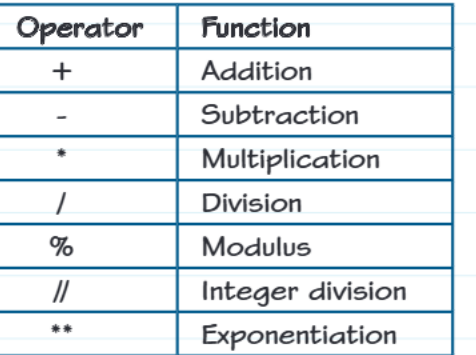
Understanding these symbols is crucial because they form the foundation of almost every calculation you'll write in your programmes. The plus and minus signs work exactly as you'd expect, while some others like the double asterisk (**) for exponentiation might be new to you.
How data types affect your results
When you use arithmetic operators, the type of data you're working with can change what kind of result you get back. This is really important to understand because it can sometimes give you unexpected results!
Division always gives you a decimal number - even when you divide two whole numbers that divide evenly. For example, 6 / 3 gives you 2.0, not just 2. This happens because the computer wants to be as accurate as possible.
Note
String Operations Work Differently
Multiplying strings creates repetitions - this is a cool feature! When you multiply a piece of text (called a string) by a whole number, you get that text repeated. So "Ha" * 3 would give you "HaHaHa".
Adding strings joins them together - this is called concatenation. When you use the plus symbol between two pieces of text, they get stuck together. For example, "Hello" + " World" becomes "Hello World".
Order of operations - BIDMAS
Just like in regular maths, programming follows a specific order when doing calculations. This order is called BIDMAS, and it ensures that complex calculations always give the same result.
The BIDMAS order is:
- Brackets - anything in brackets gets calculated first
- Indices or powers - exponentiation (**)
- Division (/), modulus (%), and integer division (//)
- Multiplication (*)
- Addition (+)
- Subtraction (-)
Important
Remember that division, modulus, and integer division all have the same priority level, just like multiplication. When operations have the same priority, they're calculated from left to right.
Seeing operators in action
Looking at real code examples helps you understand how these operators work in practice. Understanding what each operator does becomes clearer when you see the actual results they produce.
Example
Worked Example: Using All Arithmetic Operators
num1 = 7
num2 = 4

print("Add", num1, num2, num1 + num2)        # Results in 11
print("Subtract", num1, num2, num1 - num2)   # Results in 3
print("Multiply", num1, num2, num1 * num2)   # Results in 28
print("Divide", num1, num2, num1 / num2)     # Results in 1.75
print("Exponentiation", num1, num2, num1 ** num2)  # Results in 2401
print("Modulus", num1, num2, num1 % num2)    # Results in 3
print("Integer Division", num1, num2, num1 // num2)  # Results in 1
Understanding the Special Operators:
- Modulus gives you the remainder when one number is divided by another. So 7 % 4 gives you 3 because when you divide 7 by 4, you get 1 with a remainder of 3.
- Integer division gives you just the whole number part of a division, throwing away any decimal part. So 7 // 4 gives you 1, not 1.75.
Real-world applications
Arithmetic operators aren't just for simple calculations - they're used in complex real-world programmes too. For example, calculating the volume and surface area of a sphere uses several operators:
- Volume =
- Surface area =
In code, this would use multiplication (*) and exponentiation (**), and you'd need to import the maths library to get the value of π (pi).
Exam tips
Understanding arithmetic operators is essential for exam success. Here are the most common areas where students make mistakes and strategies to avoid them.
Important
Common mistakes to avoid:
- Remember that division (/) always gives a decimal result, even with whole numbers
- Don't confuse integer division (//) with regular division (/)
- When using modulus (%), remember it gives you the remainder, not the quotient
- Always consider BIDMAS when working out the order of calculations
Question strategies:
- If you see a calculation, work through BIDMAS step by step
- When asked about data types, remember that division creates floats (decimal numbers)
- Practice identifying what each operator does - examiners love testing the less common ones like modulus
Summary
Key Points to Remember:
- Arithmetic operators perform basic mathematical calculations - addition, subtraction, multiplication, division, modulus, integer division, and exponentiation
- Data types matter - division always returns decimals, while string operations can repeat or join text together
- BIDMAS determines the order - brackets first, then indices/powers, then division/multiplication (left to right), then addition/subtraction (left to right)
- Modulus (%) gives remainders and integer division (//) gives whole number results only
- Practice with real examples - the more you see these operators in action, the better you'll understand when and how to use them