Authentication (Edexcel GCSE Computer Science): Revision Notes
📚Revision Notes
Authentication

What is authentication?
Authentication is a security process used to verify that someone trying to access a computer system or device has permission to do so. Think of it like checking someone's ID card before letting them into a building - the system needs to confirm you are who you say you are.
Note
The ID card analogy is perfect for understanding authentication - just like a security guard checks your ID before allowing building access, computer systems need to verify your identity before granting system access.
Most authentication systems work by asking users to provide two pieces of information:
- A username (who you claim to be)
- A password (proof that you really are that person)
Data structures for storing user credentials
When building an authentication system, programmers need somewhere to store all the valid usernames and passwords. This information is typically stored in database tables.
For programming purposes, we can represent this data using a two-dimensional data structure - essentially a list that contains other lists. Each inner list (or "record") holds information about one individual user.
Note
Understanding Two-Dimensional Data Structures
The structure works like this:
- Each row represents one user
- The first column contains the username
- The second column contains the corresponding password
This setup allows the programme to search through all users efficiently using a technique called linear search.
How authentication works in code
Let's look at how we can write a programme to authenticate users:
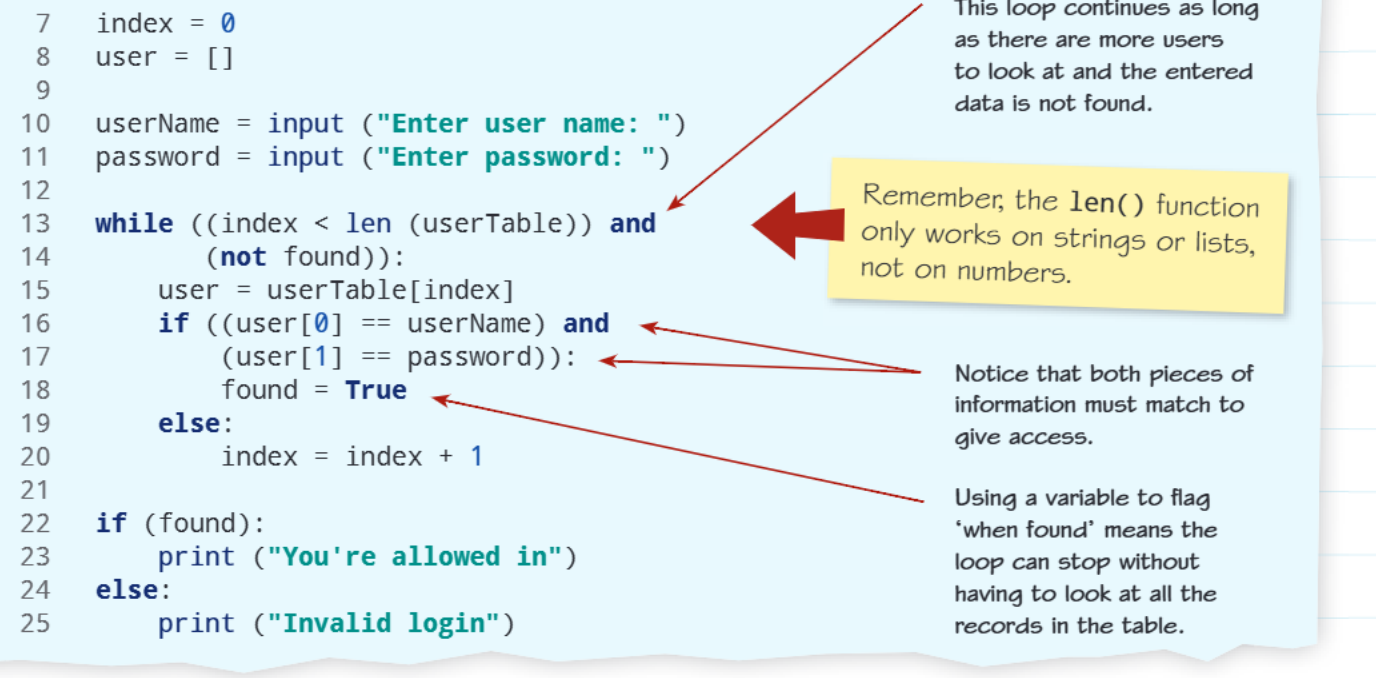
Understanding the authentication algorithm
The code example shows several important programming concepts working together:
Setting up the data and variables:
- The userTable stores all valid username and password combinations
- Variables like userName, password, found, and index help control the authentication process
- The found variable acts as a boolean flag - it starts as False and only becomes True when valid credentials are found
The search process: The programme uses a while loop to search through the user table. The loop continues as long as:
- We haven't checked all users yet (index < len(userTable))
- We haven't found a match yet (not found)
Important
Important note about len(): Remember that the len() function only works on strings and lists, not on numbers. This is why we can use it on userTable (which is a list) but not on something like the number 5.
Checking credentials: For each user record, the programme checks if BOTH the username AND password match what the user entered. Notice the and operator - this means both conditions must be true for access to be granted.
Using the boolean flag: When valid credentials are found, the programme sets found = True. This clever technique allows the loop to stop immediately without having to check all remaining records in the table.
Key programming concepts
Linear search in authentication
Even though we're dealing with usernames and passwords, the underlying logic is the same as performing a linear search through any data structure. The programme examines each record one by one until it finds what it's looking for or reaches the end.
Note
Linear Search in Action
Linear search is particularly effective for authentication because:
- It systematically checks each user record
- It can stop immediately when a match is found
- It handles cases where no match exists by checking all records
Boolean flags for loop control
The found variable is an excellent example of using a boolean flag to control programme flow. This technique helps make code more efficient because it can stop searching as soon as the correct answer is found.
Validation requirements
Notice that the authentication requires an exact match for both pieces of information. This is crucial for security - even if someone knows a valid username, they still can't access the system without the correct password.
Important
Security Through Exact Matching
Authentication systems must be strict about matching because:
- Even small typing errors should deny access
- Partial matches could be security vulnerabilities
- Both username AND password must be completely correct
Practice exercise
Example
Worked Example: Passcode Validation System
A programme needs to validate usernames and passcodes, where the passcode must be exactly four digits long and stored as an integer. Given this user table:
userTable = [["AAA34", 4860], ["CAB98", 7101], ["GUS21", 5975]]
You would need to write a programme that:
- Asks the user for their username and passcode
- Searches through the table to find a match
- Grants or denies access based on whether both pieces of information are correct
The key difference here is that passcodes are stored as integers (numbers) rather than strings, so you'll need to handle the data types appropriately.
Remember!
Summary
Key Points to Remember:
- Authentication verifies identity - it's like checking an ID card before granting access
- Two-dimensional data structures can store username and password pairs efficiently
- Linear search examines each record until finding a match or reaching the end
- Boolean flags help control loops and make programmes more efficient
- The len() function works on strings and lists, but NOT on numbers
- Both username AND password must match for successful authentication - security requires exact matches