Convert algorithms 2 (Edexcel GCSE Computer Science): Revision Notes
📚Revision Notes
Convert algorithms 2
Understanding selection in algorithms
When you're converting algorithms from flowcharts to Python code, you'll often encounter decision-making processes. These decisions help your programme choose different paths based on specific conditions. The most common way to handle this in Python is through selection statements using if, elif, and else.
Selection statements allow your programme to test conditions and execute different blocks of code depending on whether those conditions are true or false. This is essential for creating programmes that can respond to different inputs or situations.
Note
Decision-making is one of the fundamental concepts in programming. Every time you see a diamond shape in a flowchart, you're looking at a point where your programme needs to make a choice about which path to follow.
Converting flowcharts with multiple decisions
When a flowchart contains decision symbols (diamond shapes) that lead to different outcomes, you need to think carefully about how to structure your Python code. Understanding the relationship between flowchart elements and Python syntax is essential for accurate conversion.
Important
Key Rules for Selection Statements:
When to use else: If your flowchart has symbols on the "no" path of a decision, you'll need an else statement to handle that alternative route.
When to use elif: If your flowchart contains multiple selection symbols in a sequence, you'll likely need elif (which means "else if") to check additional conditions.
Worked example: Number range checker
Let's examine a practical example of converting a flowchart that validates user input by checking if a number falls within a specific range.
Example
Worked Example: Converting a Range Validation Flowchart
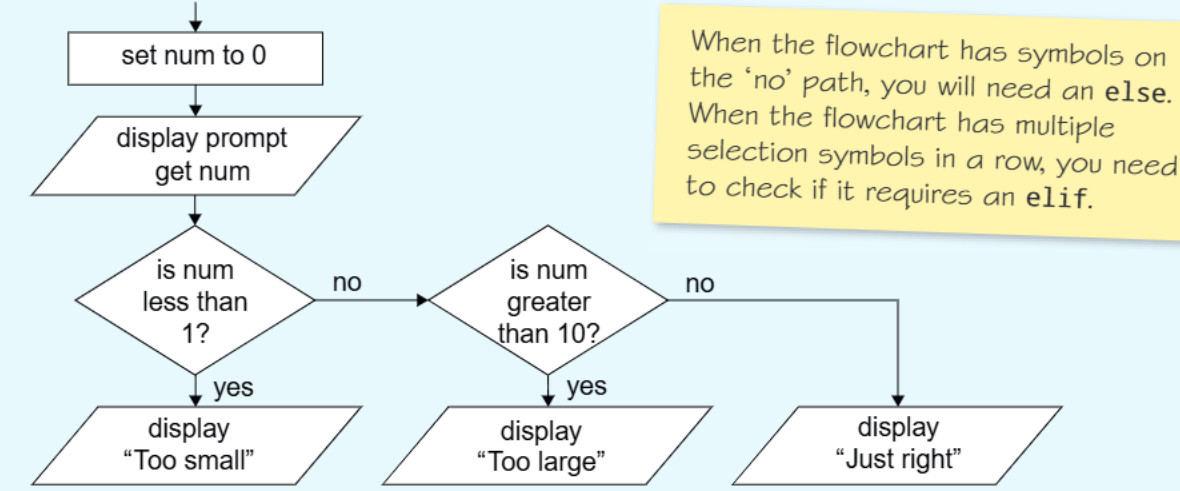
This flowchart demonstrates a common pattern where we need to validate user input. Here's how we convert it to Python:
num = 0
num = int(input("Enter a number"))
if (num < 1):
    print("Too small")
elif (num > 10):
    print("Too large")
else
    print("Just right")
Key points about this conversion:
- The first decision symbol becomes an if statement
- The second decision symbol becomes an elif because it's checking another condition
- The "Just right" message goes under else because it handles all other cases (numbers between 1 and 10)
Notice how the flowchart's "no" paths lead to either another decision or the final output. This tells us we need both elif and else in our code to ensure all possible paths are covered.
Practice example: Student seating assignment
Here's another common type of algorithm that uses selection based on alphabetical sorting:
Note
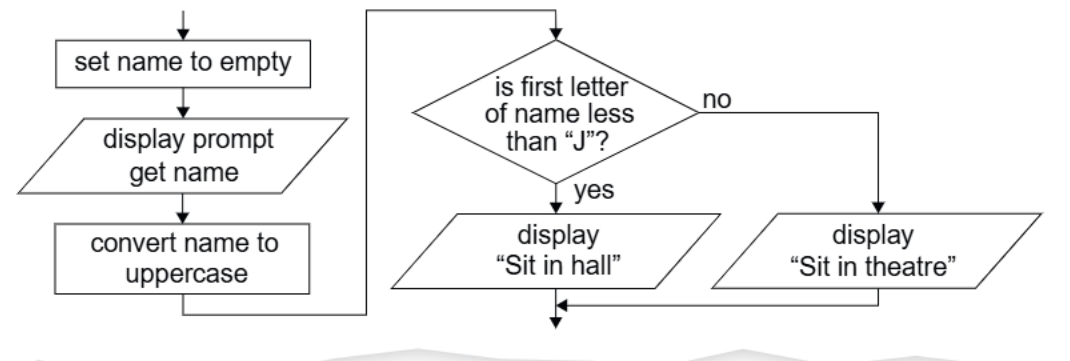
This flowchart shows how to assign students to different areas based on their surname. The algorithm follows a clear sequence:
- Gets the student's name
- Converts it to uppercase (for consistent comparison)
- Checks if the first letter comes before "J" in the alphabet
- Assigns seating based on this comparison
To convert this flowchart to Python, you would need to implement several key components:
- An if statement to check the first letter condition
- An else statement to handle names starting with J-Z
- String manipulation methods like upper() and indexing operations
Important conversion tips
Following a systematic approach will help you convert flowcharts accurately and avoid common pitfalls.
Note
Essential Conversion Guidelines:
Identify the flow: Follow the arrows in your flowchart carefully. Each path that branches out needs to be handled in your code.
Count your conditions: Multiple diamond shapes usually mean you'll need elif statements, not just multiple separate if statements.
Handle all paths: Make sure every possible route through your flowchart has a corresponding piece of code.
Test your logic: The conditions in your if and elif statements should match exactly what the diamond shapes are asking in the flowchart.
Common exam mistakes to avoid
Understanding these common errors will help you write more reliable code conversions.
Important
Critical Mistakes to Avoid:
- Forgetting to use elif when you have multiple related conditions
- Using separate if statements instead of elif when conditions are mutually exclusive
- Not handling the "no" path of a decision with appropriate else statements
- Missing the conversion of input to the correct data type (like using int() for numbers)
Summary
Key Points to Remember:
- Selection statements let your programme make decisions and follow different paths
- Use if for the first condition, elif for additional related conditions, and else for everything else
- Multiple diamond shapes in a flowchart usually require elif statements in your Python code
- Always trace through your flowchart carefully to ensure every path is covered in your code
- Test your converted code with different inputs to make sure it behaves like the original flowchart